8
a
11
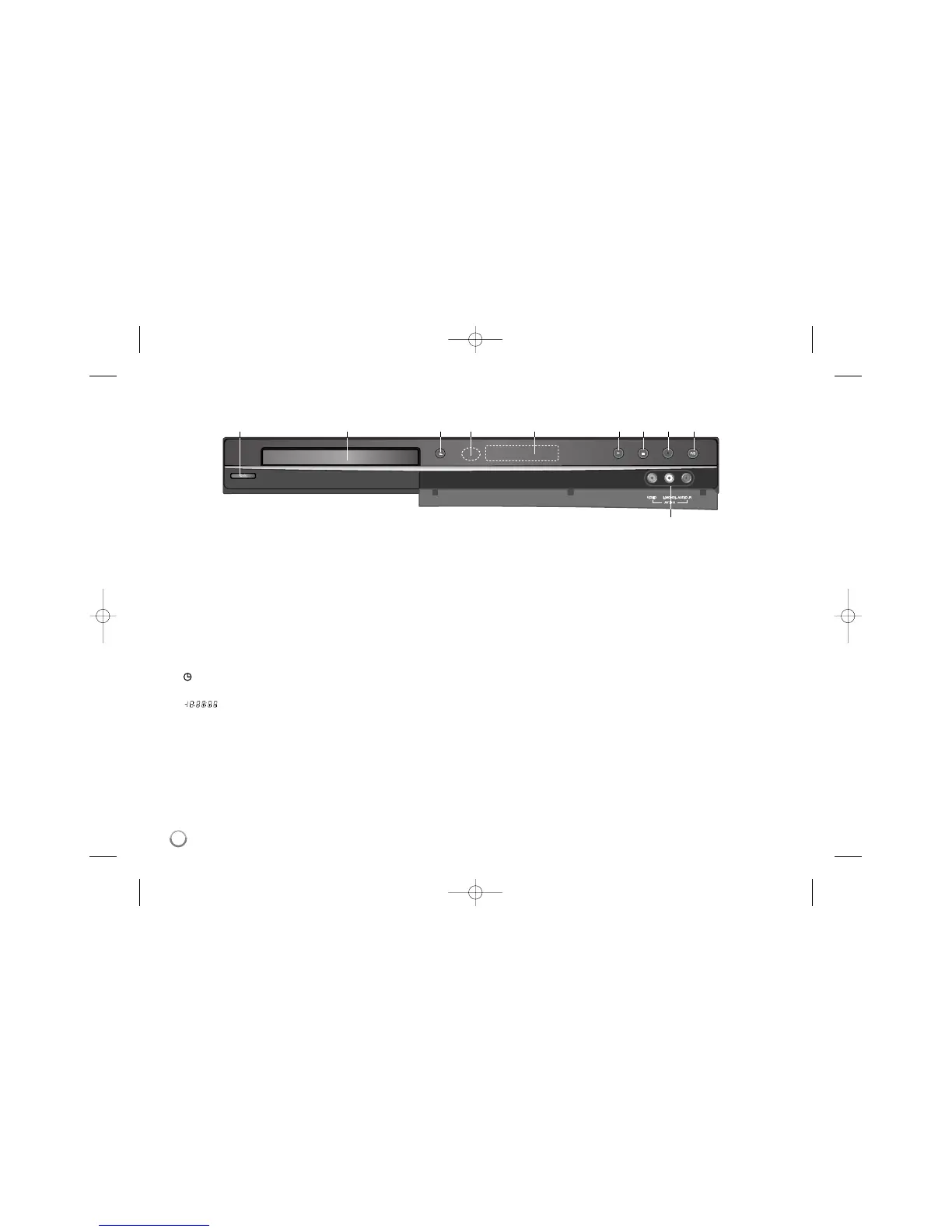
/ I (POWER button)
Switches the unit ON or OFF.
b Disc Tray
Insert a disc here.
c OPEN/CLOSE (Z)
Opens or closes the disc tray.
d Remote Sensor
Point the remote control here.
e Display window
Shows the current status of the unit.
REC: The unit is recording.
: Indicates when the unit is in timer recording or a timer recording is pro-
grammed.
: Indicates clock, total playing time, elapsed time, title number,
chapter/track number, channel, etc.
f N (PLAY)
Starts playback.
g x (STOP)
Stops playback or recording.
h z (REC)
Starts recording. Press repeatedly to set the recording time.
i P/S (Progressive Scan)
Switches the progressive mode.
576i(OFF), 576p(ON)
j AV IN 3 (VIDEO IN/AUDIO IN (Left/Right))
Connect the audio/video output of an external source (Audio system, TV/
Monitor, VCR, Camcorder, etc.).
Main Unit
a b c d e fghi
j



 To Next Page