EasyManua.ls Logo

LG DRP4 - Page 13

LG DRP4
35 pages
Print Icon
To Next Page IconTo Next Page
To Previous Page IconTo Previous Page
Loading...
13
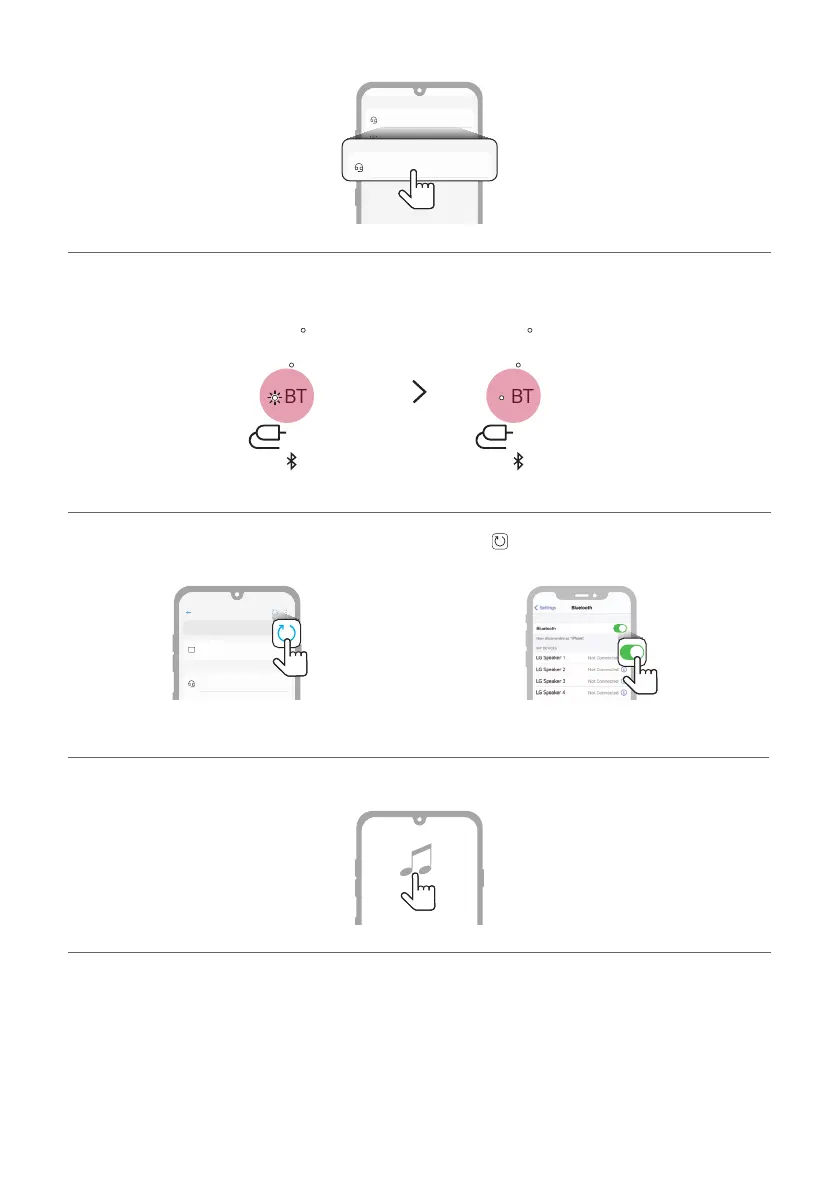
d You will see a list of connectable devices on the smartphone screen. Find and tap the name “LG-DRP4(XX)”.
LG-DRP4(XX)
Bluetooth devices
LG Smart Phone
Bluetooth devices
AVAILABLE DEVICES
Bluetooth
LG-DRP4(XX)
Bluetooth devices
Bluetooth devices
On
AVAILABLE DEVICES
e Once the smartphone is connected to product via Bluetooth, the Bluetooth LED will turn on.
AUX
USB
BT
AUX
USB
BT
f If LG-DRP4(XX) does not appear on the list, tap on the Refresh icon on an Android phone or restart
Bluetooth on an iPhone.
Bluetooth
LG Speaker 1
Bluetooth devices
LG Smart Phone
On
AVAILABLE DEVICES
<Android phone> <iPhone>
g Select and play a track on the smartphone.

Other manuals for LG DRP4

Related product manuals