17
Connecting to USB
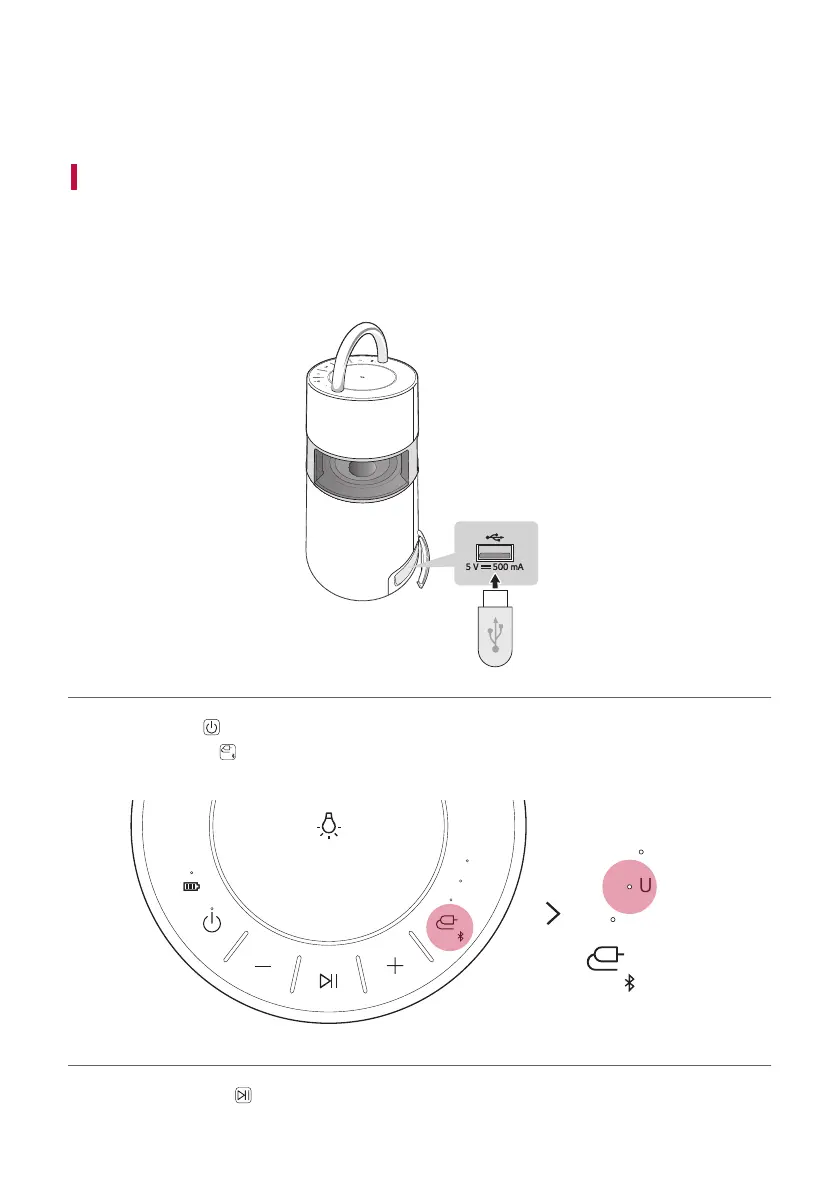
You can enjoy sound by connecting a USB storage device with music les to the product.
Connecting the product to a USB storage device
a Open the back cover of the product and plug the USB storage product into the USB terminal.
• The product cannot play any devices connected with a USB storage device hub or a USB storage device cable.
• The product cannot be connected to a USB storage device, USB type MP3 player or card reader that requires
a separate device drive to be installed.
AUX
USB
BT
b Press the Power button to the turn on the product.
c Press the Function
button on the product repeatedly to select the USB function. The USB LED will turn
on.
AUX
USB
BT
AUX
USB
BT
d Press the Play/Pause button to enjoy the music.
Connecting to USB


 To Next Page