12
Connecting to Bluetooth
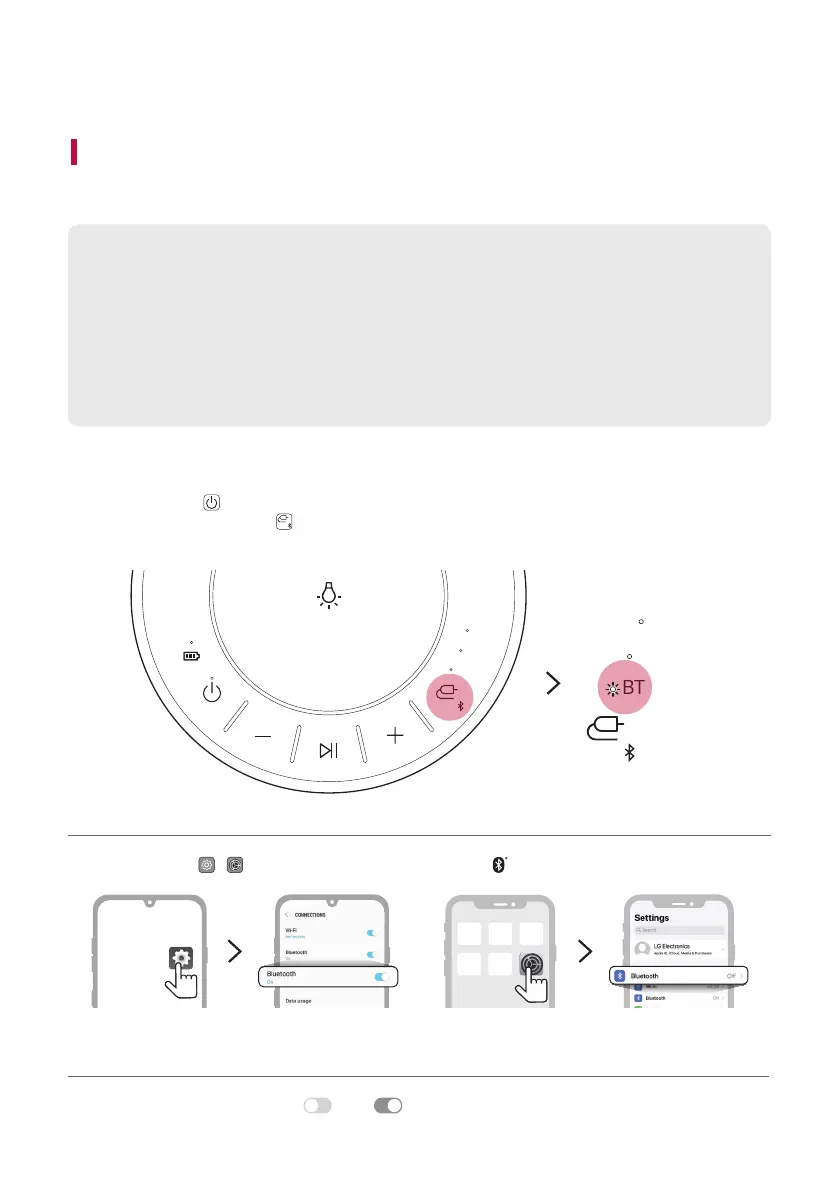
Connecting Smartphone to the Speaker via Bluetooth
You can play music les stored on a Bluetooth device, or run music apps to enjoy the music with this product.
Please check the following rst.
• The following are the Bluetooth specications of the product.
- Version: 4.0
- Codec: SBC, AAC
• How to connect the device to the product may differ depending on the type and model of the
Bluetooth device. For information on how to connect the product, refer to the user manual of the
Bluetooth device to be connected.
Select the [Bluetooth] menu on the smartphone's Settings screen.
The menu access method may differ depending on the smartphone manufacturer and model.
a Press the Power
button of the product and turn it on.
Press and hold the Function
button on the product until you hear a notication sound. Bluetooth LED
blinks for 60 seconds.
AUX
USB
BT
AUX
USB
BT
b Tap the Setting ( / ) button on your smartphone and select Bluetooth.
<Android phone> <iPhone>
c Turn on the Bluetooth function. (
Off > On)
Connecting to Bluetooth


 To Next Page