6
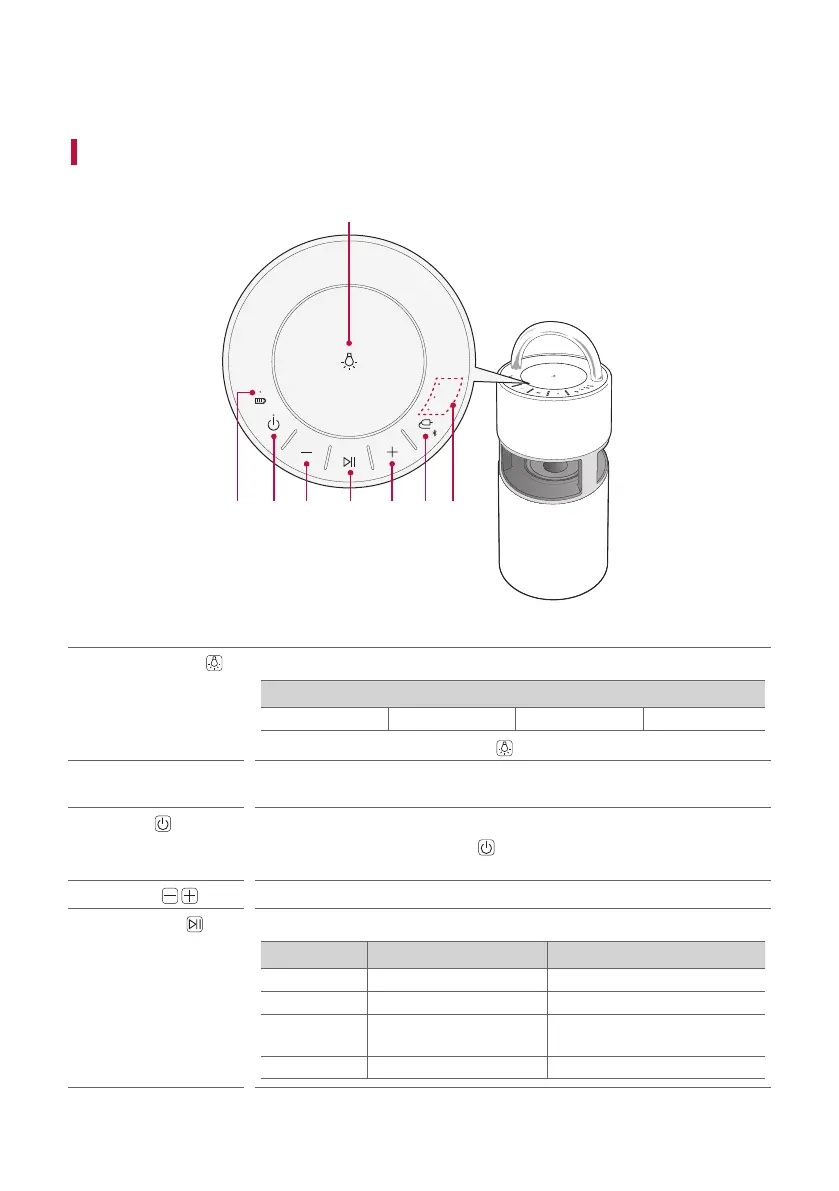
Exploring the Product
Top
AUX
USB
BT
b
a
c d e d f g
a
Mood lighting
Press the button to select the desired mood lighting.
Mood lighting
Ambient Nature Party Off
• Press and hold the Mood Lighting
button to turn off the mood lighting.
b
Battery LED
Please check the battery charging level and battery status. ([ See “Checking
Battery Status” on page 11.)
c
Power
It turns on/off the product.
• If you press and hold the Power
button for 2 seconds with product turned
on, you can see the battery status on the battery LED.
d
Volume
It controls the volume level.
e
Play/Pause
Press the button to operate the product.
Function Operation How to Use
USB/BT Play/Pause Press the button.
USB/BT Moving to the next music Press the button twice quickly.
USB/BT
Moving to the previous
music
Press the button three times
quickly.
AUX Mute Press the button.
Exploring the Product


 To Next Page