Connecting 11
Connecting
2
Connecting to an
Amplifier
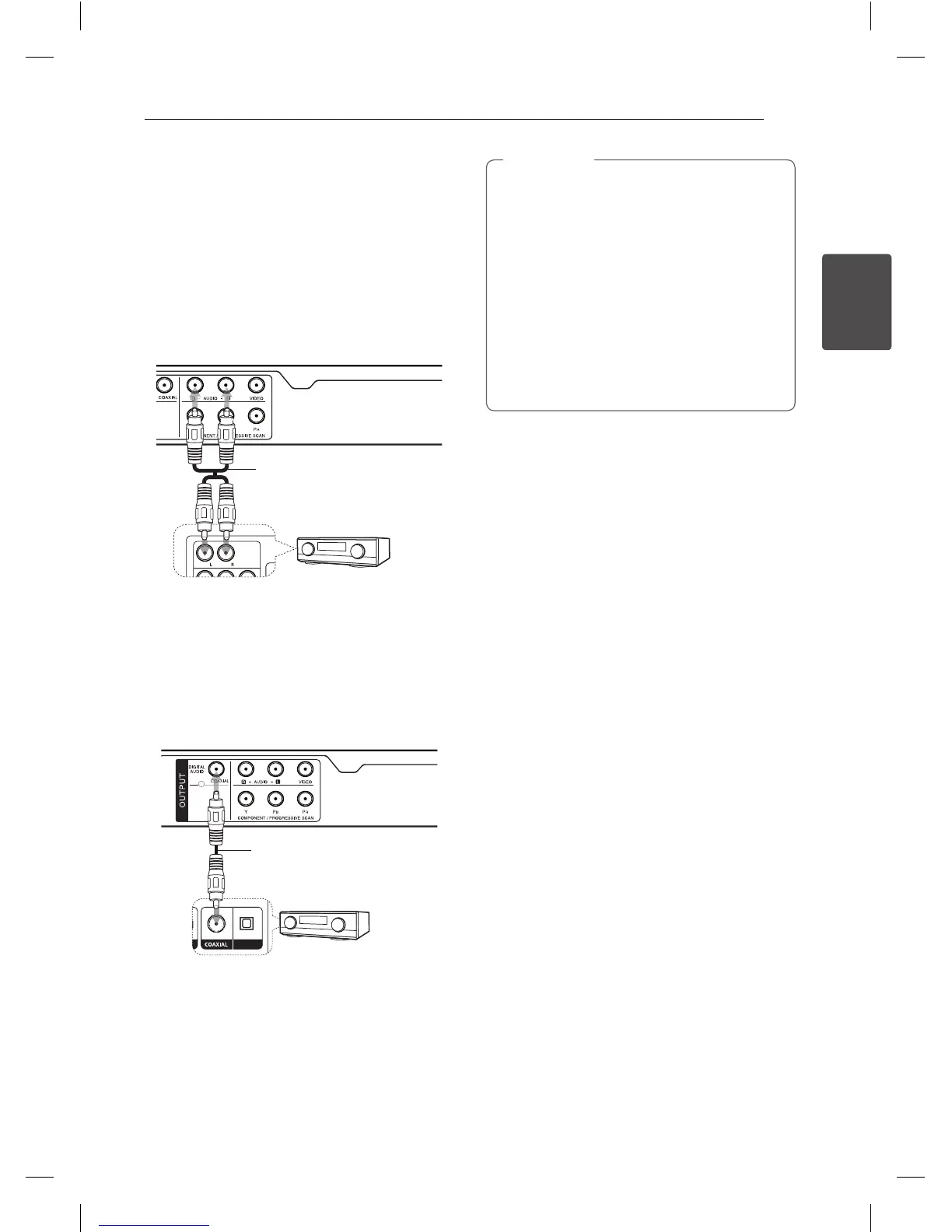
Connecting Audio cable
Connect the AUDIO OUTPUT on the unit to 2CH
AUDIO IN on amplier with Audio cable, such as
AUDIO Left/Right with white/red.
Audio Cable
Receiver / Amplier
Rear of the Unit
Connecting COAXIAL
(digital audio) cable
Connect one of the unit’s DIGITAL AUDIO OUTPUT
(COAXIAL) jacks to the corresponding jack on your
amplier.
Rear of the Unit
Receiver / Amplier
Coaxial Cable
y
If your TV is not capable of handling 96 kHz
sampling frequency, set the [Sample Freq.]
option to [48 kHz] on the setup menu.
y
If your TV is not equipped with Dolby Digital
and MPEG decoder, set the [Dolby Digital] and
[MPEG] options to [PCM] on the setup menu.
y
If the audio format of the digital output
does not match the capabilities of your
amplier, the amplier will produce a strong,
distorted sound or no sound at all.
y
To see the audio format of the current disc
in the on-screen display, press AUDIO.
y
This unit does not perform internal (2
channel) decoding of a DTS sound track.
To enjoy DTS multi channel surround, you
must connect this unit to a DTS compatible
amplier via one of this unit’s digital audio
outputs.
,
Note


 To Next Page