Operating14
Operating
4
General Playback
Playing a Disc
rt
1. Press OPEN/CLOSE (
B
), and place a disc on the
disc tray.
2. Press OPEN/CLOSE (
B
) to close the disc tray
For the most DVD-ROM discs, playback starts
automatically.
For the Audio CD, select a track using
w/s/
a/d
and press PLAY (
z
) or ENTER (
b
) to
play the Track.
Playing a file
yui
1. Press OPEN/CLOSE (
B
) to place a disc on
the disc tray, or connect the USB device.
(USB: DVX642 only)
2. Select a le using
w/s/a/d
, and press PLAY
(
z
) or ENTER (
b
) to play the le.
RETURN (
x
) Changes between Disc and
USB Device.
TITLE Changes the mode. (Music
:
Photo
:
Movie)
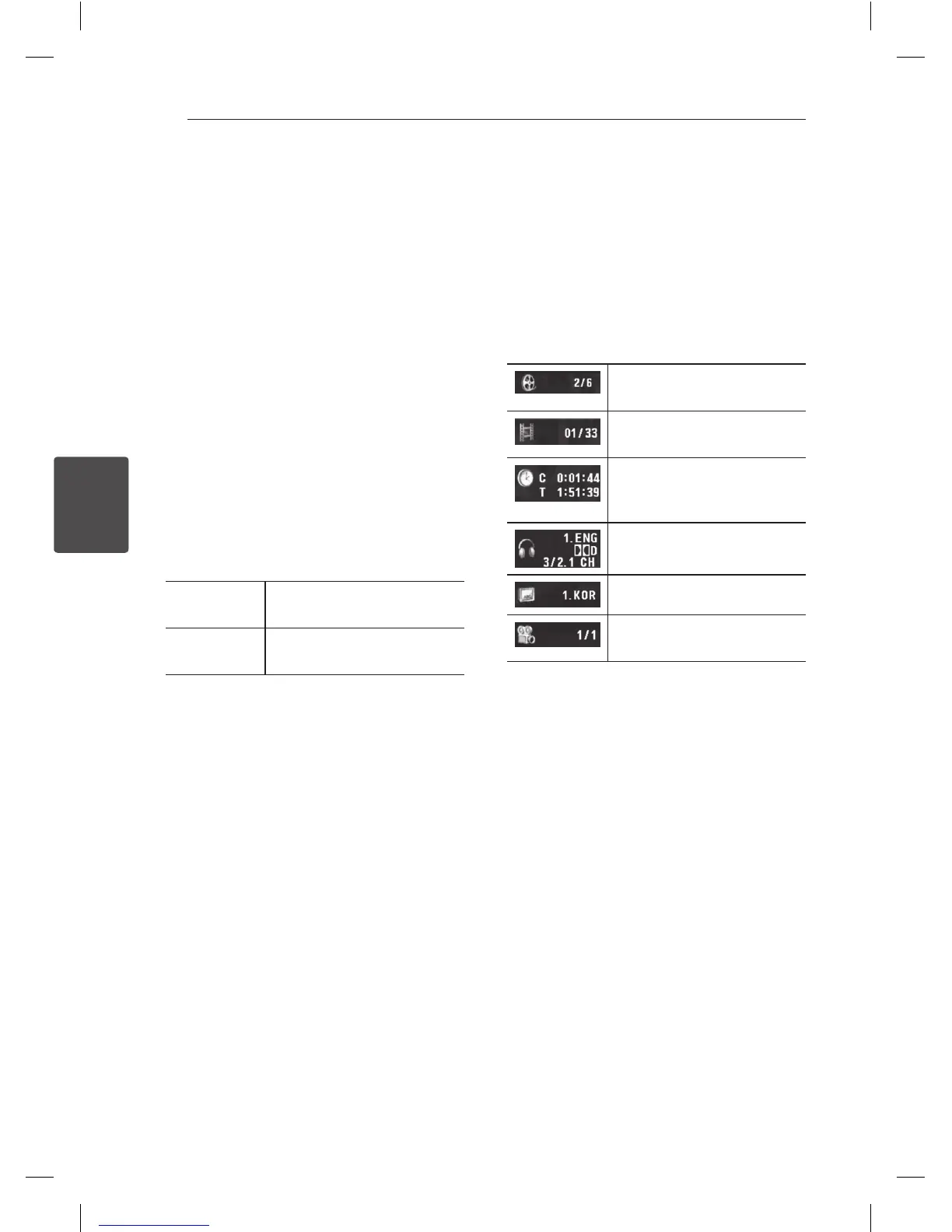
On-Screen display
ry
You can display and adjust various information and
settings about the content.
1. While playback, press DISPLAY to show various
playback information.
2. Select an option using
w/s
.
3. Use
a/d
and numerical button to adjust the
selected option value.
4. Press RETURN(
x
) to exit the On-Screen display.
Current title number/total
number of titles
Current chapter number/total
number of chapters
Elapsed playing time
Selected total time of current
title/le
Selected audio language or
channel
Selected subtitle
Selected angle/total number
of angles


 To Next Page