ELECTRICAL CONNECTION
11
ENGLISH
Cable connection
1 Open the EEV KIT terminal box cover.
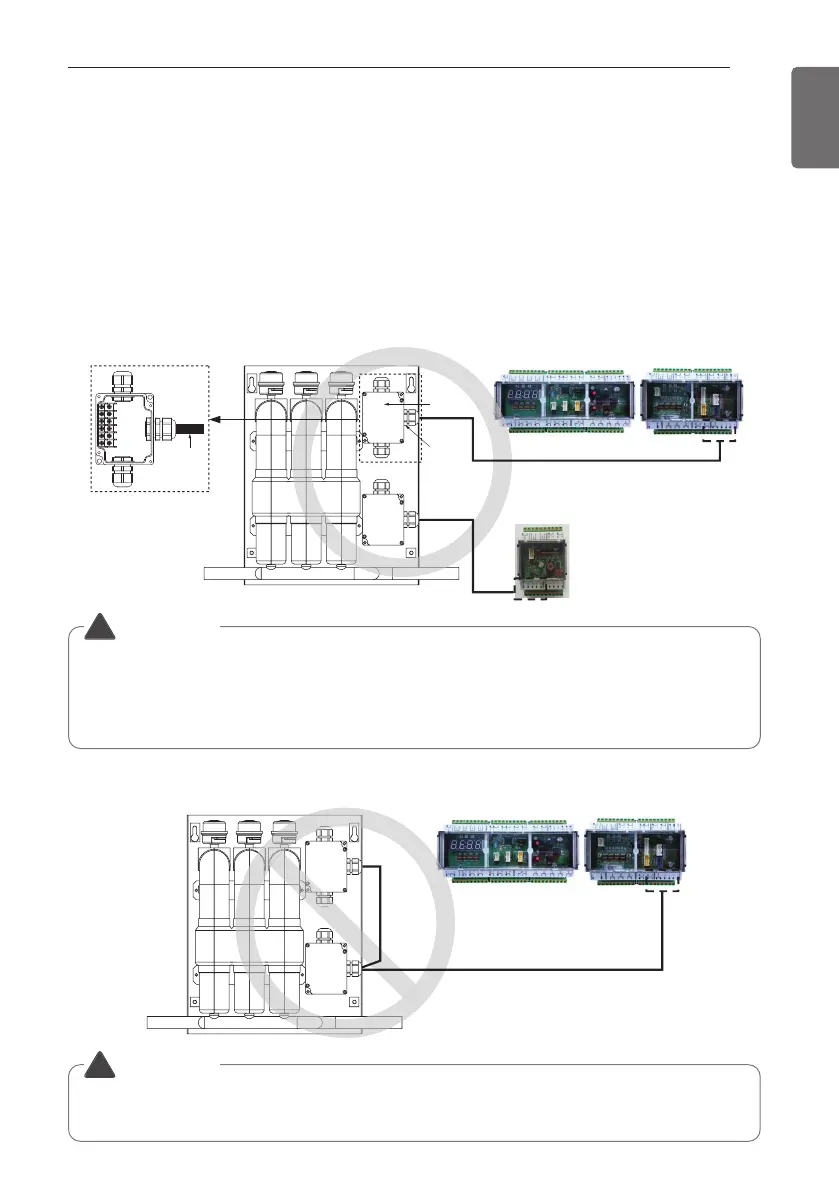
2 Check the marked color label and connect the cable using the driver (+).
• Example) Model PRLK594A0
※ PRLK396A0 is a model with one terminal block.
(Correct wiring)
■ AHU controller
Detail
■ AHU EEV controller (sold separately)
WARNING
• Please connect one controller with one terminal block of EEV KIT. Failure to do so may
result in component damage or fire. (Refer to correct wiring.)
• To connect with EEV KIT (PRLK594A0), the AHU EEV controller must be purchased
separately.
!
(Incorrect wiring)
■ AHU controller
WARNING
• Do not connect to the AHU controller after wiring the terminal blocks inside the EEV KIT.
Failure to do so may result in component damage or fire. (Refer to incorrect wiring.)
!
ELECTRICAL CONNECTION



 To Next Page