Operating24
Operating
3
Selecting a folder and an
MP3/WMA/FLAC file
1. PRESETFOLDER
W
/
S
on the remote control
repeatedly until a desired folder appears.
2. Press
d
/
M
to play it. The first file of folder will
be played. (During playback, if you selecting a
folder you want, this step is not necessary.)
y
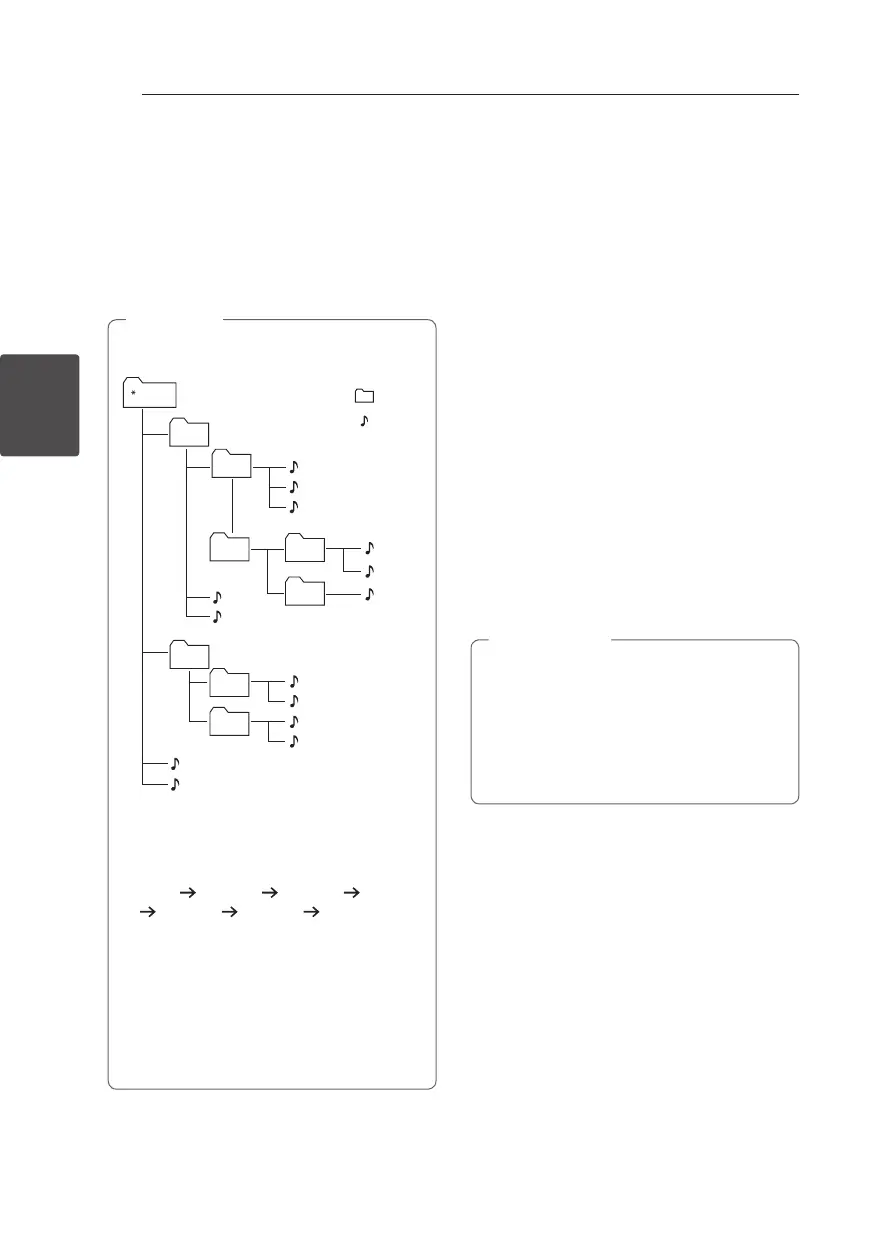
CD / USB Folders/Files are recognized as
below.
FOLDER 1
ROOT FOLDER
FOLDER 2
FILE 1
FILE 2
FILE 3
FILE 4
FILE 5
FILE 6
FILE 7
FILE 8
FILE 9
FILE 10
FILE 11
FILE 12
FILE
FILE 13
FILE 14
FOLDER3
FOLDER4
FOLDER5
FOLDER6
FOLDER7
FOLDER8
y
If there is no le in a folder, the folder will
not appear
y
Folders will be presented as the following
order;
ROOT
FOLDER1 FOLDER3 FOLDER7
FOLDER8 FOLDER5 FOLDER6
y
File will be played from
$
le No.1 to
$
le
No.14 one by on.
y
Files and folders will be presented in order
recorded and may be presented dierently
according to the record circumstances.
y
*ROOT : the rst screen you can see when a
computer recognize the CD/USB is “ROOT”.
,
Note
Deleting an MP3/WMA/FLAC
file
You can delete file, folder or format by pressing
DELETE on the remote control. This function is
supported only in stop state. (USB only)
1. - Select the file you want to delete by using
C
/
V
. And press DELETE.
- Select the folder you want to delete by
pressing PRESETFOLDER
W
/
S
on the remote
control. Then press DELETE.
- Press and hold DELETE to format the USB
device.
Or
Press DELETE repeatedly while searching a file.
The display window will be changed in the
following order.
- DEL FILE? : Deletes file
- DEL FOLDER : Deletes folder
- FORMAT? : Formats USB
2. To delete file/folder or format, press
d
/
M
.
3. If you want to exit the current mode, Press
Z
on the unit or
Z
ENTER on the remote control.
y
Do not extract the USB device during
operation. (play, delete, etc.)
y
Regular back up is recommended to
prevent data loss.
y
The delete function may not be supported
according to the USB state. (lock, etc.)
>
Caution



 To Next Page