4 Troubleshooting
Troubleshooting28
4
Troubleshooting
Troubleshooting
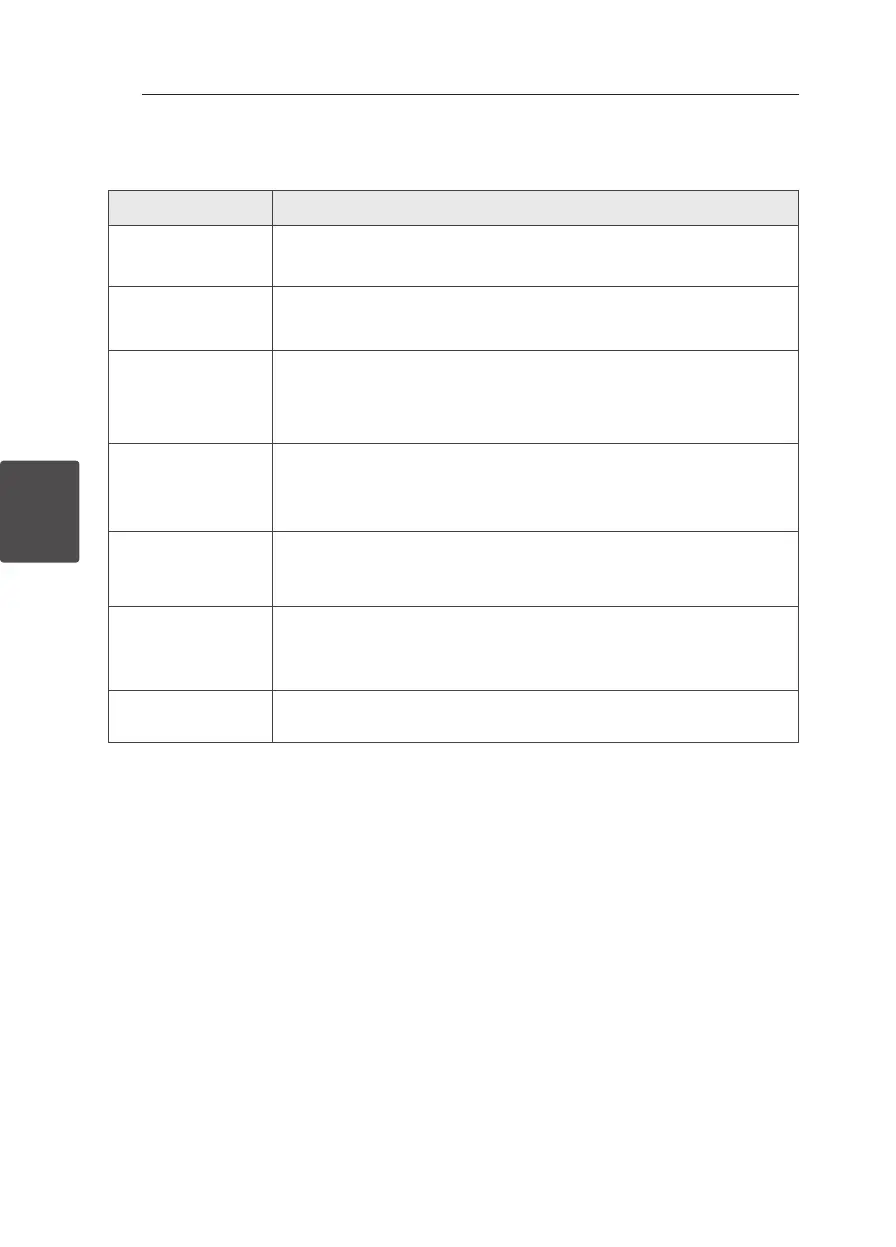
Problem Correction
No Power.
y
Plug in the power cord.
y
Check the condition by operating other electronic devices.
No sound.
y
Press FUNCTION or FUNC. and check the selected function.
y
If not, connect speaker cables correctly. Speaker cables connected correctly.
The unit does not start
playback.
y
Insert a playable disc.
y
Clean the disc. (Refer to the 31 page)
y
Insert the disc with the label or printed side facing upward.
Radio stations cannot be
tuned in properly.
y
Connect the antenna securely.
y
Tune to the station manually.
y
Preset some radio stations, see page 22 for details.
Android device does not
work.
y
Check whether your device’s O/S is ver 4.1(or later) or AOA 2.0 (or later).
y
Connect your Android device using USB cable rmly.
The remote control does
not work properly.
y
Operate the remote control within about 7 m.
y
Remove the obstacle in the path of the remote control and the unit.
y
Replace the batteries with new ones.
Clock is not displayed.
Connect your Bluetooth device to your unit through “LG Bluetooth Remote” app
for time sync.



 To Next Page