Setting up
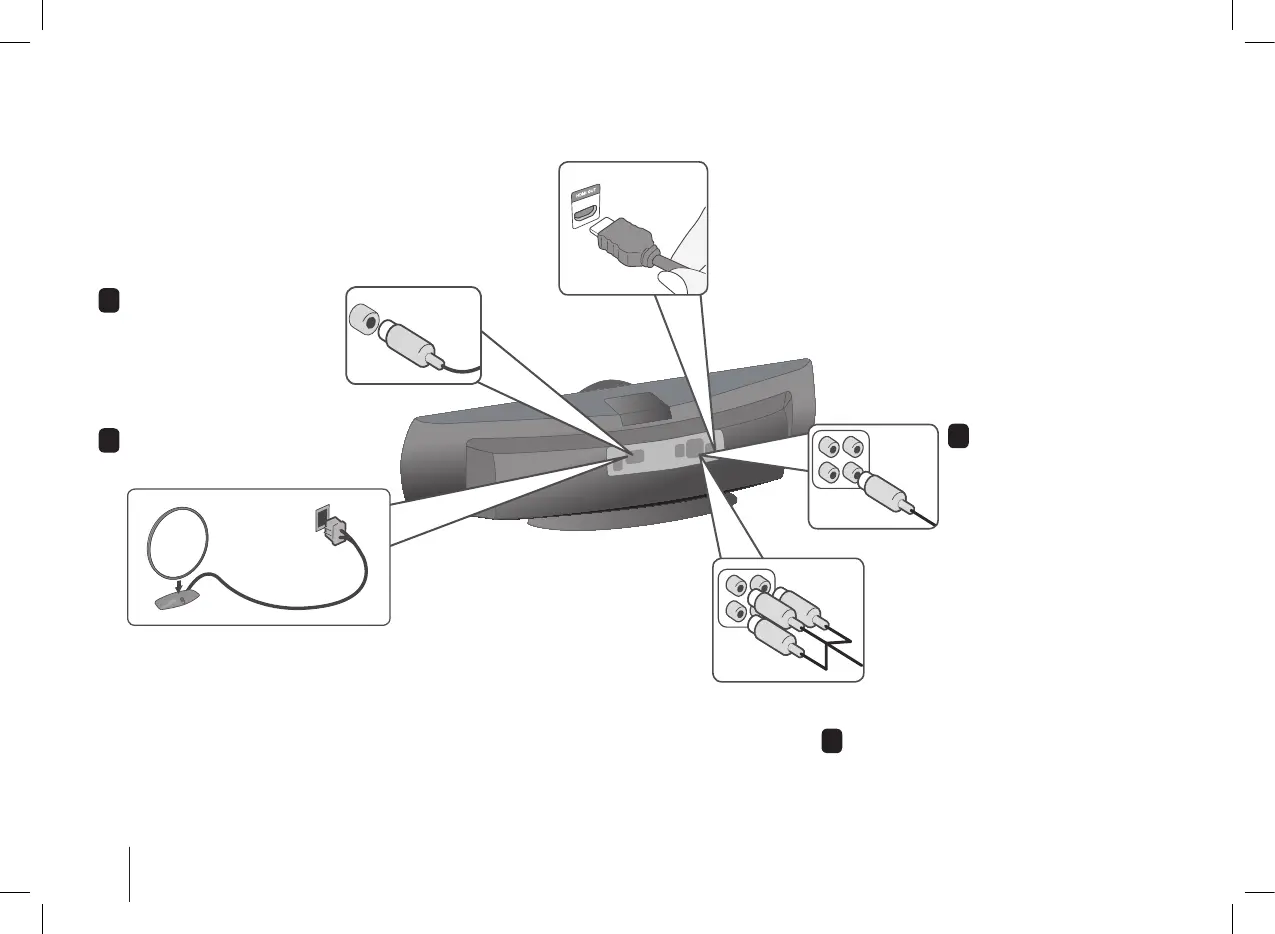
Connecting your unit to your TV and aerials.
1
Connect the FM aerial.
The reception will be at its
best when the two loose ends
of the aerial are in a straight
and horizontal line.
Plug the TV into the unit.
You can connect using a video cable.
If you are using a High Denition TV you can connect using the
HDMI cable. Set the TV source to HDMI. Press RESOLUTION
on the remote to select the correct resolution for you HDMI
connection. The LG screen will appear when the correct resolution
is selected.
3
Video Out connection
Connect the VIDEO
OUTPUT(MONITOR) jack on
the unit to the corresponding
input jack on your TV using a
Video cable.
Componenet Video connection
Connect the COMPONENT VIDEO
(PROGRESSIVE SCAN) OUTPUT jacks on
the unit to the corresponding input jacks on
your TV using a Y PB PR cable.
4
Plug the unit plug into a wall socket.
2
Connect the AM loop aerial to the
unit. (Optional)


 To Next Page