Connection
15
Connection
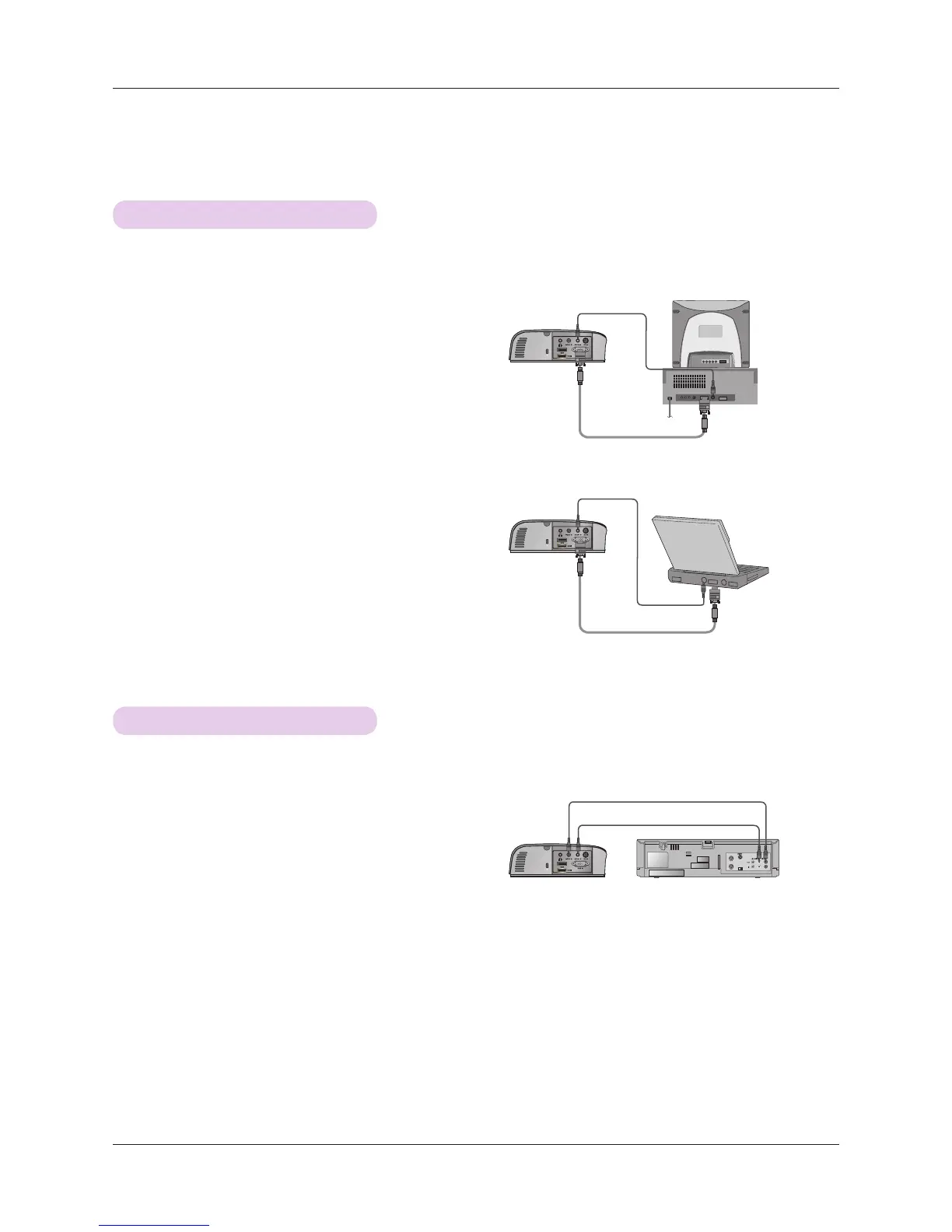
Connecting to a Desktop PC
* You can connect the projector to a computer with VGA, SVGA, XGA, SXGA output.
* Refer to page 39 for resolutions the projector supports.
< How to connect >
1. Connect the RGB IN of the projector and the computer
output port with a computer cable.
2. Connect the AUDIO IN of the projector and the computer
audio output port with an audio cable.
* You may have to change the resolution that your PC exports to
one supported by the projector. Refer to page 39. This projec-
tor may not support output from laptops when the laptop
screen is on.
Connecting to a Video Source
< How to connect >
1. Connect the VIDEO IN of the projector to the output jack
of the video source with a video cable.
2. Connect the AUDIO IN of the projector to the output jack
of the audio source with an audio cable.
* You can connect a VCR, a camcorder or any other compatible video image source to the projector.
<VCR>
Audio Cable
Audio Cable
Audio Cable
Video Cable
Computer Cable
Computer Cable


 To Next Page