USB
36
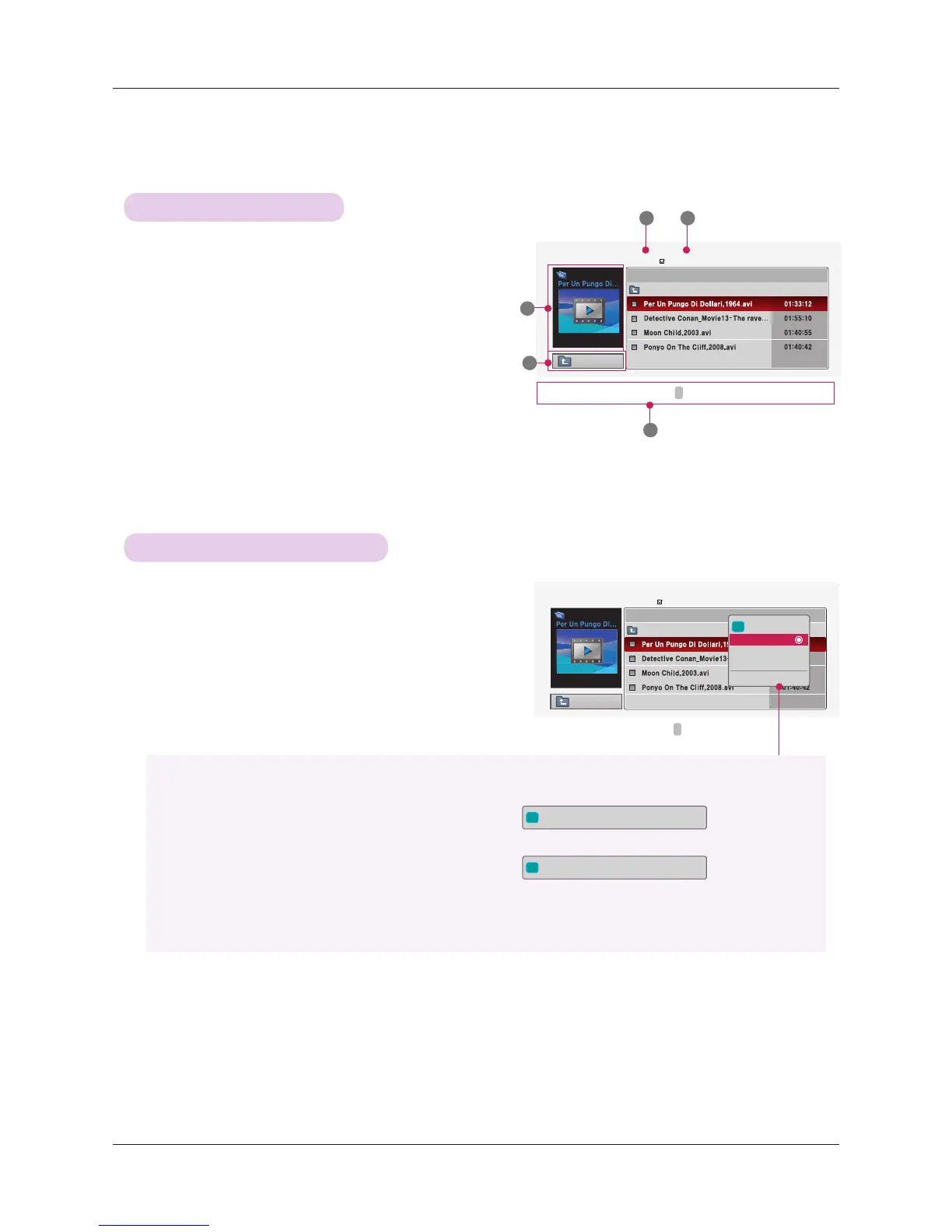
1. Moves to upper level folder
2. Preview: Display the title/folder name of the movie in the
selected folder
3. Current page/Total pages
4. Total number of marked movies
5. Corresponding buttons on the remote control
Up Folder
DurationTitle
Page 1/1
No Marked
MOVIE LIST
704 x 396 668 MB
Movie
Up Folder
Up Folder
DurationTitle
Page 1/1
No Marked
MOVIE LIST
704 x 396 668 MB
Movie
Up Folder
Movie Selection and Popup Menu
Screen Components
2
3 4
5
1
i
704 x 396 668 MB
Play
Mark All
Delete
Close
1. Press the USB button. Then, move to MOVIE LIST with
the <, > buttons and press the ◉OK button.
2. Press the ∧, ∨, <, > move to a desired movie file and
press the ◉OK button.
3. Move to a desired item with the ∧, ∨ buttons and then
press the ◉OK button.
• Play: Play the selected movie titles.
- In the case of files not supported, a message regarding non-supported file is displayed.
- The screen is played, but when the audio file is not supported, the following message shows.
• Mark All: Mark all movies in the folder.
• Delete: Delete the selected movie.
• Close: Close the pop-up menu.
i
This file is invalid.
i
Unsupported Audio.
ꔂ
Move
ꔉ
PopUp Menu PAGE Page Change
ꘁ
Mark
ꕉ
Exit
ꕌ
ꕍ
ꔂ
Move
ꔉ
PopUp Menu PAGE Page Change
ꘁ
Mark
ꕉ
Exit
ꕌ
ꕍ


 To Next Page