Getting Started14
Getting Started
1
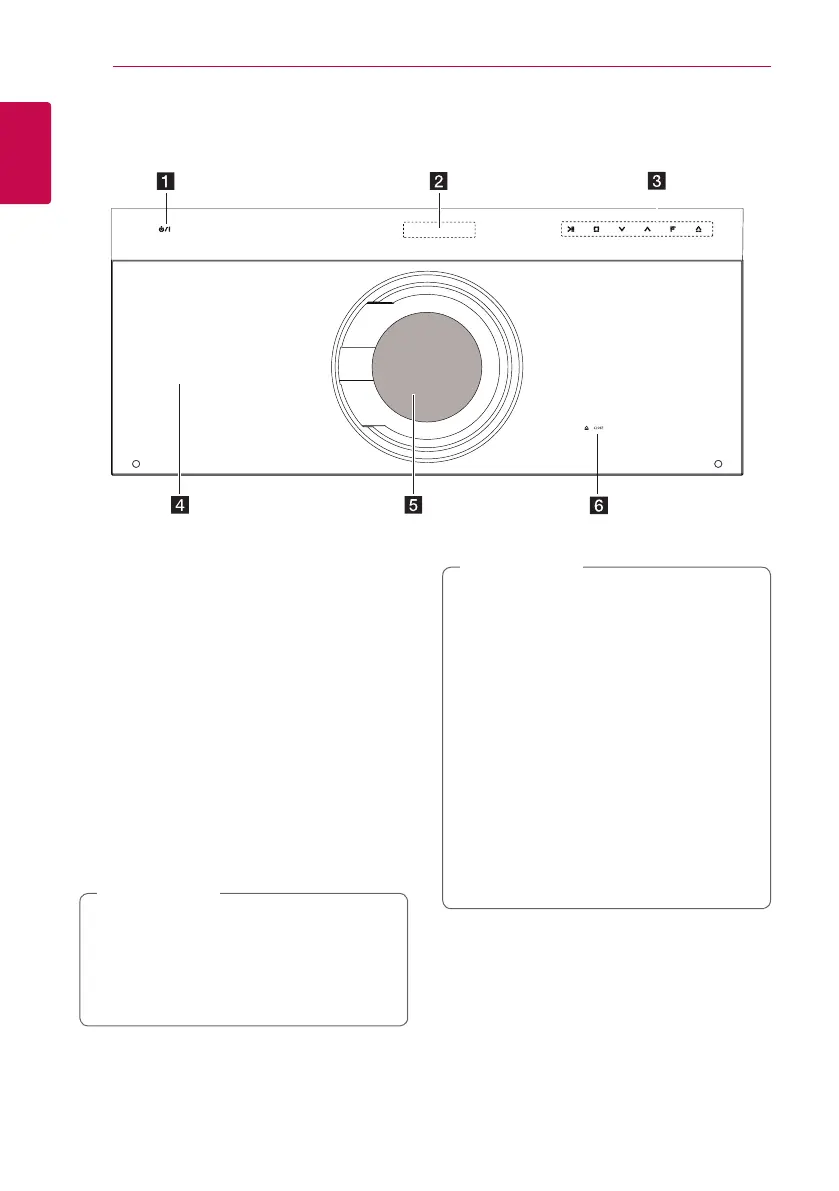
Player (Front)
a
1
/
!
(POWER) Button
b
Display Window
c
Operation buttons
T
(PLAY / PAUSE)
I
(STOP)
SW
(Volume control)
F (Function)
Changes the input source or function.
R
(OPEN/CLOSE)
d
Front Door
After several minutes with the front door
opened, the front door closes automatically.
e
Disc Loader
f
R
Close Button
y
Be careful not to pinch your nger or any
object in it when closing the front door.
y
Do not raise the front door with hands
when the unit is in power o because you
might damage the unit.
>
Caution
Precautions in using the touch buttons
y
Use the touch buttons with clean and dry
hands.
- In a humid environment, wipe out any
moisture on the touch buttons before
using.
y
Do not press the touch buttons hard to
make it work.
- If you apply too much strength, it can
damage the sensor of the touch buttons.
y
Touch the button that you want to work in
order to operate the function correctly.
y
Be careful not to have any conductive
material such as metallic object on the
touch buttons. It can cause malfunctions.
>
Caution


 To Next Page