23
ENGENGLISH
ASSEMBLING AND PREPARING
Preparing Built-in Camera
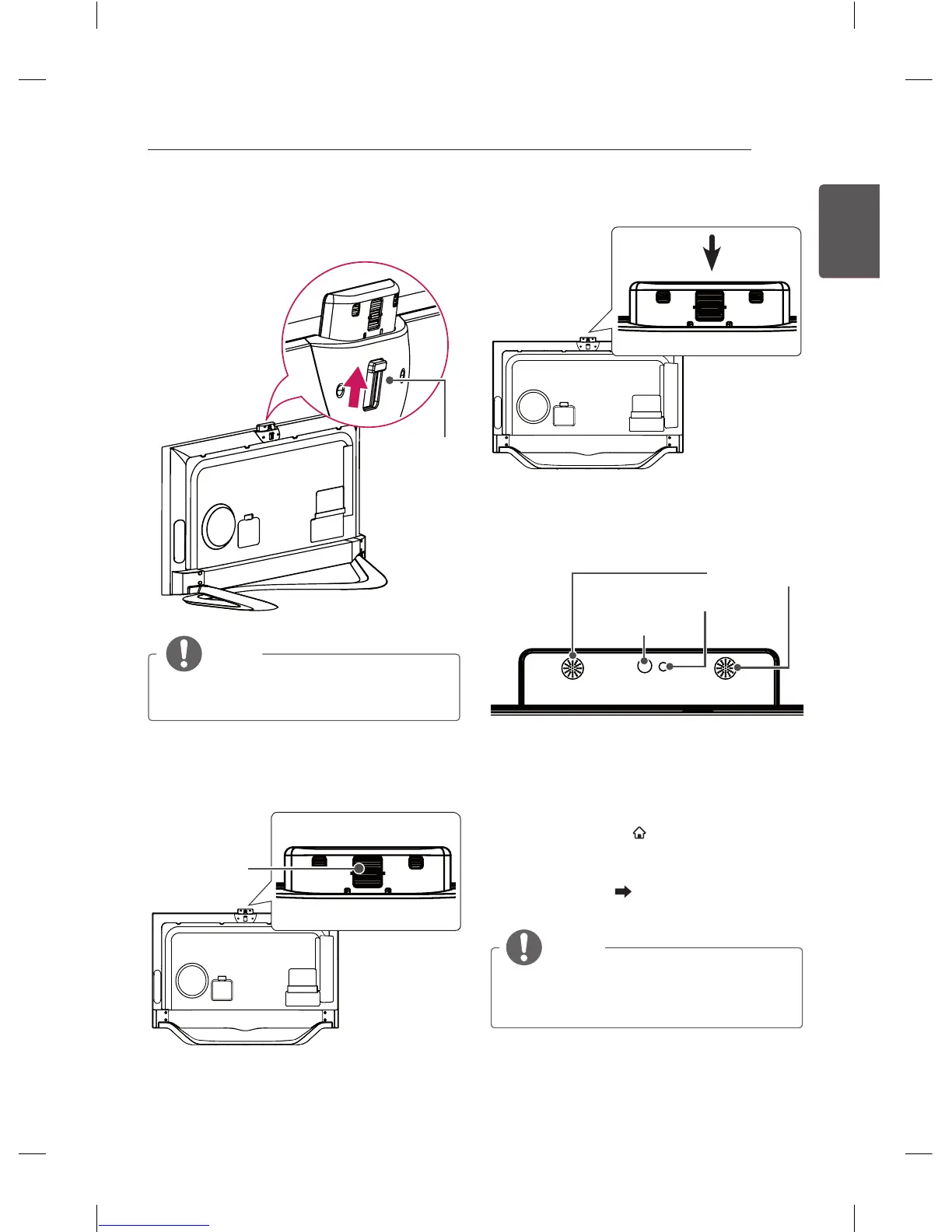
1 Pull up the slide at the back of the TV.
Slide
NOTE
y
Remove the protective film before using
the built-in camera.
2 You can adjust the angle of the camera with
the angle adjustment lever on the back of the
built-in camera (within 5 degrees vertically).
Angle
Adjustment
Lever
3 Push down the built-in camera when you are
not using it.
Name of Parts of Built-in Camera
Indicator
Microphone
Camera Lens
Checking the Camera’s Shooting
Range
1 Press the SMART button on the remote
control to display the More menu.
2 Select Settings from the More menu and
then press the Wheel(OK) button.
3 Go to OPTION Camera Setting Help
and press the Wheel(OK) button.
NOTE
y
The optimal distance from the camera
to use the motion recognition function is
between 1.5 and 4.5 m.



 To Next Page