28
ENG
ENGLISH
MAKING CONNECTIONS
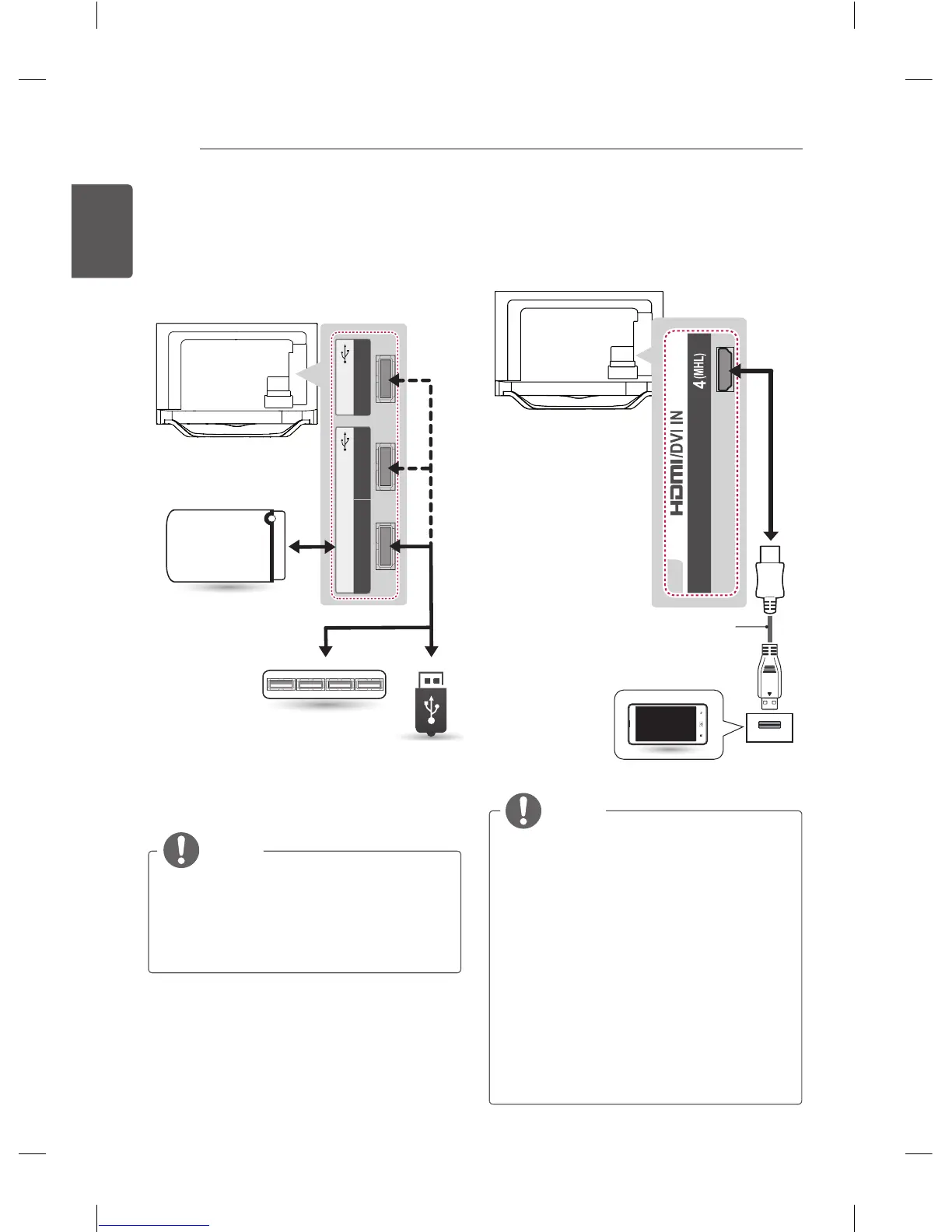
USB connection
Connect a USB storage device such as a USB
flash memory, external hard drive, or a USB
memory card reader to the TV and access the
Smart Share menu to use various multimedia
files.
HUB
HDD
(*Not Provided)
USB
(*Not Provided)
(*Not Provided)
NOTE
y
Some USB Hubs may not work. If a USB
device connected using a USB Hub is not
detected, connect it to the USB port on
the TV directly.
y
Connect the external power source if your
USB is needed.
MHL connection
Mobile High-definition Link (MHL) is an interface
for transmitting digital audiovisual signals from
mobile phones to television sets.
MHL passive cable
(*Not Provided)
Mobile phone
NOTE
y
Connect the mobile phone to the HDMI/
DVI IN 4 (MHL) port to view the phone
screen on the TV.
(LA97**, LA98** : HDMI/DVI IN 3(MHL))
y
The MHL passive cable is needed to
connect the TV and a mobile phone.
y
This only works for the MHL-enabled
phone.
y
Some applications can be operated by the
remote control.
y
For some mobile phones supporting MHL,
you can control with the magic remote
control.
y
Remove the MHL passive cable from the
TV when:
»
the MHL function is disabled
»
your mobile device is fully charged
in standby mode



 To Next Page