26
ENG
ENGLISH
MAKING CONNECTIONS
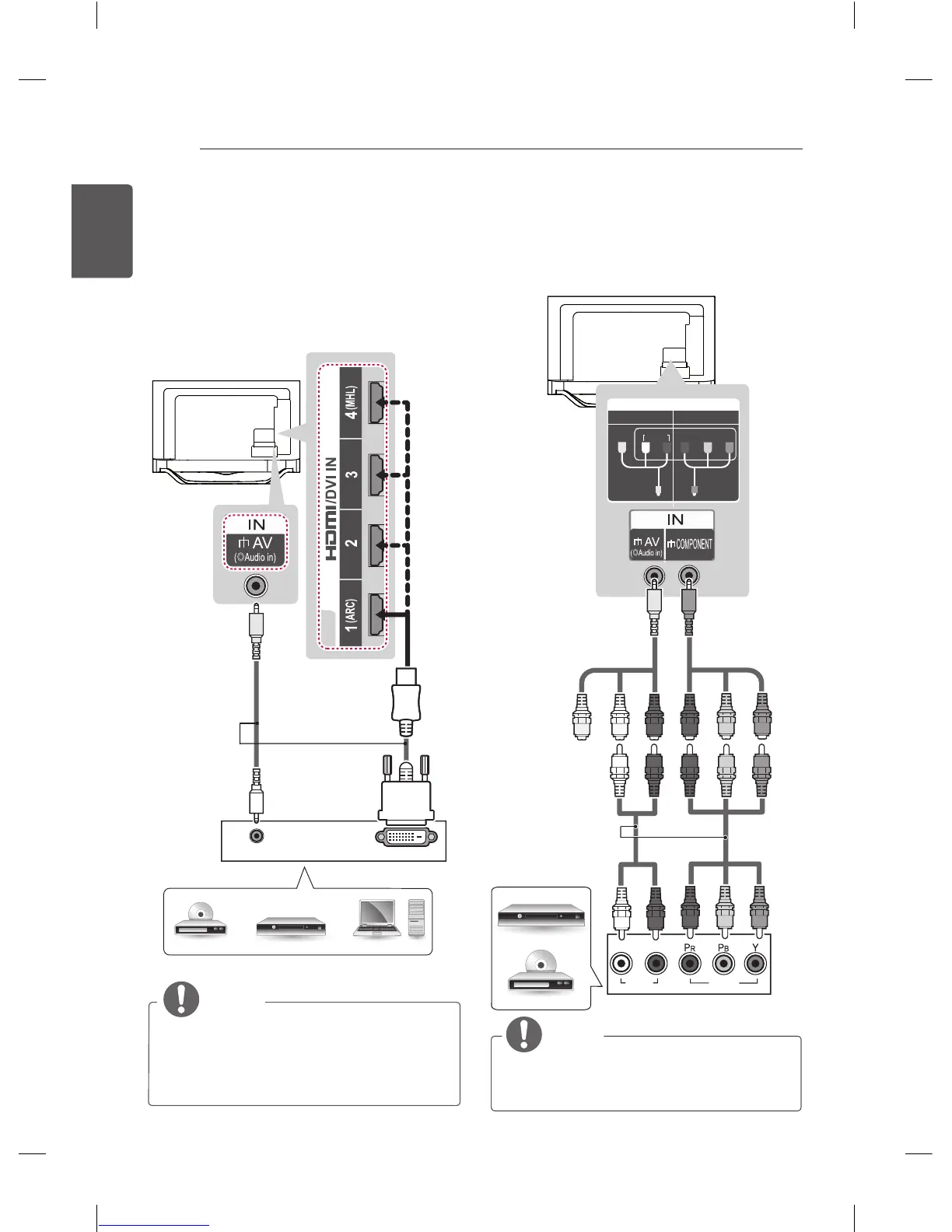
Component connection
Transmits analog video and audio signals
from an external device to the TV. Connect the
external device and the TV with a component
gender cable as shown.
VIDEO
AUDIO
L R
IN
COMPONENT
YPB
AUDIO
AV
PR
VIDEO
NOTE
y
If cables are not installed correctly, it
could cause this image to display in black
and white or with distorted colours.
RED
BLUE
GREEN
RED
WHITE
DVD / Blu-Ray /
HD Cable Box
RED
RED
BLUE
BLUE
GREEN GREEN
RED RED
WHITE WHITE
YELLOW
(Use the composite
video cable provided.)
(*Not Provided)
GREENYELLOW
(Use the
component video
cable provided.)
DVI to HDMI connection
Transmits the digital video signal from an
external device to the TV. Connect the external
device and the TV with the DVI-HDMI cable as
shown. To transmit an audio signal, connect an
audio cable.
Choose any HDMI input port to connect. It does
not matter which port you use.
DVI OUT
AUDIO OUT
NOTE
y
Depending on the graphics card, DOS
mode may not work if a HDMI to DVI
Cable is in use.
y
When using the HDMI/DVI cable, Single
link is only supported.
DVD/ Blu-Ray / HD Cable Box / PC
(*Not Provided)
YELLOW



 To Next Page