18
ENG
ENGLISH
ASSEMBLING AND PREPARING
4
CAUTION
y
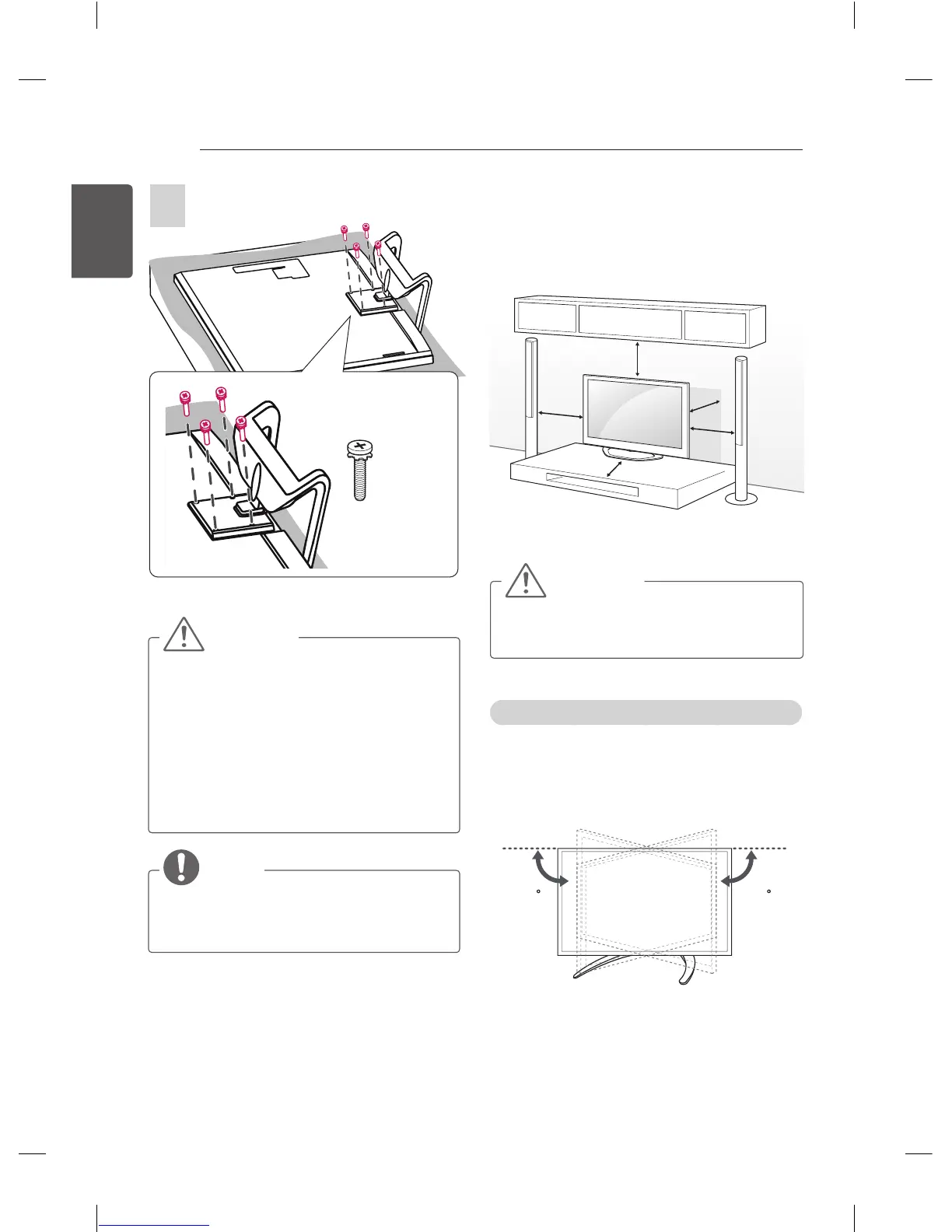
When attaching the stand to the TV
set, place the screen facing down on a
cushioned table or flat surface to protect
the screen from scratches.
y
Make sure that the screws are fastened
completely. (If they are not fastened
securely enough, the TV may tilt forward
after being installed.)
Do not fasten the screws with excessive
force otherwise they may be worn out
and become loose.
NOTE
y
Remove the stand before installing the
TV on a wall mount by performing the
stand attachment in reverse.
Mounting on a table
1 Lift and tilt the TV into its upright position on
a table.
- Leave a 10 cm (minimum) space from
the wall for proper ventilation.
10 cm
10 cm
10 cm
10 cm
10 cm
2 Connect the power cord to a wall outlet.
CAUTION
y
Do not place the TV near or on sources
of heat, as this may result in fire or other
damage.
Adjusting the angle of the TV to suit view
(This feature is not available for all models.)
Swivel 15 degrees to the left or right and adjust
the angle of the TV to suit your view.
(Only LA79**)
1515
M4 x L20
4EA



 To Next Page