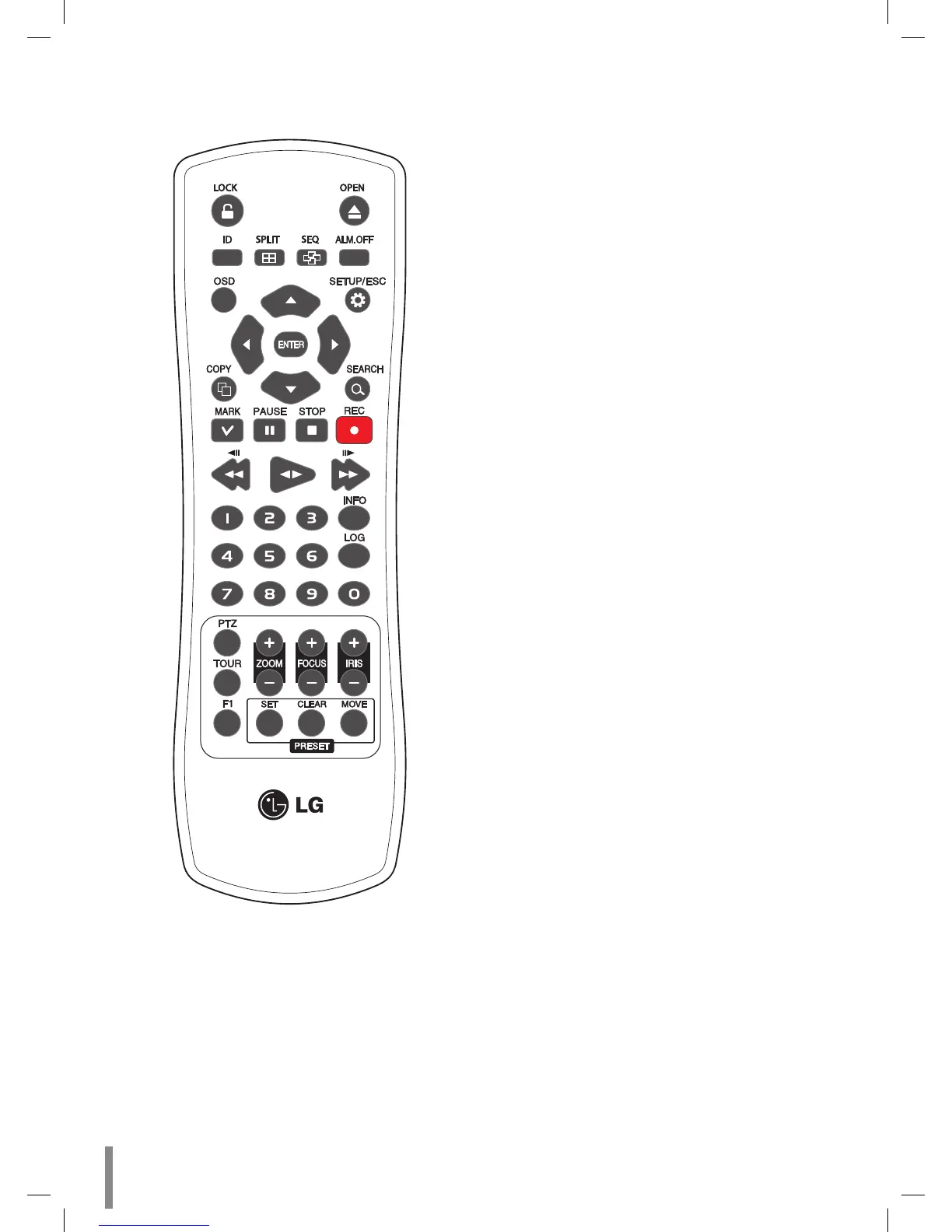
Remote Control
LOCK: Displays the lock menu to change user type or
disable system operation.
OPEN: Opens or closes the disc tray. This button is only
used for LE2104D models.
ID: Set the appropriate DVR system ID to operate via
the IR Remote Controller when using the multiple DVR.
Press the ID button then press the number button with-
in 2 seconds to select the system ID of the DVR. If you
set the system ID to “0”, you can control multiple DVR at
the same time.
•
•
•
SPLIT: Press to see different multiscreen modes.
SEQ: Views the all channels in sequence on the full
screen display mode. You cannot use sequence mode
with the 4 split.
ALM.OFF: Cancels alarm activation and returns the sys-
tem to the condition before the alarm was activated.
OSD: Displays the submenu.
SETUP/ESC: Displays the setup menu or cancels opera-
tion of the setup menu.
Arrow Buttons (b B v V): Selects or moves between
the menu options.
ENTER: Confirms menu selections.
COPY: Copies the recording data to an external device.
SEARCH: Displays the search menu.
MARK: Sets the mark point for recording search. You
can set the mark point during the single or multi chan-
nel playback of recorded data.
PAUSE (X): Pauses playback.
STOP(x): Stops playback.
REC (z): Starts or stops recording.
m/c : Searches the recorded images in reverse or
skips the recorded images.
bB: Playback or reverse playback of recorded images.
M/C : Forward searches the recorded images or
skips the recorded images.
Number Buttons (0,1-9): To select the PTZ preset num-
ber, ID, or channel.
INFO: Displays or removes the system information win-
dow.
LOG: Displays or removes the System Log List window.
PTZ: Switches this unit to PTZ mode to control the con-
nected PTZ camera.
TOUR: Tours all registered preset positions in the cam-
era.
ZOOM + / -: Zooms in/out on the playback window.
FOCUS + / -: Adjusts the focus of a camera.
IRIS + / -: Adjusts the iris of a camera.
F1: This button is not available.
PRESET
SET: Registers the PTZ camera's preset positions.
CLEAR: Deletes a memorized preset position.
MOVE: Moves the camera to the preset position.
•
•
•
•
•
•
•
•
•
•
•
•
•
•
•
•
•
•
•
•
•
•
•
•
•
•
-
-
-
10 Introduction


 To Next Page