Connections and settings 39
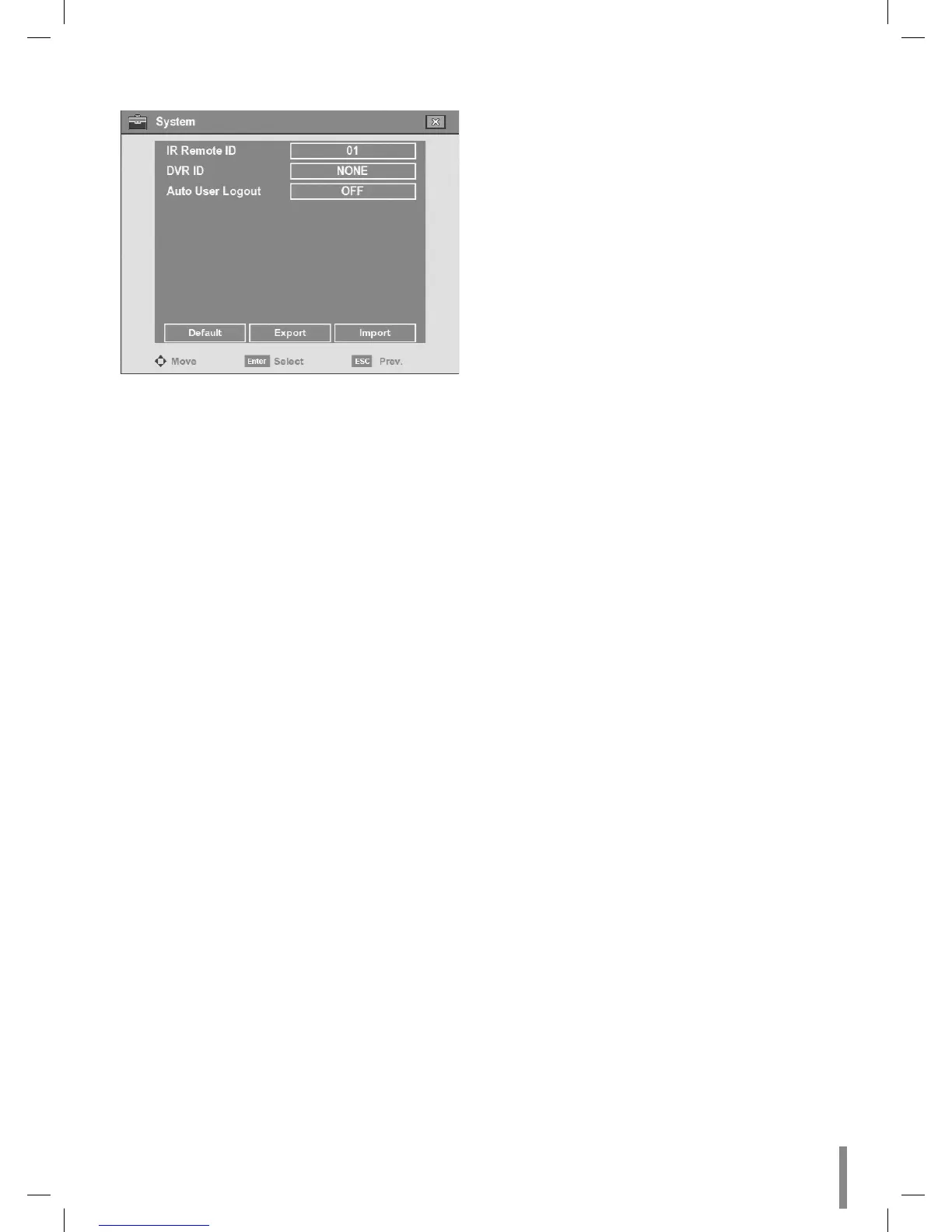
System
IR Remote ID: Select the IR Remote ID for this unit (0~9).
If you use multi systems set the IR Remote ID for each
DVR unit.
DVR ID: Select the DVR ID for this unit (NONE, 1~16). If
you use multi systems set the DVR ID for each DVR unit.
You can controll the DVR by using the LKD1000 con-
troller. (For more details refer to the LKD1000 owner's
manual).
Auto User Logout: Logout is automatically at fixed inter-
vals. You can set auto logout time to 5 MIN, 10 MIN, 30
MIN, 60 MIN or OFF.
Default: You can reset the DVR to its original factory
settings. Some options cannot be reset (date, time, day-
light saving, time zone and user password settings).
Export: Export the configuration data from this DVR to
the USB memory stick.
Import: Import the DVRs configuration data from the
USB memory stick.
Notes:
Configuration data import is available when the con-
figuration data of a DVR is the same kind as this unit’s
data.
If you use a USB memory stick for configuration export,
you must disconnect the other external USB devices.
•
•
•
•
•
•
•
•


 To Next Page