8
Main Unit
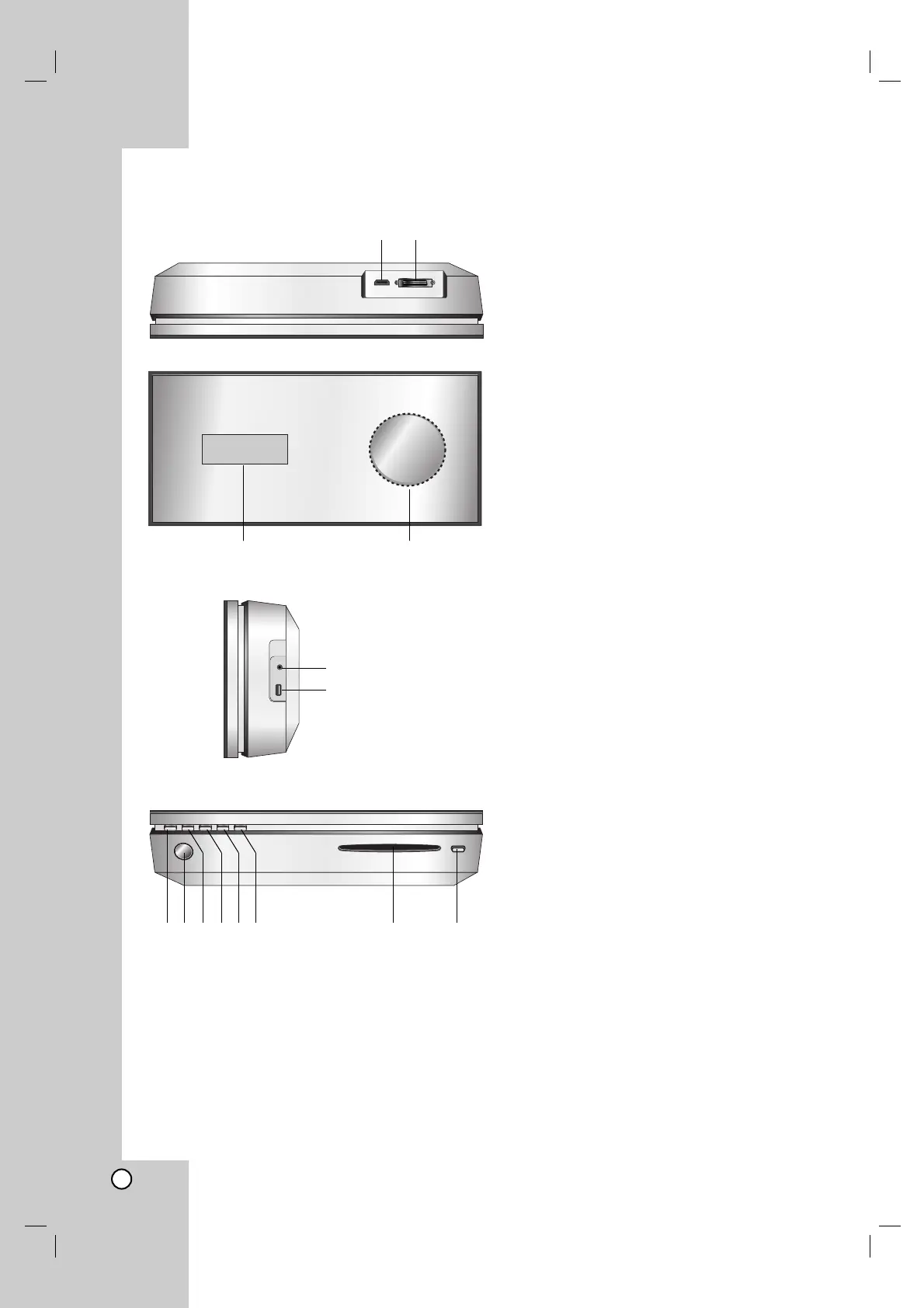
a HDMI Connector (Type A)
HDMI output providing a high quality interface for
digital audio and video.
b SYSTEM Connector
Connect the main unit to the active subwoofer.
c Display window
d * Touch pad
You can point to, select, and scroll objects on the
display window.
You can also change the volume by moving your
finger around the touch wheel.
e PHONES
3.5 mm headphone jack.
Tips:
Adjust the volume to a moderate level before
you plug in the headphones.
Connecting headphones will switch off the
speakers.
f USB
Connect to a USB port of multimedia (USB
memory etc.)
g
11
/I
Switches the unit ON or OFF.
h Remote Sensor
Point the unit remote control here.
i HOME
Accesses or removes the HOME menu.
j PLAY
Starts playback
k STOP
Stops playback or recording.
l PAUSE
Pauses playback temporarily.
m CD slot loader
Notes:
Do not push a disc forcibly into the CD slot.
Do not pull or push a disc while a disc is ejected.
Press EJECT again to reinsert the disc after
ejecting it.
n EJECT
Ejects or inserts a disc from the slot loader.
a
g m
c d
nhi
b
jkl
e
f



 To Next Page