EasyManua.ls Logo

LG LH-W360SE - User Manual

LG LH-W360SE
28 pages
Print Icon
To Next Page IconTo Next Page
Loading...
R
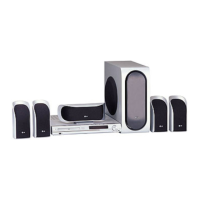
WIRELESS DVD
RECEIVER SYSTEM
MODEL: LH-W360SE
(Main Unit: LH-W360
Speakers: LHS-36SES, LHS-36SEW
ACC36R, ACC36T)
Before connecting up, operating or repairing this product,
please read this instruction booklet carefully and
completely.
LH-W3600SE_JA6PLLD_ENG
USB

Questions and Answers

  • P
    Patty BerryAug 13, 2025
    Why does my LG Receiver remote control not work?
    • E
      ericluceroAug 13, 2025
      If the remote control for your LG Receiver isn't working, try these steps: 1. Point the remote at the receiver's remote sensor. 2. Ensure you're within 23 ft (7 m) of the receiver. 3. Remove any obstacles between the remote and the receiver. 4. Replace the remote's batteries with new ones.
  • B
    Brooke MorganAug 16, 2025
    Why is there no sound from my LG Receiver, or is the sound very low?
    • G
      gillpaulaAug 16, 2025
      If you're experiencing sound issues with your LG Receiver, consider these potential causes: 1. The equipment connected with the audio cable is not set to receive DVD audio signal output: Select the correct input mode of the receiver. 2. The audio cables are not connected securely: Connect the audio cable into the jacks securely. 3. The power of the equipment connected with the audio cable is turned off: Turn on the equipment connected with the audio cable. 4. The audio connecting cable is damaged: Replace it with new one.
  • L
    Loretta JoyceAug 20, 2025
    What to do if LG Receiver has no power?
    • B
      Benjamin HendersonAug 20, 2025
      If your LG Receiver isn't powering on, the power cord might be disconnected. Ensure the power cord is securely plugged into the wall outlet.
  • K
    Kimberly FlynnAug 25, 2025
    What to do if there is no picture on my LG Receiver?
    • M
      Mr. Steve Mason MDAug 25, 2025
      If you're not getting a picture from your LG Receiver, check the following: 1. Make sure your TV is set to the correct video input mode for the DVD signal. 2. Ensure the video cable is securely connected to both the receiver and the TV. 3. Verify that the connected TV is turned on.
  • C
    Christopher CollinsAug 27, 2025
    How to fix loud hum or noise heard from LG LH-W360SE Receiver?
    • M
      Michael LeeAug 28, 2025
      If you're hearing a loud hum or noise from your LG Receiver, check these: 1. The disc is dirty: Clean the disc. 2. The speakers and components are connected poorly: Connect the speakers and components securely. 3. The DVD/CD Receiver is located too close to the TV: Move your TV away from the audio components.
  • T
    Tiffany StewartAug 31, 2025
    Why is the playback picture quality poor on my LG LH-W360SE?
    • J
      Jeffrey SmithAug 31, 2025
      If the playback picture from your LG Receiver is poor, consider these solutions: 1. Clean the disc, as it may be dirty. 2. Ensure a disc is inserted. 3. Make sure you're using a playable disc. 4. Place the disc with the playback side down. 5. Position the disc correctly within the guide on the disc tray. 6. If a menu is on the screen, press the SETUP button to turn it off. 7. If the Rating level is set, cancel the Rating function or change the rating level.
  • E
    Eric DavisSep 4, 2025
    What to do if nothing is displayed on the front panel of my LG Receiver?
    • S
      Samuel NewmanSep 4, 2025
      If nothing is showing on the front panel display of your LG Receiver, press the DIMMER button on the remote control.
  • N
    Nicholas GrantSep 8, 2025
    What to do if the audio CD indicator does not work on my LG LH-W360SE Receiver?
    • K
      Kaitlin KeySep 8, 2025
      If the audio CD indicator isn't working on your LG Receiver, it might be because no disc is inserted. Try inserting a disc.

LG LH-W360SE Specifications

General IconGeneral
BrandLG
ModelLH-W360SE
CategoryReceiver
LanguageEnglish

Related product manuals