Getting Started8
Getting Started
1
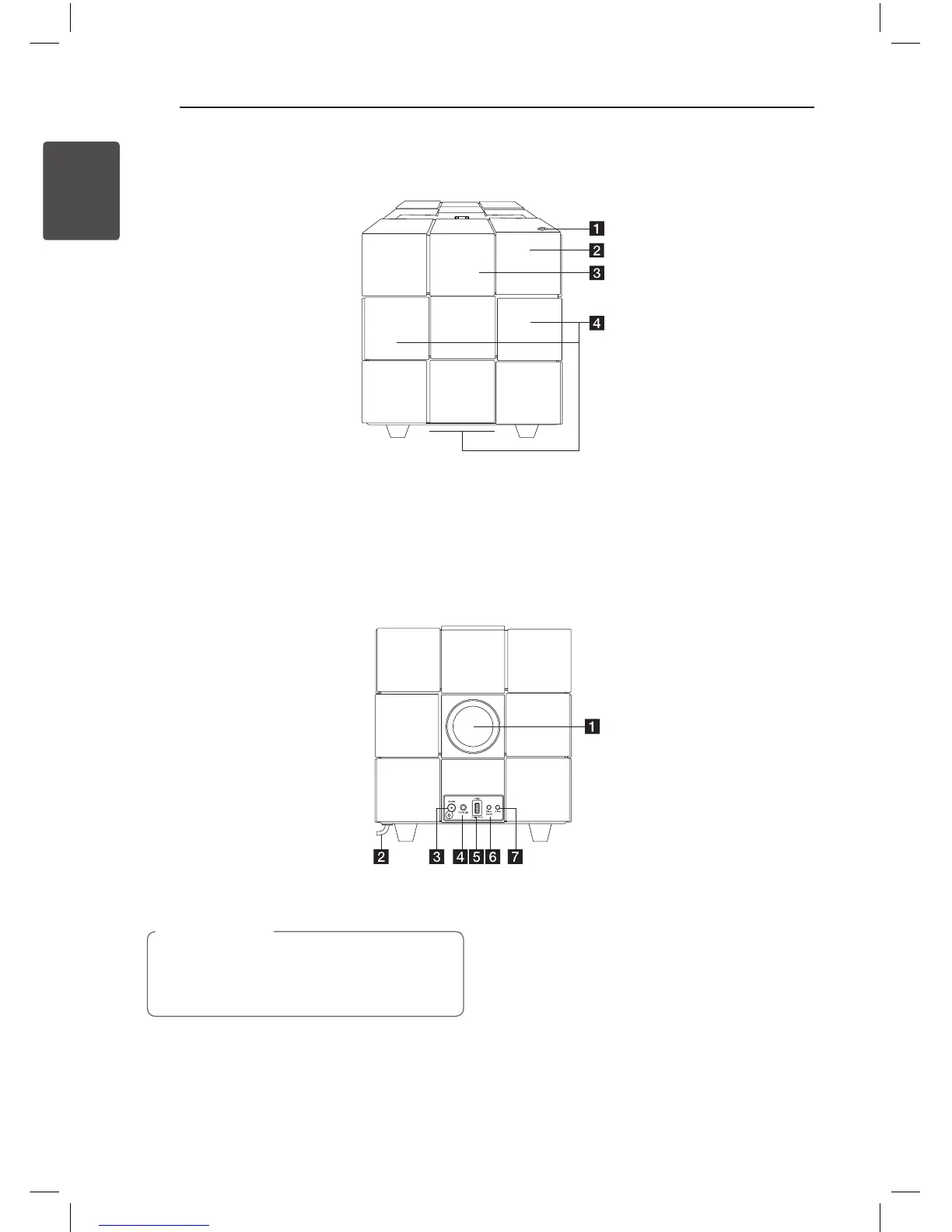
Front Panel
Back Panel
a 1
Switches the unit ON or OFF.
b
Remote Sensor
c
Control panel
d
Speaker
This unit has a built-in subwoofer at the
bottom.
a
Speaker duct
Be careful to make sure children not to put
their hands or any objects into the speaker
duct.
>
Caution
b
AC power cord
c
FM ANT.
d
PORT.IN (3.5 mm)
Listens to music from your portable device.
e
USB Port
Plays music le by connecting the USB device.
f
Alarm On/O
- Sets the alarm timer.
- Turns o the alarm.
- Displays alarm setting.
g
Clock
Sets the clock and checks the time.
ND8520-FA.BGBRLLK_ENG.indd 8 12. 6. 14. �� 10:57



 To Next Page