2
DECK MECHANISM DISASSEMBLY
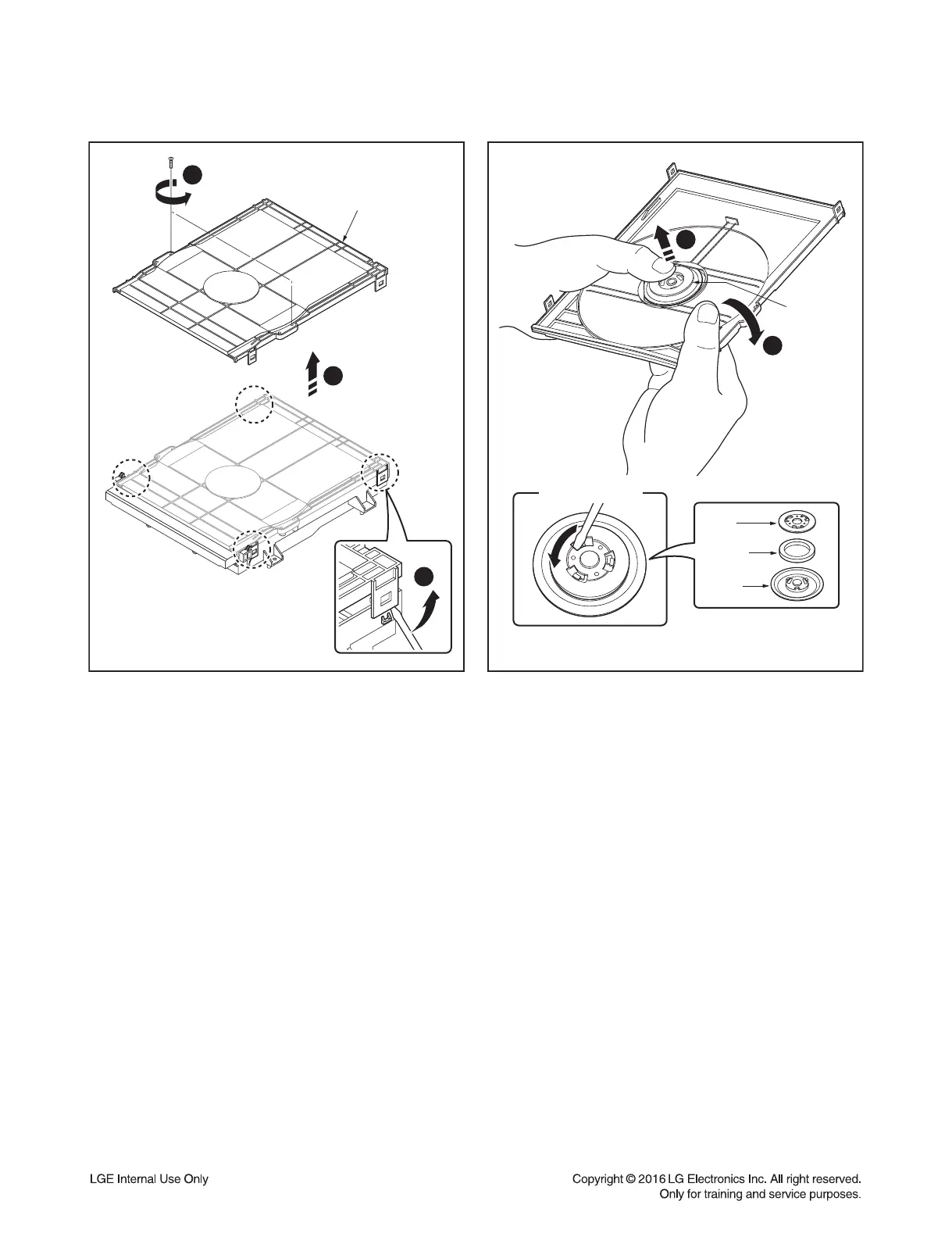
1. Cover Top
1) Remove the 2 screws (S1).
2) Unhook the 4 Locking Tabs (L1) by using a
flat-head screwdriver.
3) Remove the Cover Top.
2. Clamp Assembly
1) Place the Clamp Assembly as Figure B.
2) Bending the Cover Top in direction of
arrow (2) as Figure B.
3) Separate the Clamp Assembly from the
Cover Top.
2-1. Plate
1) Turn the Plate to a counterclockwise direction
and then lift up the Plate.
2) Remove the Plate.
2-2. Magnet
Remove the Magnet.
2-3. Clamp
Remove the Clamp.
1
3
(S1)
Cover Top
< Figure A >
(L1)
2
1
2
< Figure B >
Clamp
Assembly
Clamp Assembly
Plate
Magnet
Clamp



 To Next Page