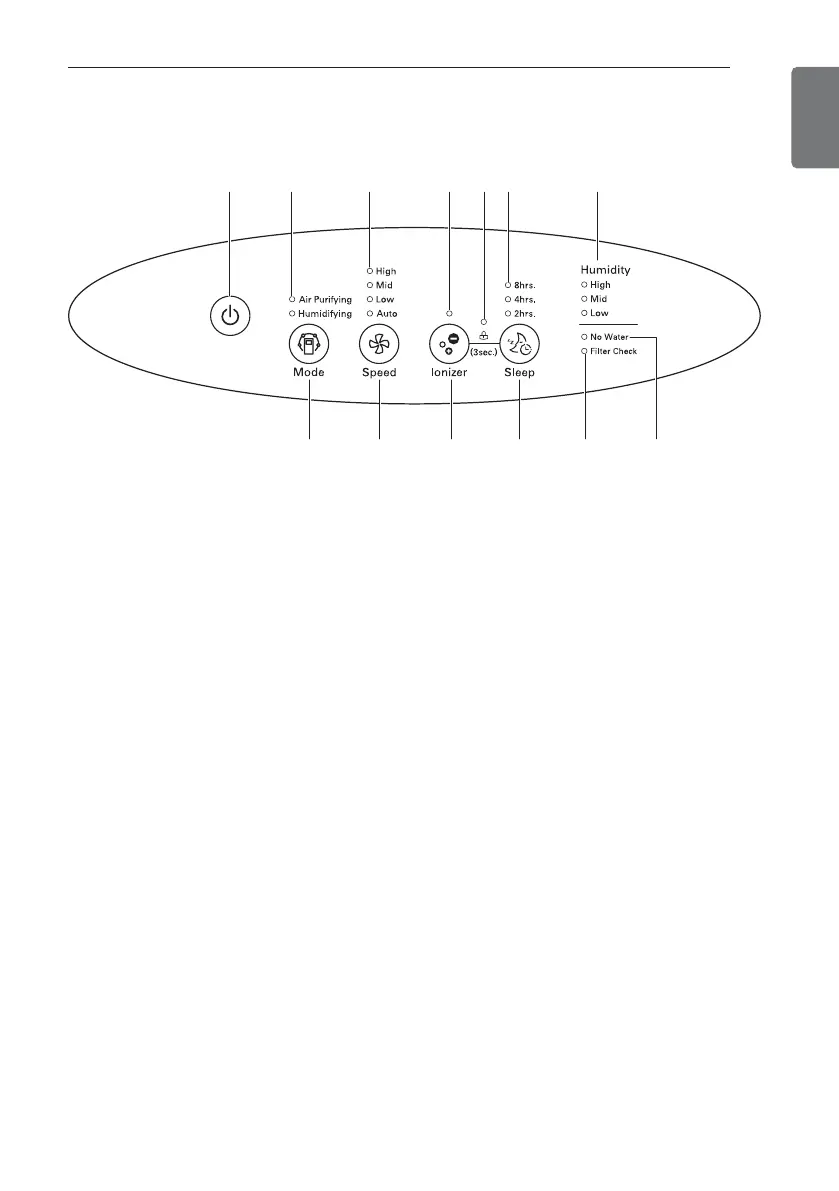
1. Power On/Off button
2. Operation mode indicator : Press the
operation mode button to select the
operation mode.
3. Fan Speed Display : Press the fan
speed button to change air volume.
4. Ionizer lamp : It removes various bac-
teria in the room air by releasing steril-
izing ion.
5. Lock lamp : It sets or releases lock
function when pressing the Ionizer
button and the Sleep button simulta-
neously.
6. Sleep mode display part : Press the
Sleep button to select operation time.
7. Current humidity display part: It dis-
plays the current humidity when it op-
erates the humidifying purification
function.
8. Operation mode button
9. Fan speed button
10. Ionizer button
11. Sleep button
12. Check filter lamp : Check the filter
when light is on.
13. No water lamp : This is turned on
when there is no water in the water
tank when using the humidifier func-
tion and off when water is filled.


 To Next Page