OPERATION
15
ENGLISH
OPERATION
Clean Operation mode
Purify Indoor Air.
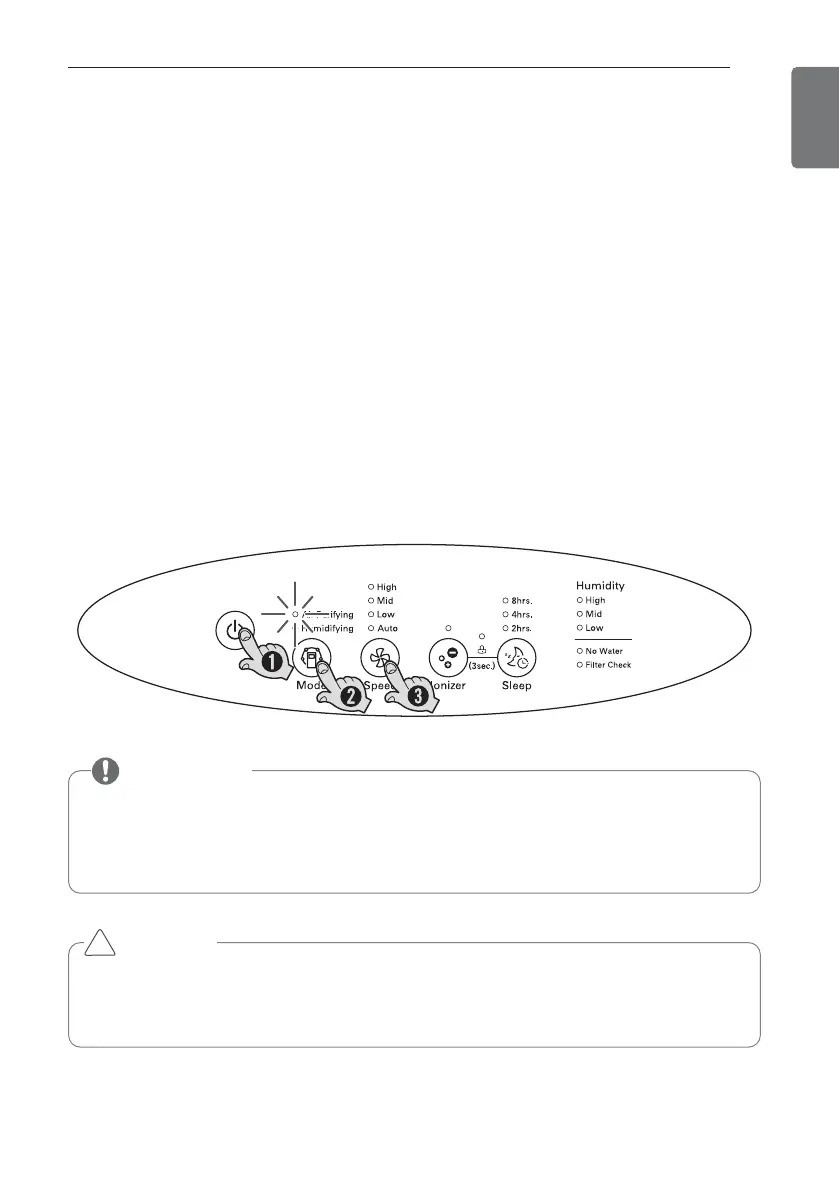
1. Press On/Off Button.
A confirmation tone will sound to indicate that the unit is powering on.
The unit will also produce a tone when the unit is first plugged in.
Fresh air will come out from the air outlet.
- Press On/Off button again to turn off.
- When restart air purifier, system will retrieve to the previous operating condition.
2. Adjust to Clean Operation mode with operation mode button.
3. Select the desired wind amount with Speed button.
- Every time you press the speed button, it is changed in the order of automatic →
Low → Mid → High → automatic.
Use of power
• 220-240 V is exclusively used this product.
• For power supply, use exclusive 220 V – 240 V outlet.
Information
CAUTION
• If the front panel is not closed properly, 4 wind amount indicator LEDs in the
speed are lighted together.
• Properly close the front panel before the use.
!


 To Next Page