21
ENGLISH
[Photo & Video]
Viewing Photos and Videos
You can view photos and videos using the [Photo & Video] app.
1 Press the button on your remote control.
2 Launch the [Photo & Video] application.
3 Select your desired storage device.
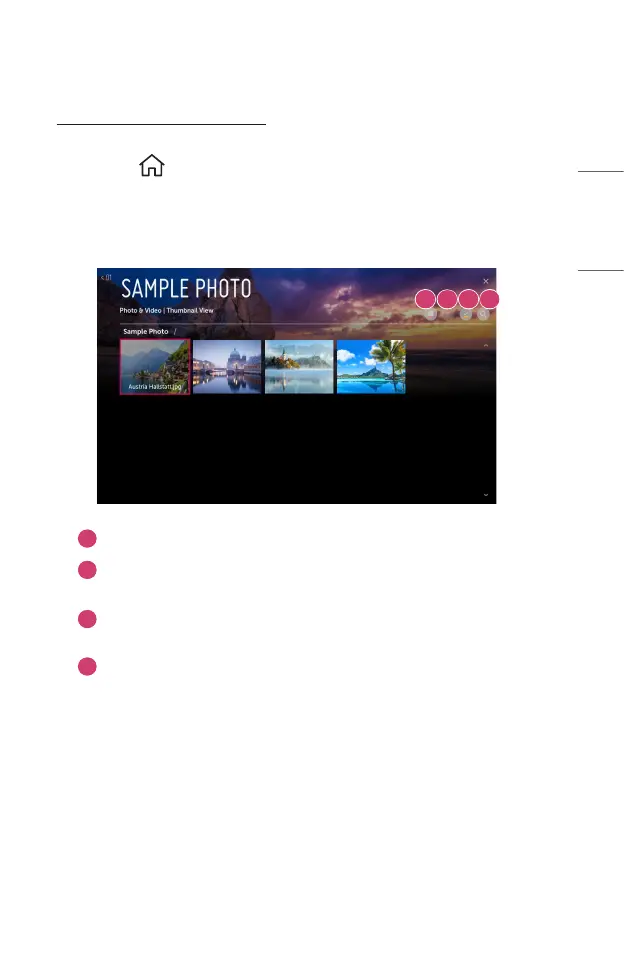
4 Select and view your desired photo or video.
1 2 3 4
1
Select your desired type of content and viewing method.
2
Select and delete your desired content.
(You cannot delete les that are shared from other devices.)
3
Select the content you want to play. You can only select the same type of
content as you rst selected.
4
Launch [Search].
• Certain content may not be displayed on the list if the number of all content
exceeds 40,000.



 To Next Page