22
ENGLISH
Photo Player
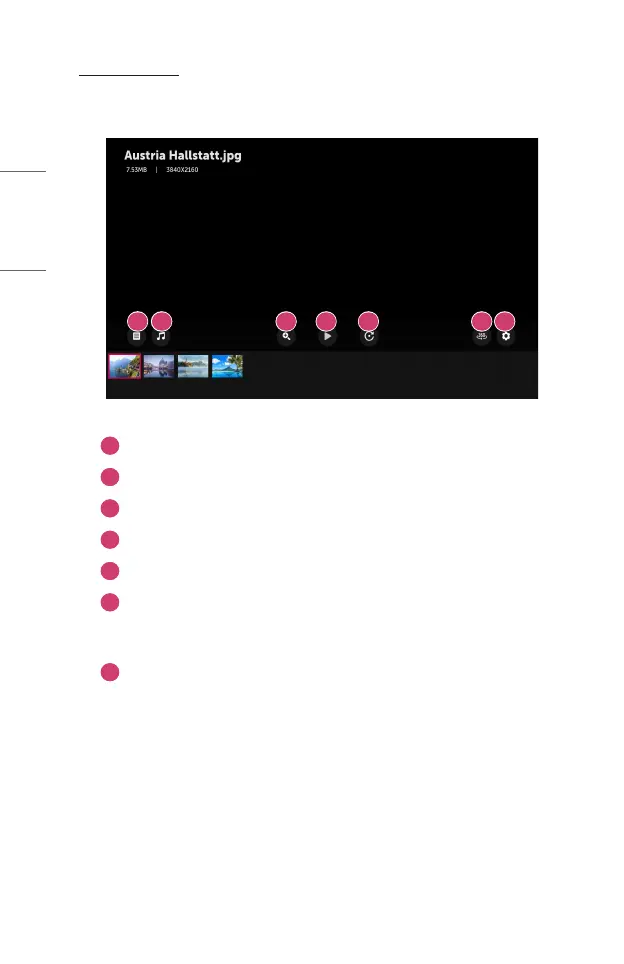
Selecting a photo in the [Photo & Video] app runs the photo player. You can view your
saved photos.
1 2 3 4 5 6 7
1
Returns to the entire content list.
2
You can play background music by running the music player.
3
You can zoom the photos in/out.
4
Starts the slide show.
5
Rotates photos.
6
360-degree photos can be viewed in 360 degrees.
• Using the 360° VR Play on a normal photo may distort the image.
• Some models may not be supported.
7
You can set the size of a photo or change the speed and effect of a slide
show.



 To Next Page