9
Introduction
a
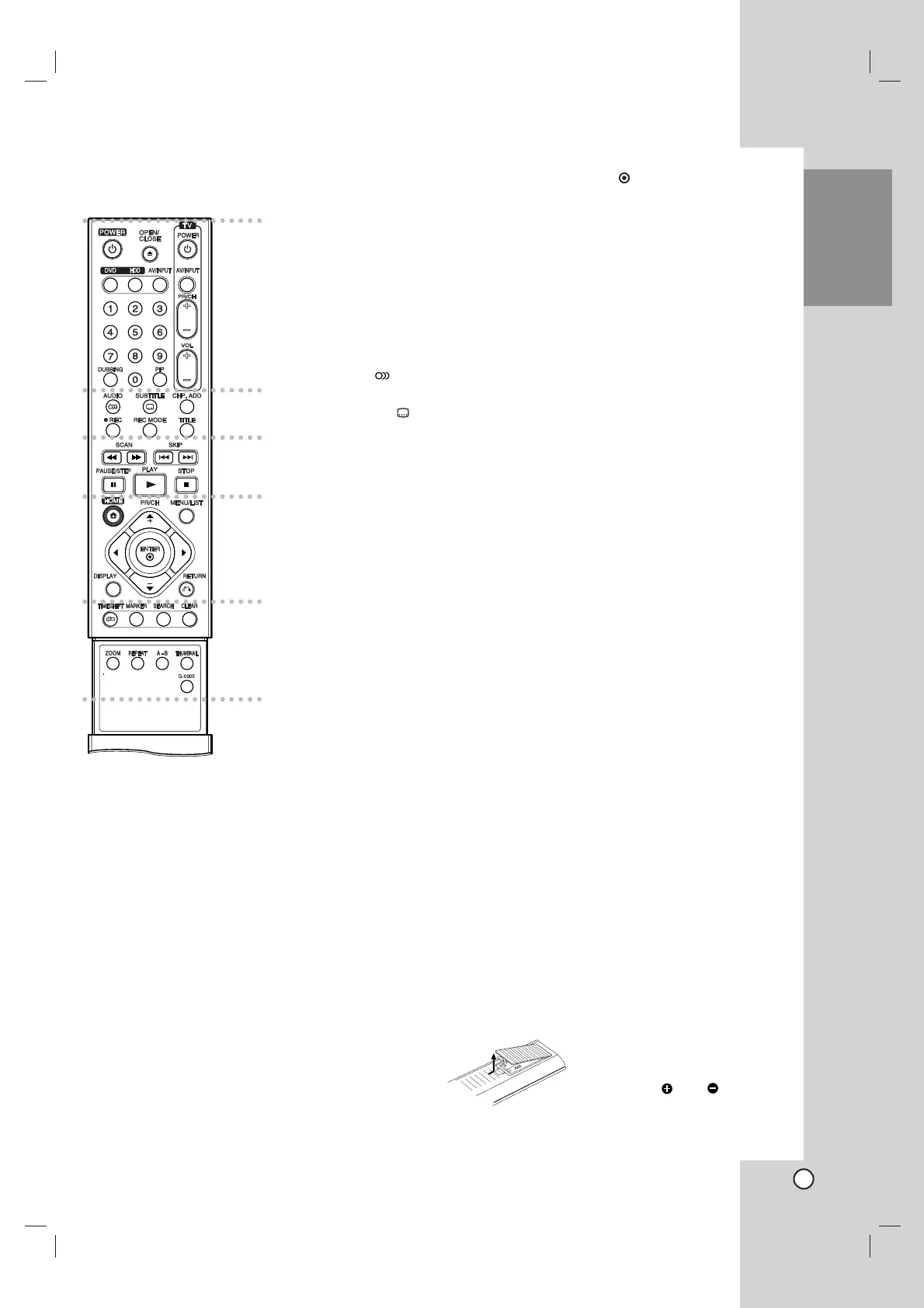
POWER: Switches the recorder
ON or OFF.
OPEN/CLOSE (Z): Opens and
closes the disc tray.
DVD: Selects the unit’s function
mode to DVD.
HDD: Selects the unit’s function
mode to HDD.
AV/INPUT: Changes the input to
use for recording (Tuner, AV1-2,
or DV IN).
0-9 numerical buttons: Selects
numbered options in a menu.
DUBBING: Copies DVD to HDD
(or HDD to DVD).
PIP: Selects PIP function on or off.
TV Control Buttons: See page
56.
b
AUDIO ( ): Selects an audio
language or audio channel.
SUBTITLE ( ): Selects a subtitle
language.
CHP. ADD: Inserts a chapter
marker when playing.
REC (z): Starts recording.
REC MODE: Selects the recording
mode.
TITLE: Displays the disc’s Title
menu, if available.
c
SCAN (m / M): Search
backward or forward.
SKIP (. / >): Go to next or
previous chapter or track.
PAUSE/STEP (X) : Pause
playback or recording temporarily.
PLAY (N): Starts playback.
STOP (x): Stops playback or
recording.
d
HOME: Accesses or removes the
HOME menu.
MENU/LIST: Accesses menu on a
DVD disc. Switches between Title
List-Original and Title List-Playlist
menu.
b / B / v / V (left/right/up/down):
Selects an option in the menu.
ENTER ( ): Acknowledges menu
selection.
PR/CH (+/-): Scans up or down
through memorized channels.
DISPLAY: Accesses On-Screen
Display.
RETURN (O): Removes the
menu.
e
TIMESHIFT: Activates pause live
TV/playback (timeshift) for a live
TV program.
MARKER: Marks any point during
playback.
SEARCH: Displays Marker Search
menu.
CLEAR: Removes a track number
on the Program List or a mark on
the Marker Search menu.
ZOOM: Enlarges video image.
REPEAT: Repeat chapter, track,
title, all.
A-B: Repeat sequence.
THUMBNAIL: Selects a thumbnail
picture.
G-
CODE
: To display the program
menu for G-
CODE
System
programming.
Remote Control
a
b
c
d
e
Remote Control Operation
Point the Remote Control at the remote sensor and
press the buttons.
Caution
Do not mix old and new batteries. Never mix different
types of batteries (standard, alkaline, etc.).
Remote Control Battery Installation
Remove the battery cover on the
rear of the Remote Control, and
insert two R03 (size AAA)
batteries with and matched
correctly.


 To Next Page