EasyManua.ls Logo

LG SH52TH-C - User Manual

LG SH52TH-C
28 pages
Print Icon
To Next Page IconTo Next Page
Loading...
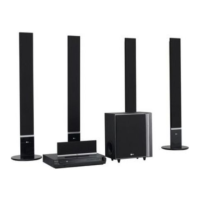
WIRELESS DVD/CD
RECEIVER SYSTEM
OWNER’S MANUAL
MODEL: HT502THW
Main Unit - HT502THW-AN
Speakers - SH52TH-F
SH52TH-S
SH52TH-C
SH52TH-W
W92-T, W92-R
Before connecting, operating or adjusting this product,
please read this instruction booklet carefully and
completely.
HT502THW-AN_DMARLLP_ENG_6965
R

Other manuals for LG SH52TH-C

Questions and Answers

  • A
    Alexander KimSep 8, 2025
    What to do if there is no sound from LG SH52TH-C Receiver?
    • K
      Kayla PriceSep 8, 2025
      If you're not getting any sound or only hearing very low-level sound from your LG DVD/CD Receiver, first, check that the equipment connected with the audio cable is set to receive DVD audio signal output. Ensure the audio cables are securely connected. Also, verify that the connected equipment is powered on. If the issue continues, the audio connecting cable may be damaged, consider replacing it.
  • O
    ortizdebraAug 25, 2025
    How to fix LG SH52TH-C Receiver remote control that is not working?
    • J
      Jonathan HernandezAug 25, 2025
      If the remote control for your LG Receiver isn't working, make sure you're pointing it directly at the receiver's remote sensor. Ensure you are within 23 ft (7 m) of the receiver and that there are no obstacles in the way. If it still doesn't work, replace the batteries with new ones.
  • A
    angela66Aug 25, 2025
    How to fix LG SH52TH-C remote control not working?
    • R
      rmercerAug 26, 2025
      If your LG Receiver remote control isn't working correctly, here are some things to check: * Make sure you're pointing the remote control directly at the remote sensor on the DVD/CD Receiver. * Ensure you're using the remote control within a reasonable distance, about 23 ft (7 m). * Remove any obstacles that might be blocking the path between the remote and the receiver. * Try replacing the batteries in the remote control with new ones.
  • J
    julie78Sep 18, 2025
    What causes loud hum or noise from LG SH52TH-C?
    • B
      Bryan AlvarezSep 18, 2025
      If you're hearing a loud hum or noise from your LG DVD/CD Receiver, here's what to check: * Clean the disc, as it may be dirty. * Ensure the speakers and components are securely connected. * Move the TV away from the audio components, as the receiver may be located too close to the TV.
  • S
    Susan RiosSep 8, 2025
    How to fix LG Receiver when there is no power?
    • R
      ryanwalterSep 8, 2025
      If your LG Receiver isn't powering on, make sure the power cord is securely plugged into the wall outlet.
  • J
    johnsonandreaSep 13, 2025
    What to do if nothing is displayed on the front panel display of my LG SH52TH-C?
    • M
      Michael BaileySep 13, 2025
      To resolve nothing being displayed on the front panel of your LG Receiver, press the DIMMER button on the remote control.
  • P
    portersamanthaSep 3, 2025
    Why won't my LG Receiver start playback?
    • V
      Valerie ReevesSep 3, 2025
      If your LG Receiver isn't starting playback, consider these possible reasons: * Make sure a disc is inserted. * Ensure the inserted disc is playable. * Check that the disc is placed correctly, with the playback side down. * Verify the disc is placed within the guide on the disc tray. * Clean the disc if it's dirty. * If a menu is on the TV screen, press the SETUP button to turn it off. * If the Rating level is set, cancel the Rating function or change the rating level.
  • M
    Morgan PriceSep 4, 2025
    How to stop loud humming from my LG SH52TH-C Receiver?
    • M
      Michael AndrewsSep 4, 2025
      If you're experiencing loud hum or noise from your LG Receiver, consider the following: * Clean the disc, as it might be dirty. * Ensure that the speakers and components are securely connected. * Move the TV away from the audio components, as the DVD/CD Receiver might be too close to the TV.
  • D
    Daniel MathisSep 23, 2025
    What to do if the audio CD indicator doesn't work on my LG Receiver?
    • T
      Tracey MillerSep 23, 2025
      If the power is on but the DVD/CD Receiver audio CD indicator of your LG Receiver isn't working, make sure a disc is inserted.
  • K
    Kristina WatkinsAug 29, 2025
    Why is there no sound from my LG Receiver?
    • I
      ihuntAug 29, 2025
      If your LG Receiver has no sound or very low sound, make sure the equipment connected with the audio cable is set to receive the DVD audio signal output. Check that the audio cables are securely connected and that the connected equipment is powered on. If the issue persists, try replacing the audio connecting cable, as it may be damaged.

Summary

Safety Precautions

Electrical Safety Warnings

Covers risks of electric shock and advises against opening the unit.

Power Cord and Laser System Safety

Addresses safe handling of the power cord and laser system precautions.

Unit Components Overview

Front Panel Layout and Controls

Details the controls, indicators, and ports located on the front panel of the receiver.

Rear Panel Connectivity Ports

Explains the various input and output connectors found on the rear panel.

Remote Control Operation

Remote Control Button Functions

Explains the function of each button on the remote control for system operation.

Remote Control Usage Guidelines

Details the effective operating range and battery installation for the remote.

TV Connection Guide

Standard Video Connection

Instructions for connecting the receiver to a TV using a standard video cable.

Component Video Connection

Steps for connecting the receiver to a TV using component video (Y PB PR) cables.

Optional Equipment Connection

Audio and Digital Input Connections

Details connections for external audio devices via Optical, Audio In, and AUX inputs.

USB and Antenna Setup

Instructions for connecting USB devices and setting up the FM/AM antennas.

HDMI Connection and Configuration

HDMI Cable Connection

Guide to connecting the receiver to an HDMI-compatible TV or monitor.

HDMI Resolution Settings

Explains how to adjust video resolution settings for HDMI output.

Speaker System Setup

Wireless Speaker Connection

Instructions for connecting the wireless transmitter, receiver, and speakers.

Ferrite Core Installation (Optional)

Guide to attaching ferrite cores to speaker cables for noise reduction.

Wireless System Configuration

Wireless Transmitter and Receiver Indicators

Details the LED indicators for the wireless transmitter and receiver.

Speaker Assembly and Connection

Steps for assembling speakers and connecting them to the system.

Wireless System ID Setup

Setting Wireless Transmitter ID

Procedure for setting or re-setting the wireless transmitter and receiver ID.

Wireless Speaker No Sound Troubleshooting

Diagnoses and resolves issues where wireless rear speakers are not producing sound.

Disc Information Display

On-Screen Playback Information

How to display and cycle through various playback details like track, time, audio, and subtitle.

Initial Settings and Setup Menu

Navigating the Setup Menu

Explains how to access, navigate, and exit the system's setup menu.

Language and OSD Settings

Configures display language, OSD language, and audio/subtitle preferences.

Display Settings

TV Aspect Ratio Configuration

Sets the display aspect ratio (4:3 or 16:9) for the connected TV.

Display Mode Options

Adjusts display modes like Letterbox and Panscan when TV Aspect is set to 4:3.

Audio and Speaker Settings

Audio Options and Adjustments

Configures audio settings like Dynamic Range Control, Vocal, and HD AV Sync.

5.1 Speaker Setup and Testing

Guides speaker configuration, volume, distance adjustment, and test signals.

Parental Control Settings

DVD Rating Management

Blocks playback of rated DVDs based on content ratings and age.

Password and Area Code Setup

Set or change the parental control password and configure the area code.

Other System Settings

Playback Control (PBC) and DivX Registration

Configures PBC for VCDs and obtains DivX VOD registration code.

Semi Karaoke Functionality

Enables score display and fanfare sound for karaoke playback.

General Operation Features

Disc Tray and Playback Controls

Controls for opening/closing the disc tray and managing playback (pause, skip, repeat, zoom).

Navigation and Selection Functions

Operations for navigating menus, scanning, selecting audio/subtitle languages, and slow playback.

Additional Playback Features

1.5 x Speed Playback and Time Search

Enables faster playback and searching for specific playback times on discs.

Marker Search Functionality

Allows marking and recalling specific points in a disc for quick access.

System and TV Control

Screen Saver and Last Scene Memory

Manages screen saver activation and memorizes the last playback scene.

System Select and TV Remote Control

Sets TV system (PAL/NTSC) and explains how to control LG TV functions with the remote.

Playing Audio CDs and MP3;WMA Files

MP3;WMA Disc Compatibility and ID3 Tag

Details compatibility requirements for MP3/WMA files and ID3 Tag display.

Audio File Playback Basics

Instructions for playing audio files and navigating menus, including tips.

Programmed Playback Features

Creating and Playing Track Programs

Store favorite tracks from discs into memory for custom playback sequences.

Managing Programmed Tracks

Learn how to erase individual tracks or the entire programmed list.

Viewing JPEG Files

JPEG File Playback and Compatibility

Details JPEG disc compatibility, playback procedures, and resolution notes.

Image Navigation and Modes

Covers slide show, still picture mode, image rotation, and file navigation.

Playing DivX Movie Files

DivX Playback and Compatibility Notes

Covers DivX disc compatibility, resolution, and file name limitations.

Supported DivX File Formats

Lists supported DivX video, subtitle, codec, and audio file formats.

Radio Station Presets

Storing and Clearing Radio Stations

Procedure to preset up to 50 FM/AM stations and clear stored stations.

Listening to Radio Broadcasts

Tuning and Selecting Radio Stations

Instructions for manual tuning, selecting preset stations, and using the radio tuner.

Improving Radio Reception

Tips for optimizing radio signal strength and reducing noise.

Operation and Sound Settings

Sleep Timer, Dimmer, and Mute

Controls for setting automatic power-off, display brightness, and muting audio.

Input Source and Sound Enhancement

Selects audio input sources and adjusts advanced sound modes like XTS and Virtual Sound.

Sound Mode Selection

Applies various pre-programmed sound fields for different listening experiences.

Reference Lists

Language Code Reference

Provides a list of codes for selecting desired languages for audio, subtitle, and menu.

Area Code Reference

Lists area codes used for DVD rating standards, essential for regional playback.

Troubleshooting Common Issues

Power and Basic Operation Problems

Resolves issues related to power, unit non-responsiveness, and disc insertion.

Picture and Sound Output Issues

Addresses problems with display, video quality, and audio output.

Playback and Noise Troubleshooting

Solutions for playback failures, disc errors, and audio hum or noise.

Additional Troubleshooting

Radio Tuning and Reception Issues

Resolves problems with tuning in radio stations and antenna connection.

Remote Control and Display Issues

Addresses malfunctions with the remote control and dim front panel display.

System Specifications

LG SH52TH-C Specifications

General IconGeneral
BrandLG
ModelSH52TH-C
CategoryReceiver
LanguageEnglish

Related product manuals