EasyManua.ls Logo

LG SH7B - User Manual

LG SH7B
75 pages
Print Icon
To Next Page IconTo Next Page
Loading...
OWNER’S MANUAL
SMART Hi-Fi
AUDIO
MODEL
SH7B
www.lg.com
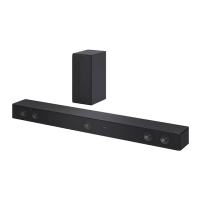
SH7B
Wireless Multi-room Sound Bar
To view the instructions of advanced features, visit
http://www.lg.com and then download Owner’s Manual.
Some of the content in this manual may differ from your unit.

Table of Contents

Other manuals for LG SH7B

Questions and Answers

  • M
    matthew34Aug 18, 2025
    What to do if the remote control of LG SH7B Speaker System does not work properly?
    • B
      Brenda StephensAug 18, 2025
      There are several reasons why the remote control might not be working correctly. First, make sure you are within 7 meters of the unit. Second, ensure there are no obstacles between the remote control and the unit. Finally, try replacing the batteries with new ones.
  • D
    Donald SantiagoAug 20, 2025
    Why is there no woofer sound from my LG SH7B Speaker System?
    • O
      ocarpenterAug 20, 2025
      First, check if the subwoofer is securely plugged into the wall outlet. Second, verify if the pairing between the unit and the subwoofer has been disconnected and connect them, if needed.
  • J
    joseph79Aug 23, 2025
    Why the AUTO POWER function does not work on my LG SH7B?
    • A
      Alexander SmithAug 23, 2025
      The AUTO POWER function may not work due to several reasons. Check the connection of the external device such as a TV, DVD/Blu-Ray player, or Bluetooth device. Also, check the state of SIMPLINK and try turning it off. Depending on the connected device, this function may not operate.
  • C
    Carlos LewisAug 26, 2025
    Why I cannot connect the LG SH7B to my home network?
    • R
      Robert BlackwellAug 26, 2025
      Wireless communication might be interrupted by household devices using radio frequencies. Try moving the speaker away from such devices.
  • G
    gary50Aug 28, 2025
    How to turn on the LG SH7B Speaker System if the power does not turn on?
    • C
      Caitlyn FrazierAug 28, 2025
      Ensure that the power plug is securely connected to the outlet.
  • F
    Felicia LeeAug 30, 2025
    Why is no sound produced by my LG SH7B Speaker System?
    • S
      Sarah JonesAug 30, 2025
      Several factors could be at play. First, check if the volume is set to the minimum; if so, adjust it accordingly. Second, ensure that the mute function isn't activated by pressing the mute button or adjusting the volume. Finally, verify that the correct input source is selected.
  • E
    Eric JacksonSep 2, 2025
    What to do if my LG SH7B Speaker System doesn't work properly?
    • J
      Jeanette AdamsSep 2, 2025
      Try turning off the power of both the unit and any connected external devices like your TV, Woofer, DVD player, or Amplifier, and then turn them back on. Alternatively, disconnect the power cord of this unit and the connected external devices, then try connecting them again. Also, note that previous settings may not be saved when the device is shut off.
  • J
    Janet GonzalezSep 4, 2025
    What to do if the Music Flow Player app doesn’t work properly with my LG SH7B Speaker System?
    • M
      Michael BuchananSep 4, 2025
      If you're having trouble with the Music Flow Player app, first ensure that your smart device is compatible with the app. Also, verify that you're using the latest version of the Music Flow Player app and that the speaker’s front LED turns from red to white.
  • C
    Cheryl CannonSep 7, 2025
    What to do if the Music Flow PC Software doesn’t work properly with my LG Speaker System?
    • M
      Melinda HudsonSep 7, 2025
      If the Music Flow PC Software isn't working correctly, start by disabling all firewalls on your PC or Mac and try connecting again. Ensure that the speaker and your PC or Mac are correctly connected to the local area network and can access the internet. Also, move the speaker and your PC or Mac away from household devices that are using radio frequencies, as they may cause interference.
  • A
    Adriana GoodmanSep 9, 2025
    What to do if the Music Flow Player doesn’t work properly with my LG SH7B?
    • J
      Jessica HaasSep 9, 2025
      First, ensure the Music Flow Player is plugged in. Next, check that the LAN cable is properly connected to both the wireless router and the LAN port on the back of the Music Flow Player. If problems persist, try relocating the speaker closer to the wireless router or the Music Flow Player. If you restart the router, you'll need to turn the speaker’s power off and on again. If you install a new router, you'll need to perform a factory reset and set up the network connection for the speaker.

Summary

Safety Information

General Safety Precautions

Covers electric shock, fire hazards, water exposure, ventilation, and heat sources.

Power Cord Safety

Advice on power cord safety, preventing damage and overload.

IMPORTANT SAFETY INSTRUCTIONS

Comprehensive Safety Guidelines

Detailed instructions on reading, following warnings, and safe usage practices.

Remote Control Functions

Button Operations

Explains the function of each button on the remote control for playback and settings.

Installing the Sound Bar

Wall Mounting Procedure

Step-by-Step Installation and Safety

Detailed steps for wall mounting, including safety precautions and hardware notes.

Cable Management and Power Connection

Connecting the AC Adapter

Instructions and safety precautions for connecting the AC adapter.

Wireless Subwoofer Setup

LED Indicator and Pairing

Explains subwoofer LED status and initial/manual pairing procedures.

Connecting to Your TV

Optical Cable Connection

Steps for connecting the unit to a TV using an optical cable.

LG Sound Sync Setup

Wired and Wireless Connection Methods

Instructions for setting up LG Sound Sync via optical cable or wirelessly.

HDMI Connection for Audio

Using HDMI Cable for ARC

Connects unit to TV via HDMI for Audio Return Channel (ARC).

ARC Function Details

ARC Requirements and Notes

Covers ARC function requirements, cable type, and automatic selection.

Advanced HDMI Connection Information

HDMI;DVI Device Compatibility and Troubleshooting

Covers compatibility issues, resolution changes, black screens, and noise.

Initial Multi-Room Setup

Wired and Wireless Network Setup

Options for initial speaker connection via LAN or Wi-Fi.

Installing Music Flow Player App

Simple Connection (EZ Setup)

Preparation and Connection Steps

Requirements for EZ Setup and step-by-step connection process.

Using Media Server for PC

Connecting Speaker to Home Network

Connecting Speaker via LAN Cable

Wi-Fi Setup for Android Devices

Wi-Fi Setup for iOS Devices

Network Connection Troubleshooting Notes

Common Network Issues and Solutions

Advice on re-setting routers, interference, and connection limitations.

Connecting Additional Speakers to Home Network

Connecting Additional Speaker via Wi-Fi Setup

Using the Bridge Device

Enjoying Music with Music Flow Player App

Playing Music Tracks

Selecting Music from Your Device

Guides on selecting music from 'My Phone' and choosing albums/songs.

Playlist Management and Playback Overview

Selecting Sound Effects

Sound Modes and Equalizer Settings

Explains sound modes (ASC, Standard, Cinema) and equalizer adjustments.

Listening to Music in Different Modes

Group Playback Setup

How to group multiple speakers for synchronized music playback.

Grouping Speakers for Playback

Surround Sound Mode (Home Cinema)

Setting Up Home Cinema Experience

How to add a sound bar and synchronize speakers for a home cinema setup.

Setting Up Surround Sound

Seamless Playback Functionality

Changing Playing Speaker Without Pause

How to switch the playing speaker seamlessly.

Using LG HomeChat Service

Connecting Audio to LG HomeChat

Setting Speaker via Music Flow Player App

Speaker Settings Menu

Speaker Configuration and Management

Options for renaming, LED control, IP info, sound settings, and system updates.

Alarms and Sleep Timer Settings

Advanced Settings

Mesh Network Channel Optimization

Adjusting the mesh network channel for improved playback speed.

Mesh Network Direct Connection and Auto Music Play

Version Information Menu

Listening to Music via Bluetooth

Pairing and Playing Music from Bluetooth Devices

Steps for pairing devices and playing music via Bluetooth.

Bluetooth Connection and Playback

Bluetooth Pairing Process and Notes

Detailed steps for pairing and important notes on Bluetooth connection.

Other Operations

Auto Power Management

AUTO POWER On;Off Functionality and Notes

Details on automatic power on/off by input source and related notes.

Display and Sound Adjustments

Volume, EQ, and Night Mode Adjustments

Covers automatic volume, Treble/Bass/Subwoofer, and Night Mode.

Bluetooth Standby Mode and Speaker Reset

Resetting the Speaker to Factory Settings

Steps to reset the speaker, clearing network information.

Troubleshooting - General Issues

Common Problems and Solutions

Addresses issues like unit not working, power, functions, sound, remote, and LG Sound Sync.

Troubleshooting - Network Issues

Network Connection and Media Server Problems

Solutions for network connection errors and media server display issues.

Music Flow Player Connectivity Solutions

Troubleshooting steps for Music Flow Player connectivity issues.

Troubleshooting - Software and Wireless Features

Application and PC Software Issues

Solutions for Music Flow Player app and PC software problems.

Wireless Feature Interference and Bluetooth Malfunctions

Tips for wireless interference and Bluetooth device issues.

Product Specifications

General, Input;Output, and Amplifier Specs

Comprehensive technical specifications including power, dimensions, ports, and output power.

Wireless Subwoofer and System Specifications

Terms of Use - LG Software License

LG SH7B Specifications

General IconGeneral
Audio decodersDTS Digital Surround, Dolby Digital
RMS rated power360 W
Audio output channels4.1 channels
Audio Return Channel (ARC)Yes
FM radio-
Product colorBlack
LED indicatorsStatus
Audio formats supportedAAC, AAC+, AIFF, ALAC, FLAC, LPCM, MP3, OGG, WAV, WMA
Subwoofer locationSeparate
Subwoofer connectivityWireless
HDMI in1
Bluetooth version4.0
Connectivity technologyWired & Wireless
AC input voltage100-240 V
AC input frequency50 - 60 Hz
Power consumption (standby)0.5 W
Power consumption (typical)22 W
Soundbar speaker RMS power160 W
Weight and Dimensions IconWeight and Dimensions
Depth85 mm
Width1059 mm
Height53 mm
Soundbar weight2676 g
Subwoofer depth228 mm
Subwoofer width152 mm
Subwoofer height304 mm
Subwoofer weight4309 g

Related product manuals