19Installation
Installation
3
Connecting to Your TV
Make one of the following connections,
depending on the capabilities of your existing
equipment.
• HDMI connection (pages 19-20)
• Component Video connection (page 21)
• Video connection (page 21)
NOTE
• Depending on your TV and other equipment
you wish to connect, there are various ways you
could connect the player. Use only one of the
connections described in this manual.
• Please refer to the manuals of your TV, stereo
system or other devices as necessary to make
the best connections.
• Make sure the player is connected directly to
the TV. Tune the TV to the correct video input
channel.
• Do not connect your player via your VCR. The
image could be distorted by the copy protection
system.
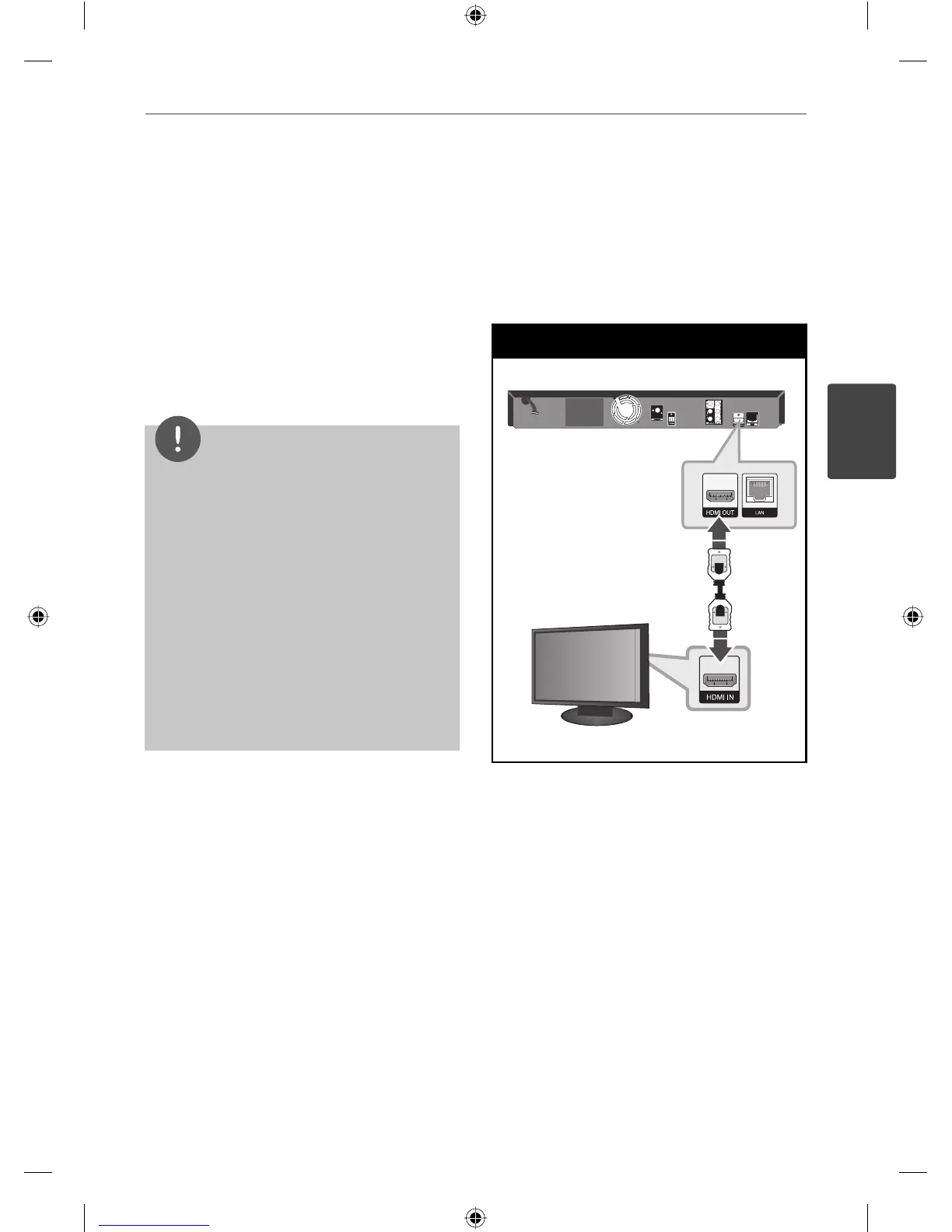
HDMI Connection
If you have a HDMI TV or monitor, you
can connect it to this player using a HDMI
cable(Type A, Version 1.3). Connect the HDMI
OUT jack on the player to the HDMI IN jack on
a HDMI compatible TV or monitor.
HDMI Connection
TV
Player
Set the TV’s source to HDMI (refer to TV’s
Owner’s manual).
HB805PH-D0_BGBRLL_ENG_0033.indd 19HB805PH-D0_BGBRLL_ENG_0033.indd 19 2010-08-19 6:49:452010-08-19 6:49:45



 To Next Page