Installation
Location and Function of Controls
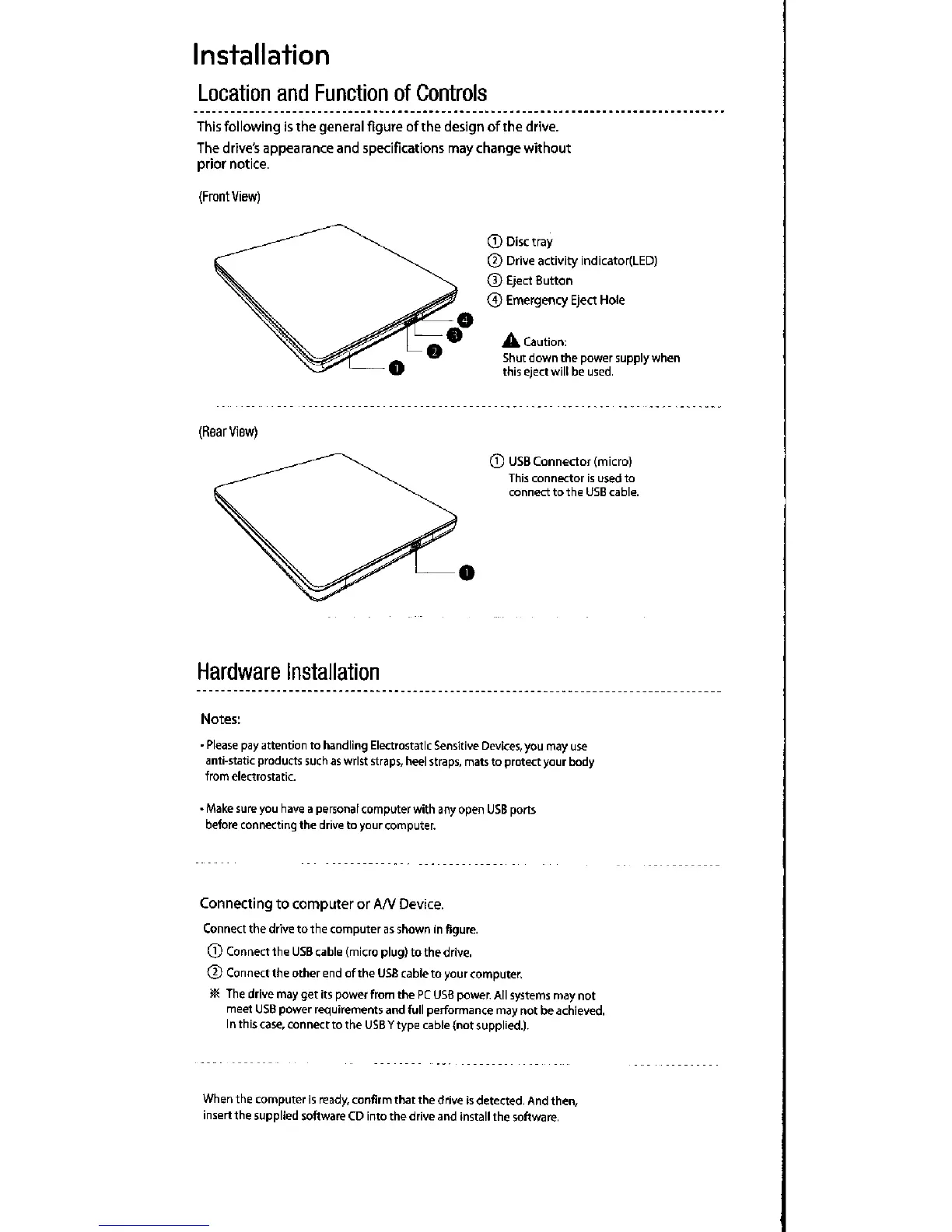
This following is the general figure of the design of the drive.
The drive's appearance and Specifications may change without
prior notice.
(Frontvlew)
(F`earview)
Hardware Installation
® Disc tray
® Drive activity indicator(LED)
® Eject Button
® Emergency Eject Hole
A caution:
Shut down the power supply when
thls e/ect will be used.
® USB Connector (micro)
This connector is used to
connect to the USE cable.
Notes;
• Please pay attention to handling Electrostatlc Sensitive Devices, you may iise
anti-static products such as wrlst straps, heel straps, mats to protect your body
from electrostatic.
• Make sure you have a per5onal computer with any open USB ports
before connecting the drlve to your computer.
Connecting to computer ctr Arv Device.
Connect the drive to the computer as shown ln figure.
® Comect the USB cable (micro plug) to the drive.
®ConnecttheotherendoftheusBcabletoyourcomputer.
ae€ The drlve may get its powei from the PC Usa power. All systems may not
meet USB power requiretT`ent5 and full performance may not be achieved.
I n th is case, con nect to the USB y type cable (not supplied.).
When the computei is ready, confirm that the drive is detected, And then,
insert the supplied software CD Into the drive and install the software.



 To Next Page