EasyManua.ls Logo

LG DR275 - User Manual

LG DR275
47 pages
Print Icon
To Next Page IconTo Next Page
Loading...
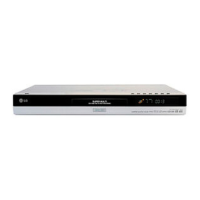
DVD RECORDER
OWNER’S MANUAL
MODEL: DR275
Before connecting, operating or adjusting this product,
please read this instruction booklet carefully and completely.

Table of Contents

Questions and Answers

  • D
    Dakota GriffinSep 10, 2025
    Why is there no picture on my TV from my LG DR275?
    • D
      Danielle MurraySep 10, 2025
      First, ensure that your TV is set to the correct video input mode to receive the signal from the recorder. Check that the video cable is securely connected. Also, verify that the TV is powered on.
  • C
    Catherine MccartyAug 22, 2025
    Why won't my LG DR275 DVD Recorder turn on?
    • E
      Elizabeth HillAug 22, 2025
      If there is no power, ensure the power cord is securely plugged into the wall outlet.
  • K
    Katherine BennettAug 25, 2025
    What to do if my LG DR275 DVD Recorder has no power?
    • P
      Patrick AllenAug 25, 2025
      If your LG DVD Recorder isn't turning on, the power cord might be disconnected. Ensure that the power cord is securely plugged into the wall outlet.
  • V
    vanessamartinAug 27, 2025
    What to do if my LG DR275 DVD Recorder remote control does not work properly?
    • J
      Jonathan MataAug 27, 2025
      If the remote control for your LG DVD Recorder isn't working correctly: * Make sure to point the remote control at the remote sensor on the recorder. * Ensure you are within 7 meters of the recorder. * Remove any obstacles between the remote and the recorder. * Try replacing the batteries in the remote control with new ones.
  • G
    Gilbert BellAug 27, 2025
    Why is there no picture on my LG DVD Recorder?
    • S
      Scott BradleyAug 28, 2025
      If you're not getting a picture from your LG DVD Recorder, here are a few things to check: * Ensure the recorder is set to TV mode by pressing the TV/DVD button on the remote control. * Make sure your TV is set to the correct video input mode to receive the signal from the recorder. * Verify the video cable is securely connected. * Confirm that your TV is turned on.
  • L
    lisaphillipsAug 29, 2025
    What to do if my LG DR275 does not start playback?
    • J
      Jeffrey ShieldsAug 29, 2025
      If your LG DVD Recorder isn't playing, consider the following: * Insert a disc, ensuring the disc indicator in the display window is lit. * Make sure you're using a playable disc, checking the disc type, color system, and regional code. * Place the disc with the playback side down. * Ensure the disc is correctly placed within the guide on the disc tray. * Clean the disc if it's dirty. * If the Rating level is set, cancel the Rating function or change the rating level.
  • J
    Jacqueline CarrollSep 18, 2025
    Why is the picture from the external recorder distorted on my LG DR275 DVD Recorder?
    • R
      Robert ScottSep 18, 2025
      If the video signal from the external component is copy-protected, connect the component directly to your TV.
  • C
    christineclarkSep 12, 2025
    What to do if my LG DR275 cannot record or did not record successfully?
    • T
      Taylor WyattSep 12, 2025
      First, check if there is sufficient blank space on the disc; if not, use another disc. If you are trying to record a copy-protected source, it is not possible to record it. When setting the recording channel, make sure the channel is tuned on the recorder’s built-in TV tuner, not the TV's tuner. If recording to a Video mode disc, copy-once material requires a VR mode formatted disc.
  • N
    Nathaniel WarrenSep 8, 2025
    Why can't I play a disc recorded on my LG DR275 on another player?
    • A
      Alicia BlakeSep 8, 2025
      If you're having trouble playing a disc recorded on your LG DVD Recorder on another player: * If the disc was recorded in Video mode, finalize the disc. * Note that some players will not play even a finalized disc recorded in Video mode. * If the disc was recorded in VR mode, the other player must be RW compatible to play it. * Discs recorded with copy-once material cannot be played on other players.
  • C
    Carlos KingSep 5, 2025
    Why is timer recording not possible on my LG DR275?
    • K
      kristenbernardSep 5, 2025
      If timer recording isn't working on your LG DVD Recorder: * Make sure the clock in the recorder is set to the correct time. * Verify that the timer has been programmed correctly. * If the timer record indicator light does not appear after programming, try reprogramming the Timer.

Summary

Safety Precautions

General Safety Warnings

Covers electrical shock risks, fire hazards, moisture, and ventilation.

Introduction and Disc Handling

Symbols and Disc Notes

Explains manual symbols and provides guidelines for handling, storing, and cleaning discs.

Recordable and Playable Discs

DVD Disc Types and Features

Details different DVD disc types and their recording/playback characteristics.

Disc Compatibility and Regional Codes

Playable Discs and Regional Code Info

Lists playable disc formats and explains the unit's regional code for DVD playback.

Front Panel Overview

Component Identification

Identifies and describes the function of each button and port on the front panel.

Remote Control Operations

Battery Installation and Usage

Explains how to use the remote control and how to install its batteries.

Hookup and Settings

Rear Panel Connections

Details the rear panel ports and how to connect the antenna.

Connecting to Your TV

Video and Audio Cable Connections

Guides on connecting the recorder to a TV via video, audio, and component cables.

Connecting to an Amplifier

Analog and Digital Audio Setup

Explains how to connect to an amplifier for stereo or multi-channel audio output.

Accessory A;V Connections

Connecting External Components

Illustrates connecting accessory components like VCRs or camcorders to the recorder.

Initial Setup and Home Menu

Auto Set Up Wizard

Guides through the initial setup process, including language, channels, and clock.

General Operation Settings

Initial Settings and Auto Programming

Details how to perform initial settings and set up automatic channel programming.

Program and Clock Management

Program Edit and Clock Set

Explains how to edit channels manually and set the device's clock.

Advanced General Settings

Progressive Scan and Language

Covers progressive scan output for picture quality and language selection for menus.

Audio and Parental Control

Audio Output and Rating Settings

Configures audio output formats and sets parental control rating levels for disc playback.

Parental Control and Recording Modes

Password, Area Code, Record Mode

Manages parental control password, area code, and selects recording quality modes.

Disc Settings and Finalization

Initialize and Finalize Discs

Guides on initializing blank discs and finalizing recorded discs for playback.

Disc Labeling and Protection

Disc Label and DivX Registration

Covers naming discs, protecting discs, and DivX VOD registration.

On-Screen Display Explanation

Displaying TV and Disc Status

Explains how to display and interpret information on the TV screen during viewing and playback.

Playback Operations

General Playback Features

Outlines basic playback controls for various disc types.

Advanced Playback Controls

Repeat Modes and Subtitle Selection

Details playback repeat functions, A-B repeat, and subtitle language selection.

Disc Menu Navigation

Time Search and Camera Angle

Explains how to navigate disc menus, search for specific times, and change camera angles.

Playing DivX Movie Files

DivX File Requirements and Playback

Covers requirements for playing DivX files and how to select and play them.

Playing Audio CDs and MP3;WMA

Music File Playback Options

Guides on playing audio CDs and MP3/WMA files, including random playback.

Viewing JPEG Files

Photo List and Full Screen Display

Explains how to view JPEG files, use the photo list, and display images in full screen.

JPEG Slide Shows

Viewing and Pausing Slide Shows

Details how to set up and view slide shows from JPEG files.

DVD Recording Basics

Recording Quality Settings

Covers DVD recording, disc types, and selecting recording quality modes (XP, SP, LP, EP, MLP).

Copy Protection and Copyright

Recording Restrictions and CPRM

Explains copy-once protection, CPRM, and copyright advice for recordings.

TV Program Recording

Basic and Instant Timer Recording

Guides on recording TV programs directly and using instant timer recording.

Timer Recording Setup

Setting Up Timer Recordings

Details how to program timer recordings for TV programs.

Recording Management

Checking, Canceling, and External Input

Covers checking, canceling timer recordings, and recording from external sources.

Editing DVD Content

Title and Chapter List Menu Overview

Introduces editing features and the Title/Chapter List menu for VR mode discs.

VR Mode Editing Features

Original vs. Playlist Editing

Explains editing original content and creating playlists, adding chapter markers.

Playlist Management

Making New Playlists

Guides on creating new playlists and adding titles/chapters to existing ones.

Deleting and Editing Content Parts

Deleting Titles, Chapters, and Parts

Covers deleting titles, chapters, or specific parts from a recorded disc.

Title and Time Search Functions

Naming Titles and Time Search

Explains how to name titles and search for specific playback times on a disc.

Dividing and Combining Titles

Splitting and Merging Chapters

Details how to divide a title into two or combine adjacent chapters.

Playlist Chapter Rearrangement

Moving and Hiding Titles;Chapters

Covers rearranging playlist chapters and hiding/protecting titles from editing.

Reference Information

Overwriting Recordings and Disc Finalization

Discusses overwriting recordings and playing finalized discs on other players.

Language and Area Code Settings

Language Codes List

Provides lists of language and area codes for disc settings.

Remote Control TV Functions

Controlling Other TVs

Explains how to use the remote control to operate other brands of TVs.

Troubleshooting Common Issues

Power, Picture, and Sound Problems

Offers solutions for common problems like no power, no picture, or no sound.

Troubleshooting and Recorder Reset

Disc Playback and Recording Issues

Addresses issues with disc playback on other players, recording failures, and remote control problems.

Product Specifications

Technical Details and Features

Lists the technical specifications, dimensions, power requirements, and formats supported.

LG DR275 Specifications

General IconGeneral
BrandLG
ModelDR275
CategoryDVD Recorder
LanguageEnglish

Related product manuals