Notes:
• Please clo not connect the USB cables by any means other than specified above.
Using the wrong type Of cable with this drive can cause it to malfunction.
• The appliance is not Intended for use by young children or infirm persons without
supervision. Young ChildTen should be 5upervised to ensure that they do not play
wlth appliance.
• lf the appliance is supplied from a cord exten5ion set or an electrlcal portable
outlet device, the cord extension set on electrical portable outlet device must be
positioned so that lt is not subject to splashlng or ingress of moisture.
The drive supports both windows and Mac .To use it p:operly, please follow
directions below.
How to Eject Disc from the drive
• When using wlth Mac
-Click the e/ect button located on Mac OS menu or toolbar.
• When using with VVIndows
-Press the eject button in the front of the product.
+ Software CD (for Windows only)
-The Software CD includes DVD software for usage for Wlndows.
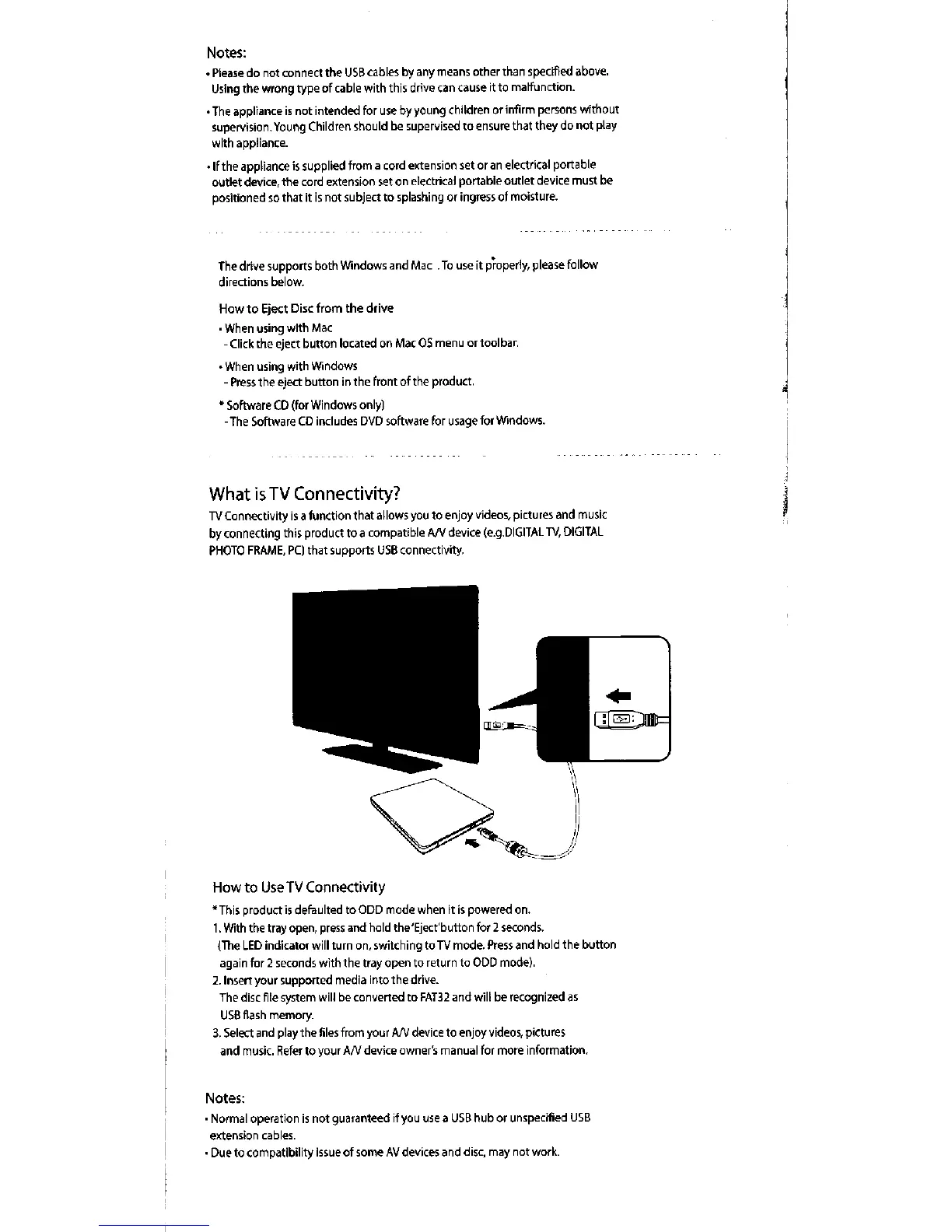
What is TV connectivity?
1\/ Connectivity is a function that allows you to enjoy videos, pi[tures and music
by connecting this product to a compatible A/V device (e.g.DIGITAL TV, DIGITAL
PHOTO FRAME, PC) that supports USB connectivity.
iEEEiEI_Eli,
How to Use TV Connectivity
*This product is defaulted to ODD mode when it is powered on.
1. Wlth the tray open, press and hold the`Eject`button for 2 seconds.
(The LED inclicatoi will turn on, switching toTV mode. Press and hold the button
again for 2 seconds with the tray open to return to ODD mode).
2. Insert your supported medla Into the drive.
The disc file system will be converted to FAT32 and will be recognized as
USB flash memory.
3. Select and play the files from your A/V devlce to enjoy videos, pictures
and music. Plefer to your Arv device owner`s rna nual for more information,
Notes:
• Normal operation is not guaranteed if you use a USB hub or unspecified USB
extension cables
• Due to compatlbility Issue of some AV devices and disc, may not work.



 To Previous Page