EasyManua.ls Logo

LG StanbyMe 27ART10AKPL - User Manual

LG StanbyMe 27ART10AKPL
4 pages
Print Icon
To Next Page IconTo Next Page
Loading...
1
M4L34
M4L10
Head
washer
AA
1X4X
Installation
A Insert the stand base into the styrofoam groove as shown in the gure.
B Insert the bar into the hole of the stand base along the groove until it reaches the parting line.
C Secure the four screws.
>10 kg
A
M4L34
4X
B
C
www.lg.com
User Install Guide
*MFL718845022201rev01*
Question and Answer IconNeed help?

Do you have a question about the LG StanbyMe 27ART10AKPL and is the answer not in the manual?

Summary

LG StanbyME Installation Guide

Assemble Stand Base and Bar

Assemble the stand base, bar, and secure with screws for initial setup.

Installation Steps

Check Cable Orientation

Verify correct alignment of power and cable holders for secure attachment.

Secure Power Plug to Screen

Attach the power plug securely to the back cover of the screen.

Attach Screen to Stand

Insert stand hook into screen groove and secure with a click sound.

Install Stand Ring Cover

Align and install the screen back cover and ring cover for a finished look.

LG StanbyME Disassembly Guide

Position Screen Vertically

Place the screen upright on a stable surface before starting disassembly.

Disassemble Screen Cover

Gently push the screen top and use a wedge or hand to remove the cover.

Disassemble Cable Holder

Position screen horizontally and remove the cable holder screw.

Release Screen Lock Mechanism

Lower the rear lever, push screen bottom, and press plug lock to detach.

Disassemble Stand Bar

Lay stand on packaging, remove screws, and detach the stand bar.

Product Specifications and Safety Information

Dimensions and Weight Details

Detailed measurements and weight specifications of the LG StanbyME stand.

Power Requirements

Specifies the voltage and amperage needed for the device.

Safety and Reference

Important safety precautions and reference materials for users.

Overview

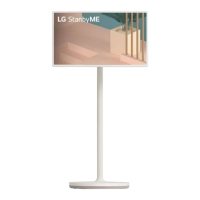
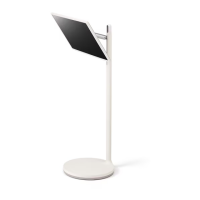
The LG StanbyME is a versatile and portable smart screen designed for flexible use in various settings. Its primary function is to provide a personal entertainment and information display that can be easily moved and adjusted to suit different activities and preferences. The device emphasizes ease of installation, adjustability, and user-friendly operation, making it suitable for a wide range of applications from casual viewing to more focused tasks.

Function Description

The LG StanbyME serves as a standalone smart display, integrating a screen, a stand, and a power source into a single, cohesive unit. It is designed to be highly portable, allowing users to move it effortlessly between rooms or even different locations within a room. The device's core function is to deliver content—whether streaming videos, browsing the web, or displaying information—in a convenient and adaptable format. Unlike traditional televisions that are often fixed in one location, the StanbyME offers the freedom to bring the screen to the user, rather than requiring the user to go to the screen. This flexibility is central to its design, enabling a more personalized and dynamic viewing experience.

The integrated smart features allow it to connect to the internet, access various applications, and potentially interact with other smart home devices. This makes it a multi-functional hub for entertainment, productivity, and information access. The screen itself is designed to be a high-quality display, providing clear visuals for an immersive experience. The stand is not merely a support structure but an integral part of the device's functionality, enabling its unique adjustability and portability.

Usage Features

The LG StanbyME boasts several key usage features that enhance its versatility and user experience:

  • Easy Installation and Setup: The device is designed for straightforward assembly. The installation process involves inserting the stand base into a styrofoam groove, securing a bar into the stand base, and then fastening it with four screws. This modular approach ensures that users can quickly set up the device without complex tools or technical expertise. The power cable and cable holder are also designed for easy integration, ensuring a neat and organized setup.
  • Screen Attachment and Security: Attaching the screen to the stand is a simple process. Users are guided to hold the screen, secure the power plug into the back cover, and then insert the stand hook into the back cover groove. A "click" sound confirms proper attachment, indicating that the screen is securely in place. A single screw further secures the screen to the cable holder, preventing accidental detachment. Finally, a ring cover is aligned and installed to complete the aesthetic and structural integrity of the stand, ensuring it sits tightly.
  • Portability and Mobility: A defining feature of the StanbyME is its portability. The integrated stand with wheels allows the device to be easily moved around. This means users can watch content in the living room, move it to the kitchen for recipes, or even to the bedroom for late-night viewing. The design emphasizes a stable yet mobile structure, ensuring the screen remains upright and secure during transit.
  • Adjustable Viewing Angles: The device offers significant flexibility in adjusting the screen's position. It can be rotated, tilted, and adjusted in height to achieve the optimal viewing angle for any activity. This includes vertical positioning for tasks like reading documents or browsing social media, and horizontal positioning for watching movies or playing games. The ability to rotate the screen 90 degrees is particularly useful for adapting content to different orientations. The height adjustment mechanism allows the screen to be raised or lowered, accommodating users of different heights or various furniture setups.
  • Cable Management: The design incorporates features for effective cable management, ensuring that power and other cables are neatly organized and out of sight. This contributes to a clean aesthetic and prevents clutter, enhancing the overall user experience. The cable holder is specifically designed to secure the power cable, maintaining a tidy appearance.
  • Intuitive Controls: The device likely features intuitive controls, possibly including a remote control, touch screen functionality, or voice commands, to navigate its smart interface and access various functions. The presence of HDMI and USB inputs suggests connectivity options for external devices, further expanding its utility.

Maintenance Features

While the manual primarily focuses on installation and disassembly, certain aspects imply ease of maintenance and care:

  • Modular Disassembly for Service or Storage: The disassembly process is designed to be as straightforward as the assembly, indicating that the device can be easily taken apart for maintenance, repair, or compact storage. This involves positioning the screen vertically, gently pushing the top to disassemble parts of the cover, and using a wedge or hand to fully remove the cover. The screen can then be separated from the stand by lowering a rear lever and pushing the bottom forward, followed by lifting the screen.
  • Careful Handling Guidelines: The manual includes cautions during disassembly, such as "Avoid pushing it hard. There is a risk of damage," and "Do not lift the plug or pull it downward when disassembling the screen." These guidelines suggest that while the device is designed for user-level assembly/disassembly, proper handling is crucial to prevent damage, implying that components are designed to be robust under normal use but require care during manipulation.
  • Component Separation: The ability to separate the screen from the stand allows for easier handling of individual components, potentially simplifying cleaning or troubleshooting. For instance, if the stand needs to be cleaned or if the screen requires attention, they can be managed independently.
  • Stand Bar Disassembly: The stand bar itself can be disassembled from the box packaging by removing four screws, which is useful for packing the device back into its original box for transport or long-term storage. This modularity ensures that the device can be efficiently stored or moved without occupying excessive space.
  • Read Safety and Reference: The inclusion of "Read Safety and Reference" in multiple languages emphasizes the importance of understanding the device's operational guidelines, which often include maintenance tips and safety precautions to ensure longevity and proper functioning.

In summary, the LG StanbyME is engineered as a highly adaptable and user-centric smart screen, prioritizing ease of use, mobility, and flexible viewing options. Its design facilitates simple setup, effortless movement, and convenient adjustments, making it a versatile companion for various daily activities. The modular construction also supports straightforward maintenance and storage, ensuring a practical and durable product experience.

LG StanbyMe 27ART10AKPL Specifications

General IconGeneral
Screen Size27 inches
Resolution1920 x 1080 (Full HD)
Panel TypeIPS
Refresh Rate60 Hz
Brightness250 cd/m²
Contrast Ratio1000:1
Viewing Angle178°(H) / 178°(V)
Color GamutsRGB 99%
Smart FeaturesYes
Operating SystemwebOS
TouchscreenYes
Response Time5 ms
PortsHDMI
Built-in SpeakersYes
BatteryYes
StandAdjustable
ConnectivityWi-Fi, Bluetooth

Related product manuals