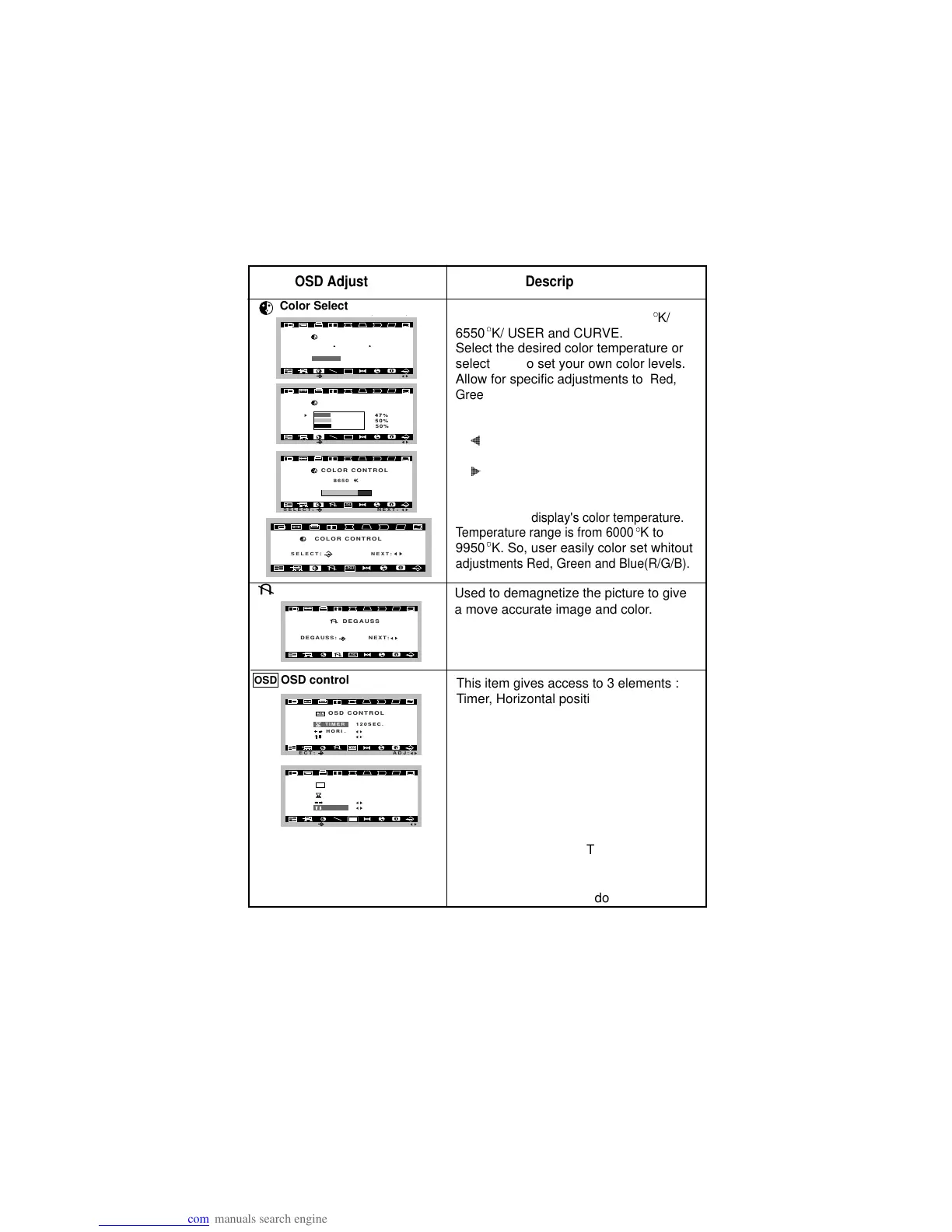
To select color temperature, 9300
W2@@6X
?W.MeI/X?hg
?7H?e?N1?hg
?@g@?hg
?@g@?hg
?3L?e?J5?hg
?V/KeO.Y?hg
V4@@0Y
K/
6550
W2@@6X
?W.MeI/X?hg
?7H?e?N1?hg
?@g@?hg
?@g@?hg
?3L?e?J5?hg
?V/KeO.Y?hg
V4@@0Y
K/ USER and CURVE.
Select the desired color temperature or
select user to set your own color levels.
Allow for specific adjustments to
Red,
Green and Blue(R/G/B).
This consists of the Decreases and
Increases function.
O2@?f
O2@@@?f
O2@@@@@?f
O2@@@@@@@?f
O2@@@@@@@@@?f
O2@@@@@@@@@@@?f
O2@@@@@@@@@@@@@?f
O2@@@@@@@@@@@@@@@?f
?@@@@@@@@@@@@@@@@@@?f
I4@@@@@@@@@@@@@@@?f
I4@@@@@@@@@@@@@?f
I4@@@@@@@@@@@?f
I4@@@@@@@@@?f
I4@@@@@@@?f
I4@@@@@?f
I4@@@?f
I4@?f
Decreases the amount of color in
the image.
@6K?
@@@6K?
@@@@@6K?hg
@@@@@@@6K?hf
@@@@@@@@@6K?he
@@@@@@@@@@@6K?h
@@@@@@@@@@@@@6K?g
@@@@@@@@@@@@@@@6K?f
@@@@@@@@@@@@@@@@@@f
@@@@@@@@@@@@@@@0M?f
@@@@@@@@@@@@@0M?g
@@@@@@@@@@@0M?h
@@@@@@@@@0M?he
@@@@@@@0M?hf
@@@@@0M?hg
@@@0M?
@0M?
Increases the amount of color in
the image.
Curve color setting is adjusters at the
factory to the display's color temperature.
Temperature range is from 6000
W2@@6X
?W.MeI/X?hg
?7H?e?N1?hg
?@g@?hg
?@g@?hg
?3L?e?J5?hg
?V/KeO.Y?hg
V4@@0Y
K to
9950
W2@@6X
?W.MeI/X?hg
?7H?e?N1?hg
?@g@?hg
?@g@?hg
?3L?e?J5?hg
?V/KeO.Y?hg
V4@@0Y
K. So, user easily color set whitout
adjustments Red, Green and Blue(R/G/B).
Color Select
OSD Adjust Description
Degauss
This item gives access to 3 elements :
Timer, Horizontal position and Vertical
position.
Press the select button to select the
desired item to change.
Timer will be controled OSD display time
from 5 second to 120 second.
To correct OSD image's Horizontal
position and Vertical position.
Horizontal position : To move image
right and left.
Vertical position : To move image up
and down.




 To Next Page