14
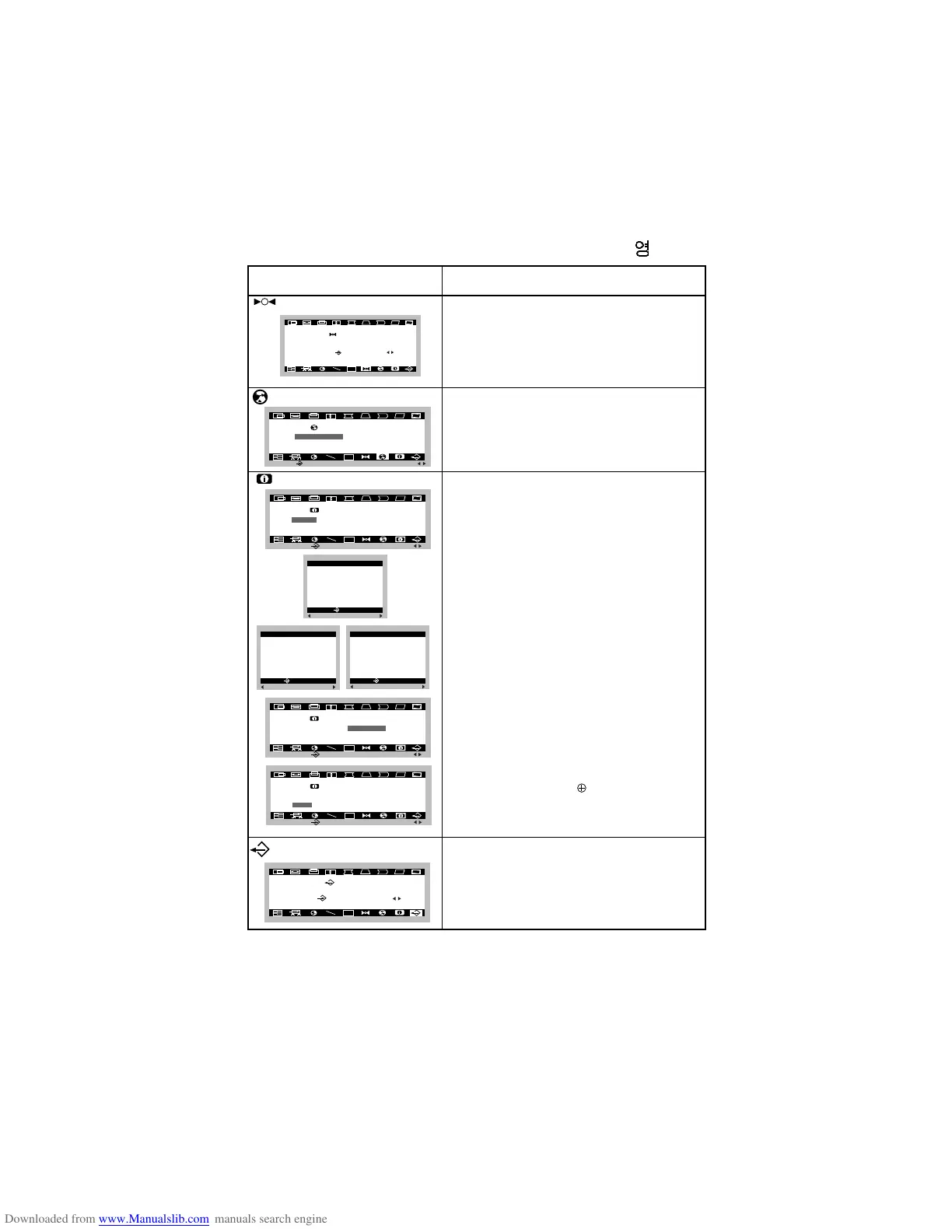
To choose the language in which the
control names are displayed.
OSD Menus are available in five language :
English, German, French, Spanish and
Italian.
To disappear of the OSD on the screen.
OSD Adjust Description
Language Select
Exit
Mode
Information
OSD
U
LANGUAGE
ENGLISH
FRANÇAIS
ITALIANO
DEUTSCH
ESPAÑOL
MAIN
:
ADJ:
OSD
U
NEXT:
SELECT:
INFORMATION
MODE
ABSENCE
DDC
MODE INFO.
H FREQ : 31 . 4KHZ
V FREQ : 70 . 0HZ
USER : 3
PRESET : 4
USER MODE
1 31 . 4 KHZ / 70 HZ
2 63 . 9 KHZ / 60 HZ
3 37 . 5 KHZ / 75 HZ
THE END
:PRESET
USER:
:PRESET
USER:
:PRESET
USER:
1 43 . 2 KHZ / 85 HZ
2 47 . 0 KHZ / 75 HZ
3 49 . 8 KHZ / 75 HZ
4 53 . 7 KHZ / 85 HZ
THE END
:PRESET
USER:
PRESET MODE
: MAIN
: MAIN
: MAIN
OSD
U
NEXT:
SELECT:
INFORMATION
MODE
ABSENCE
DDC
This item gives access to 3 elements :
Mode, Absence and DDC function.
The message does not disappear until you
click the select key again.
MODE
To inform users of preset and user mode
data.
ABSENCE
This message indicates the monitor is ON
PROCESSING even through you are
away for some time due to another matter.
DDC
To select the DDC 2B , DDC2AB,
DDC1/2B and OFF function.
Recall
If the monitor is operating in a factory
preset mode, this control will reset the
image to the factory preset mode.
If the monitor is operating in a user mode,
this control has no effect.
OSD
U
NEXT:
SELECT:
INFORMATION
MODE
ABSENCE
DDC
?@@?f
O2@@6Kg?@@?f
W2@@@@@@6Xf?@@?f
7@(MeI'@1f?@@?f
?J@(Y?e?V'@L?@@@@@?f
?7@HgN@1?@@@@@?f
?@@?g?@@?e?@@?f
?3@LgJ@5?e?@@?f
?N@)X?e?W&@H?@@@@@?f
3@)KeO&@5e@@@@@?f
V4@@@@@@0Yf?@@?f
I4@@0Mg?@@?f
?@@?f
C@@?f
?O2@@@@@@@@@@Yg
@@@@@@@@@@@@@@@?f
?J@(M?hI'@Lf
?7@Hhe?N@1f
?3@Lhe?J@5f
?N@)K?hO&@Hf
@@@@@@@@@@@@@@@?f
?I4@@@@@@@@@0Mg





 To Next Page