23
MODO PROGRAMACIÓN
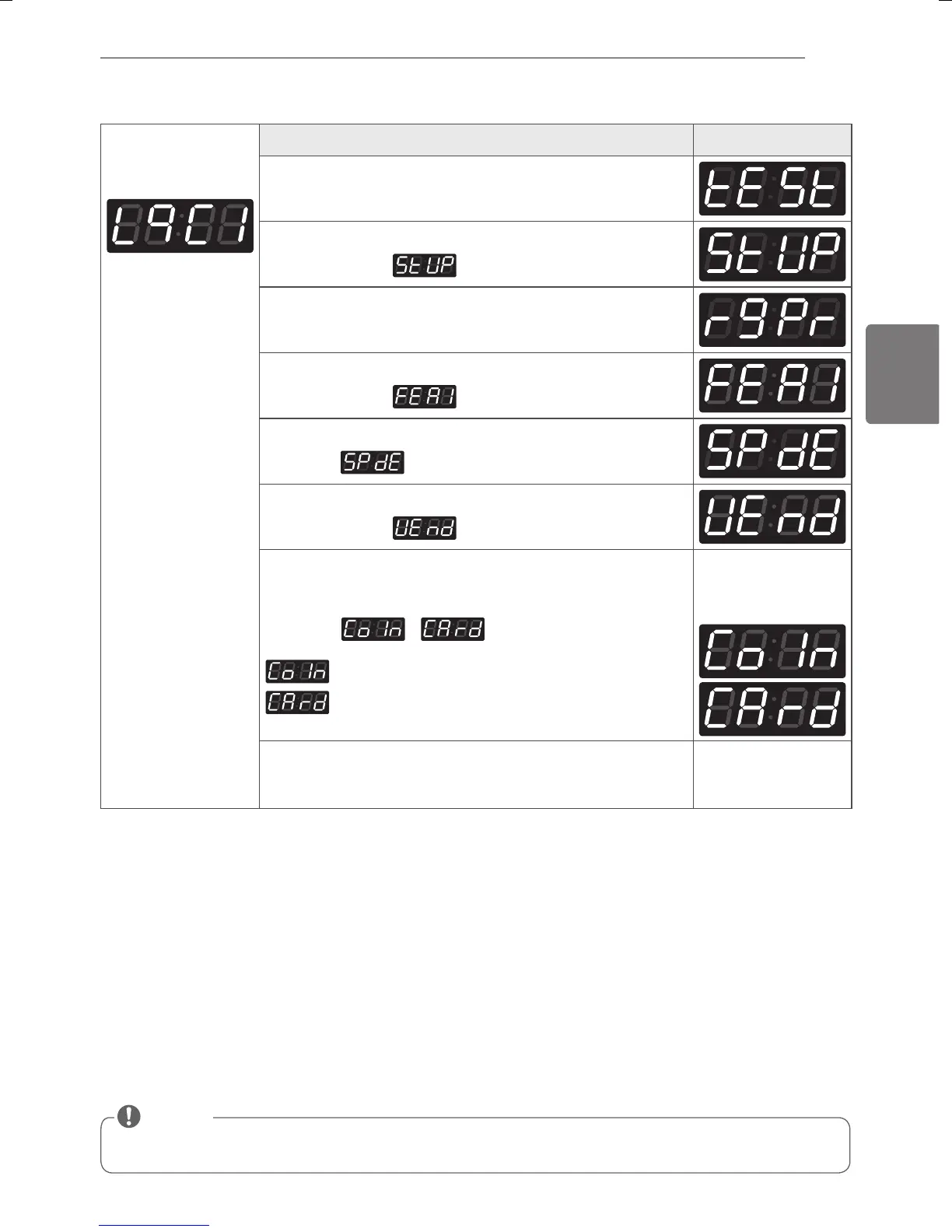
3-2. Selección del tipo de contol - Tarjeta o Moneda
Después de configurar el valor a VEND, el tipo Vend se cambia directamente sin necesidad de apagar/encender el
aparato.
NOTA
Al inicio del Setup
Verá LqC1 en el
display
BOTÓN DISPLAY
Presionar el botón Temp. Alta (High Temp.).
Presionar Temp.Media (Med Temp.) o Temp. Baja (Low Temp.)
hasta que aparezca
en el display.
Presionar el botón Inicio (Start).
Presionar Temp.Media (Med Temp.) o Temp. Baja (Low Temp.)
hasta que aparezca
en el display.
Presionar el botón Inicio (Start).
Se muestra
.
Presionar Temp.Media (Med Temp.) o Temp. Baja (Low Temp.)
hasta que aparezca
en el display.
Presionar el botón Inicio (Start).
Presionar Temp.Media (Med Temp.) o Temp. Baja (Low Temp.) y
seleccionar
o .
Deshabilitado
Habilitado
Y se mostrará
cualquiera de estas
dos indicaciones:
Presionar el botón Inicio (Start).
La máquina acepta el cambio y avanza al siguiente proceso
automáticamente.
MFL67863709_sp_170328.indd 23 2017-03-28 �� 10:01:21



 To Next Page
 Loading...