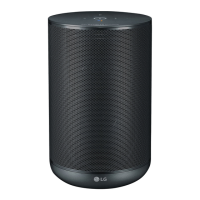
Front
e
g
a
d
b
c
f
a
Plays, pauses or skip playback.
b
Function LED
Changes LED status in according function.
Bluetooth: Blue / Wi-Fi: White (Page 14)
c
(Function)
Changes Wi-Fi or Bluetooth. (Page 15)
d
- Use in instead of saying "Hey Google" by long
pressing the
(Page 16)
- Plays or pauses a music and stops the Google
Assistant feedback. (Page 15)
e
,
Adjusts the volume.
f
Built-in microphones
g
Google Assistant LED
Changes LED status according to Google
Assistant performance. (Page 16)
Precautions in using the touch buttons
y Use the touch buttons with clean and dry
hands.
- In a humid environment, wipe out any
moisture on the touch buttons before using.
y Do not press the touch buttons hard to make
it work.
- If you apply too much strength, it can be
damaged the sensor of the touch buttons.
y Touch the button that you want to work in
order to operate the function correctly.
y Be careful not to have any conductive
material such as metallic object on the touch
buttons. It can cause malfunctions.
,
Note


 To Next Page