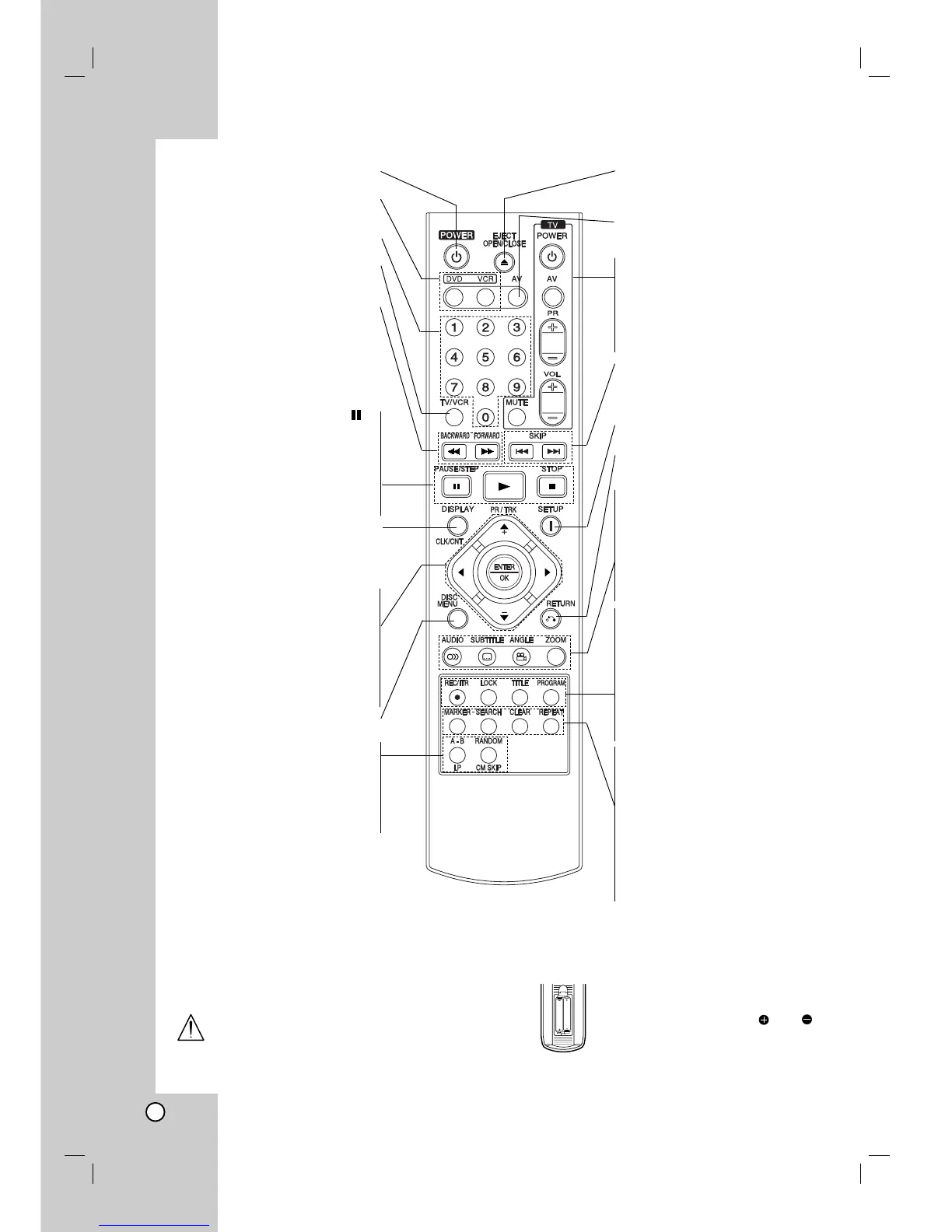
POWER
Switch this unit ON or OFF.
DVD/VCR select button
Selects operational mode of
remote control.
0-9 numerical buttons
Select numbered items in a menu.
TV/VCR
Switch between your TV’s tuner
and the VCR’s internal tuner.
BACKWARD / FORWARD
(m / M)
- DVD: Search backward or forward.
- VCR: Rewinds the tape during the
STOP mode, for fast reverse picture
search and Advances the tape during
the STOP mode, fast forward picture
search.
PAUSE/STEP ( ) •
Pause playback temporarily /
press repeatedly for frame-by-
frame playback.
PLAY (
G) •
Starts playback.
STOP (
ÁÁ
) •
Stops playback.
DISPLAY
CLK/CNT
Access the On-Screen Display.
Shows you the current time or
counter.
FGDE(left/right/up/down)
Select an item in the menu
PR/TRK(+/-)
- Select channel programme of VCR.
- To adjust tracking.
- To control vertical tremble during
picture still.
ENTER/OK
Acknowledge menu selection.
DISC MENU
Access menu of a DVD disc.
A-B/LP •
- Repeat sequence.
- Select the recording speed of
the tape.
RANDOM/CM SKIP •
- Play tracks in random order.
- CM SKIP
OPEN/CLOSE
EJECT
- Open or close the the disc tray.
- Tape Eject.
AV
Select input source for recording
into tape.
TV Control Buttons
(see p. 38)
TV POWER: Turns on or off the TV.
TV AV: Selects the TV’s source.
TV PR +/–: Selects TV’s channel.
TV VOL +/–: Adjusts TV’s volume.
MUTE: Turns on or off TV sound.
SKIP (. / >)
Go to next chapter or track. Returns to
beginning of current chapter or track
or go to previous chapter or track.
SETUP/ i
Access or remove setup menu.
RETURN
Displays the menu of a video CD
with PBC.
• AUDIO
Select an audio language (DVD).
• SUBTITLE
Select a subtitle language.
• ANGLE
Select DVD camera angle if available
• ZOOM
Enlarge video image.
• REC/ITR
Record your input sources into tape.
• LOCK (Child Lock)
Switch the Child Lock on and off.
• TITLE
Display the title menu of the disc if
available.
• PROGRAM
Access or remove program menu.
• MARKER
Mark any point during playback.
• SEARCH
Display MARKER SEARCH menu.
• CLEAR
- Clear a track number on the
program menu or a mark on the
MARKER SEARCH menu.
- Reset tape counter to zero.
• REPEAT
Repeat chapter, track, title, all.
Remote Control
8



 To Next Page