1-5
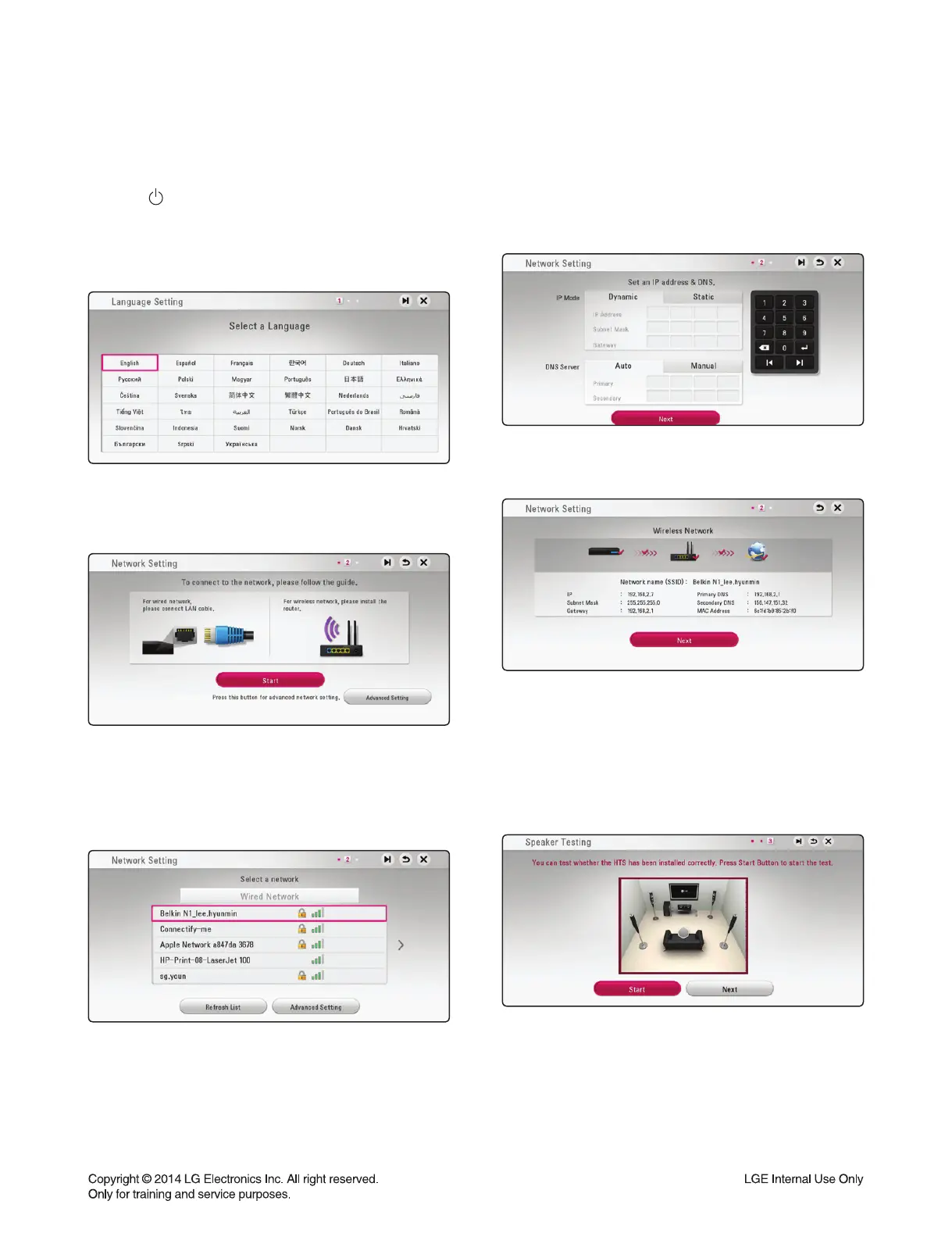
1. Press (POWER).
The initial setup wizard appears on the screen.
2. Use S/T/W/X to select a display language and
press ENTER (~).
3. Read and prepare the preparations for the network
settings and then press ENTER (~) while [Start] is
highlighted.
If wired network is connected, the network connec-
tion setting will automatically be fi nished.
4. All available networks are displayed on the screen.
Use S/T to select [Wired Network] or desired SSID
of wireless network and press ENTER (~).
If you have security on your access point, you need
to input the security code as necessary.
5. Use S/T/W/X to select the IP mode between [Dy-
namic] and [Static]. Normally, select [Dynamic] to al-
locate an IP address automatically.
6. Select [Next] and press ENTER (~) to apply net-
work settings.
Network connection status is displayed on the
screen. For details on network settings, refer to O/M
“Connecting to your Home Network”.
7. Select [Next] and press ENTER (~).
8. Press ENTER (~) to verify the test tone signals
ofthe speakers.
After verifying the test tone signals, press ENTER
(~) while [Stop] is highlighted. Select [Next] and
press ENTER (~).
INITIAL SYSTEM SETUP
When you turn on the unit for the fi rst time, the initial setup wizard appears on the screen. Set the display lan-
guage and network settings on the initial setup wizard.



 To Next Page