12
INSTALLATION GUIDE
ENG
ENGLISH
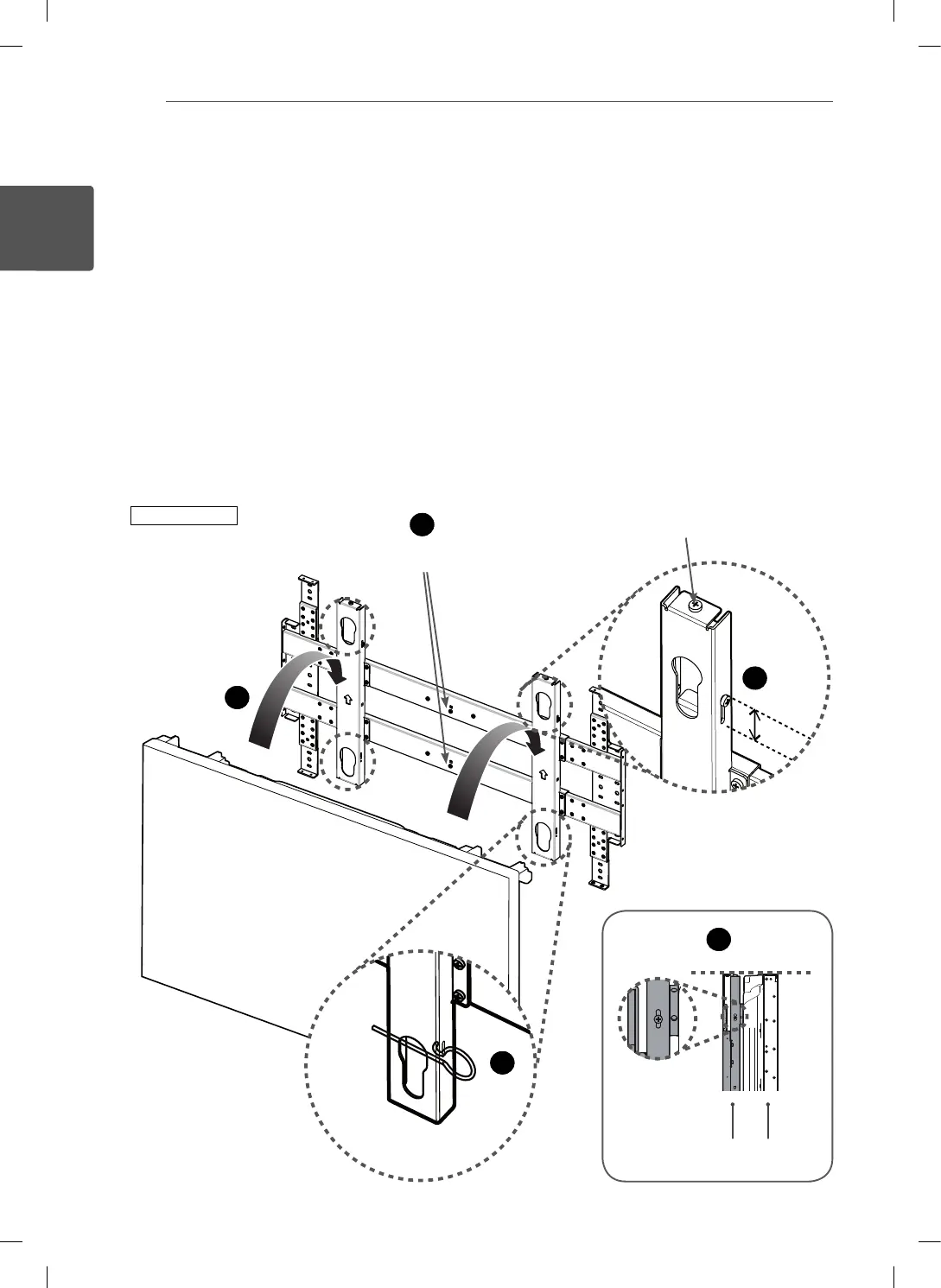
Mounting a Multi-Vision to the Product
- The picture may differ from the actual product. Please install in the following order:
1
Check if the up/down adjustment piece is located at the uppermost position.
2
Remove the two safety screws. If the safety screw is fastened, the product cannot be moved to the left or
right.
3
As shown in the figure, hang the multi-vision combined to the guide spacer using the holes on the product.
4
Align the height of the product and the Multi-Vision by adjusting the up/down adjustment piece downwards.
- If you install multiple products, accurately align the products and the Multi-Vision from bottom to top.
Otherwise, installing products that will be located at the top will be difficult.
5
Fit a safety clip to prevent the installed multi-vision from coming loose. It should be inserted to the guide
spacer hole at the bottom of both sides.
WM-L640V
1
2
3
5
4
Safety Screw (black)
Up/Down Adjustment Screw
Product Multi-Vision


 To Next Page
 Loading...