33
Parameter Editing
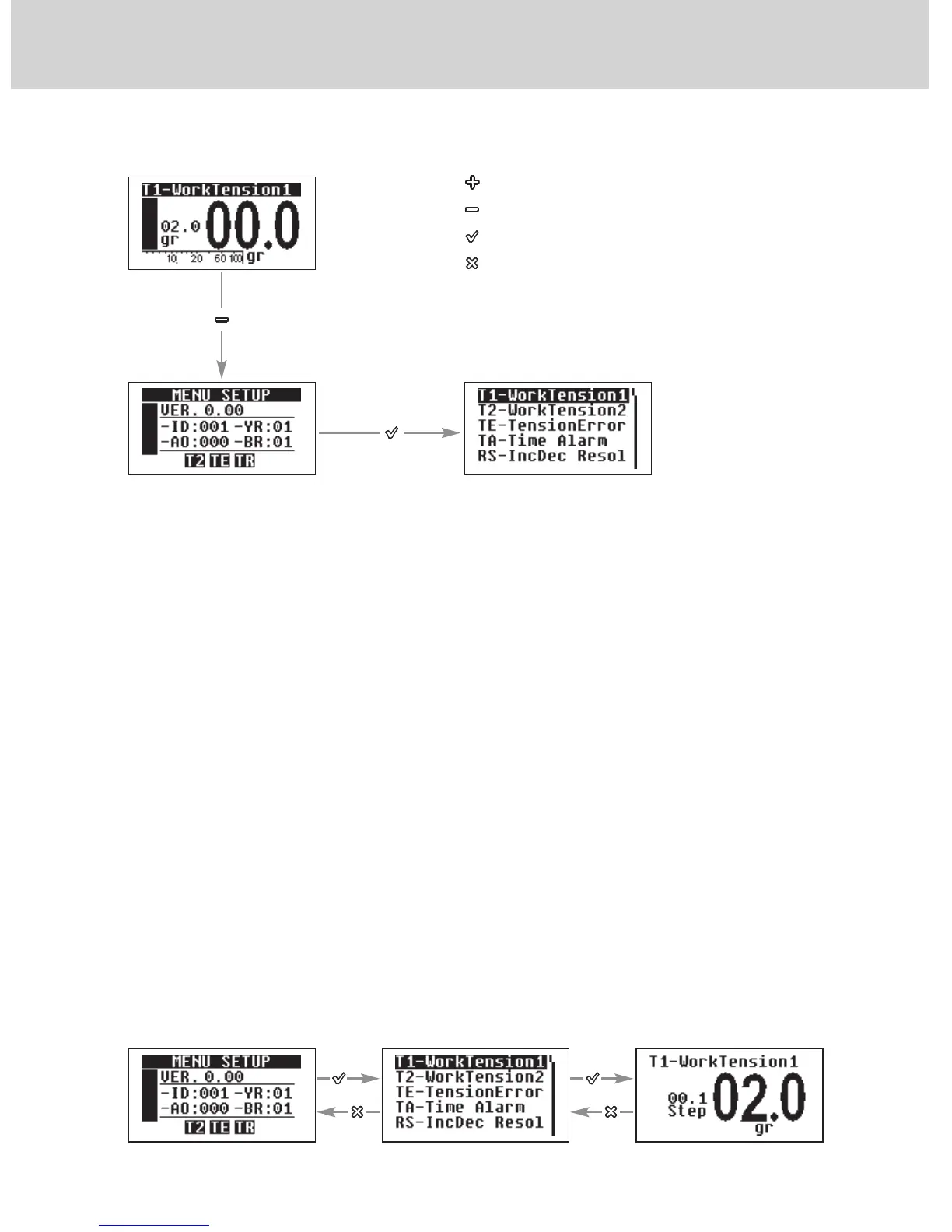
By pressing the “√” button in the “MENU SETUP" page you enter the parameter
editing mode.
In this condition, the Led will go on and the machine will Halt.
4.2 PARAMETERS
Here follows a progressive list of the main parameters required to programme
the accumulator.
4.2.1 “T1-WorkTension1”
It is the yarn reference tension the SPIN uses when both inputs named
“INC” and “DEC” are selected (ON).
The value can be set from 0.5 gr to 50 gr. By default, this value is set to 1.5 gr.
By simultaneously pressing the buttons “+” and “-” the increase Step value is set.
The increase value will alternatively change from 0.1 to 1.0. By holding
pressed the “X” button for 3 seconds, the minimum value that the parameter
can take is set.
4 - SETTING THE OPERATING PARAMETERS
Use + or - to set the
desired value
Scroll the parameters
By using + or -
To increase
To decrease
To confirm
To Exit


 To Next Page