34
4 - SETTING THE OPERATING PARAMETERS
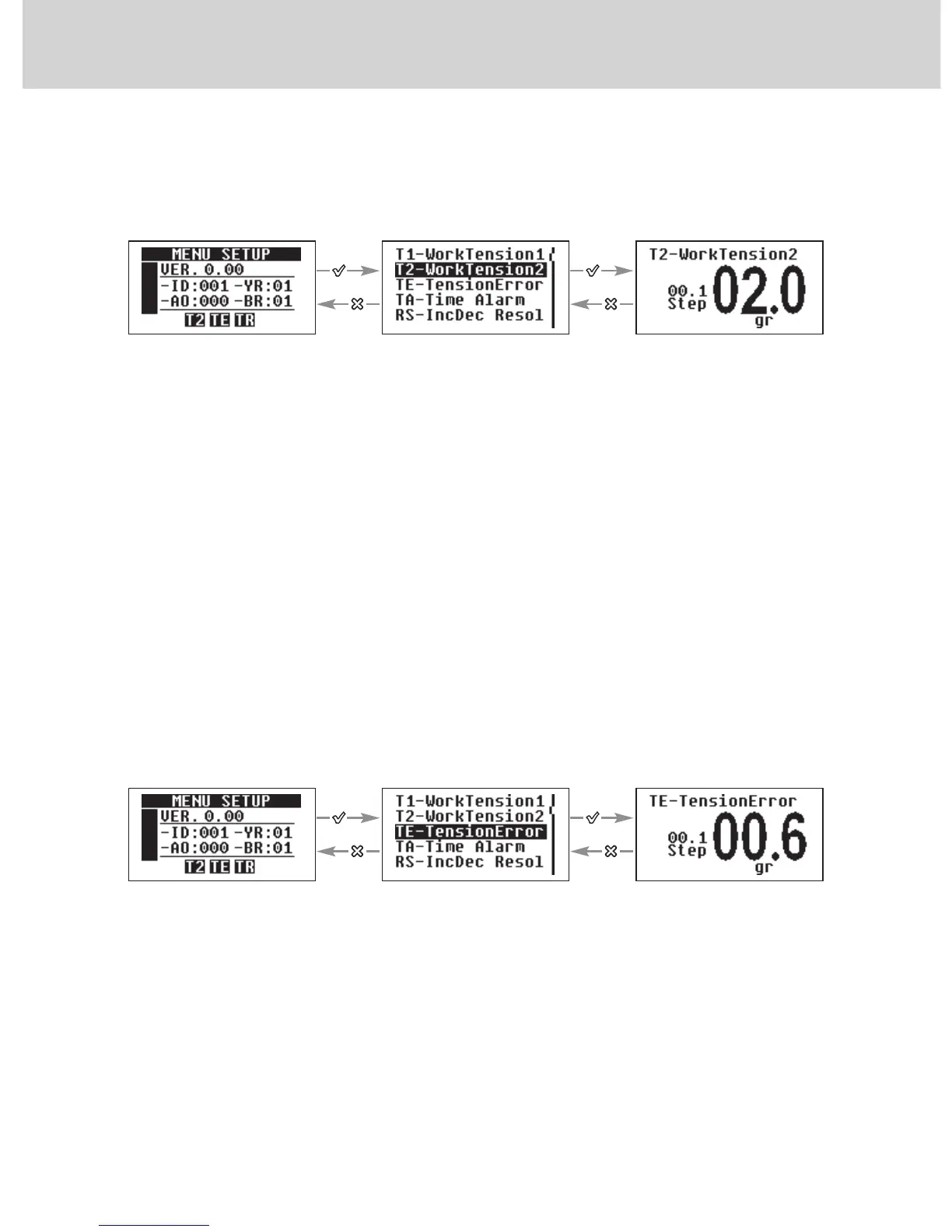
4.2.2 “T2-WorkTension2”
It is the yarn reference tension the SPIN uses when the inputs named “INC”
and “DEC” are not selected (OFF).
If the parameter is not set to “OFF”, the related icon (T2) in the “MENU
SETUP” page will be enabled.
The value can be set to “OFF” or from 0.5 gr to 50 gr. By default the value
is set to “OFF”.
By simultaneously pressing the “+” and “-” buttons the increase Step value is
set. The increase value will alternatively change from 0.1 to 1.0.
By holding pressed the “X” button for 3 seconds, the minimum value that the
parameter can take is set.
4.2.3 “TE-TensionError”
It is the maximum yarn tension variation allowed during SPIN operations.
As to the set value. If the yarn tension exceeds the selected reference
tension + or - the TE tension, then the “Tension Error” alarm will be actuated.
If the measured tensions fall below 0.4 gr the alarm is triggered in any case,
as this condition is sensed as a yarn breakage.
The TE alarm is enabled by setting a value other than “OFF” to parameter
“TA-Time Alarm”, in this case, the dedicated icon (TE) will light up in the
“SETUP MENU” page.
Use + or – to set the
desired value
Scroll the parameters
By using + or -
Use + or - to set the
desired value
Scroll the parameters by
using+ or -


 To Next Page