10 Rumblex User Manual Lifepro Recovery + Fitness Collection 11
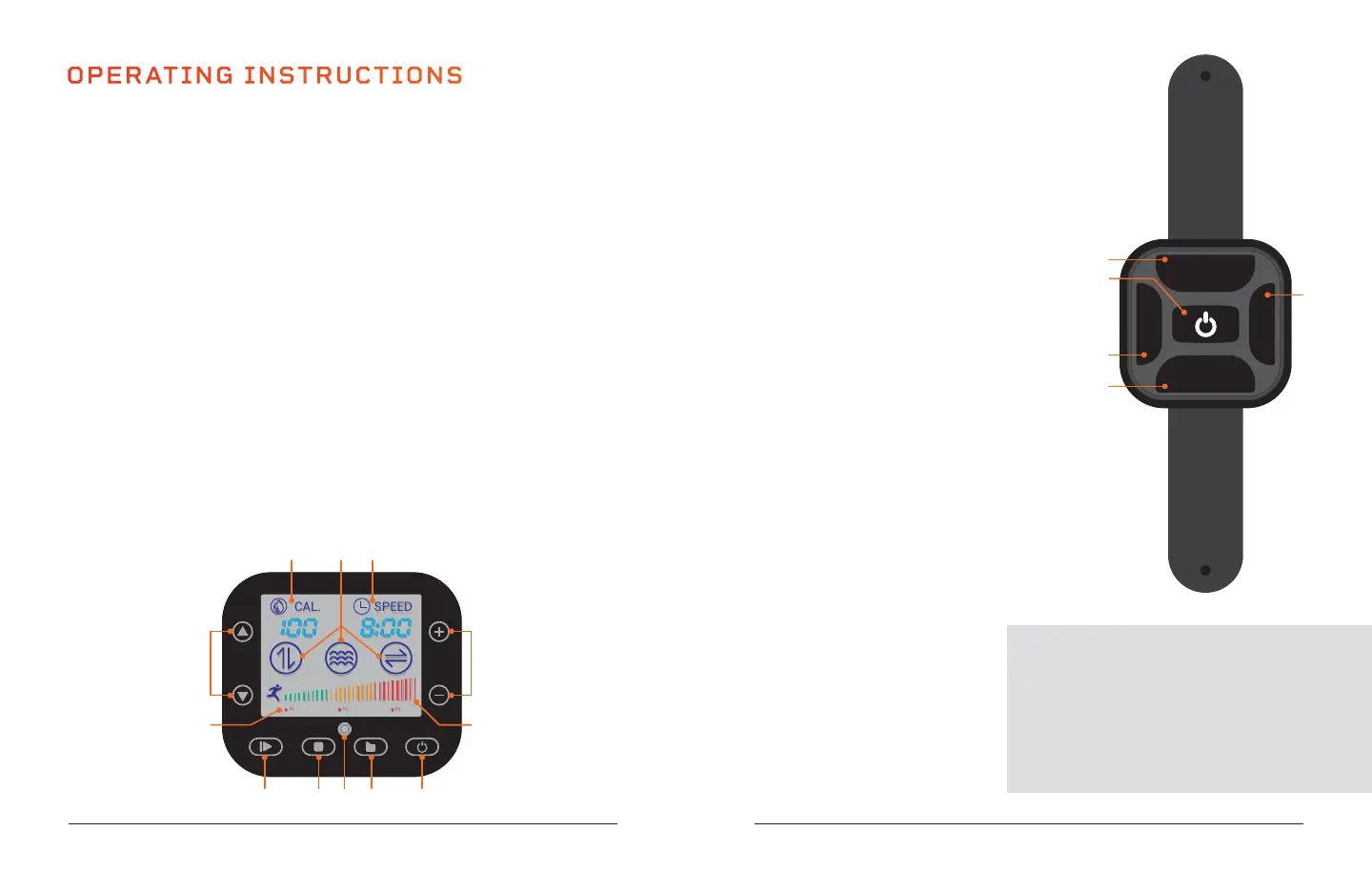
USING THE REMOTE TO OPERATE THE RUMBLEX
1. Auto Mode Button: Toggle through the preset
programs: P1, P2, P3.
2. Power/Start/Stop Button: Power the Rumblex on
and off. The button also starts/stops the selected
preset program in auto mode or a custom
workout in manual mode.
3. Time/Speed Buttons*: In standby, with
Manual Mode selected: press the buttons
to set a time duration for your custom
workout. Once the custom workout has
begun, press the the Time/Speed Buttons
to adjust the speed.
4. Manual Mode Button: Toggle through
the 7 training modes to create a custom
workout.
*Speed and time cannot be adjusted for preset programs.
OPERATING INSTRUCTIONS
USING THE DISPLAY PANEL TO OPERATE THE RUMBLEX
1. Power Button: Power the Rumblex on and off. NOTE: Unit will auto power-off
after 3 minutes of inactivity.
2. Auto Mode Button: Toggle through preset programs: P1, P2, P3.
3. Remote: Infrared receiver window for the remote.
4. Manual Mode Button: Toggle through the 7 training modes to create a
custom workout.
5. Start/Stop Button: Start/stop the selected preset program or manual mode
workout.
6. Program Indicator: Shows which preset program is selected.
7. Set Speed Buttons*: Adjust workout speed after manual mode workout
begins. Speed automatically starts at 1.
8. Training Mode Indicator: Shows which training mode is selected.
9. Calorie Indicator: Shows calories burned in current workout.
10. Time/Speed Indicator: Alternates between showing time remaining and
current speed.
11. Set Time Buttons*: Set time duration for manual mode workout.
12. Workout Intensity Graph: Shows current workout intensity.
*Speed and time cannot be
adjusted for preset programs.
MODES
Standby Mode: The Rumblex is
powered on, but no program is
selected.
Auto Mode: Choose from preset
workout programs: P1-P3.
Manual Mode: Create your own
custom workout: choose from
7 training modes, then set a
workout time duration and
speed.
USE THE BUILT-IN SPEAKERS
1. Turn ON Bluetooth on your smartphone
or other Bluetooth device.
2. Select the device called “POWERFUL”
to connect to the Rumblex’s integrated
Bluetooth speakers.
AUTO MODE
MANUAL MODE
SPEED
-
SPEED
+
1
2
4
3
3
P1 P2 P3
SPEED
CAL.
6
7 11
12
1245 3
108 9 3








 To Next Page