10 Waver™ User Manual Lifepro Recovery + Fitness Collection 11
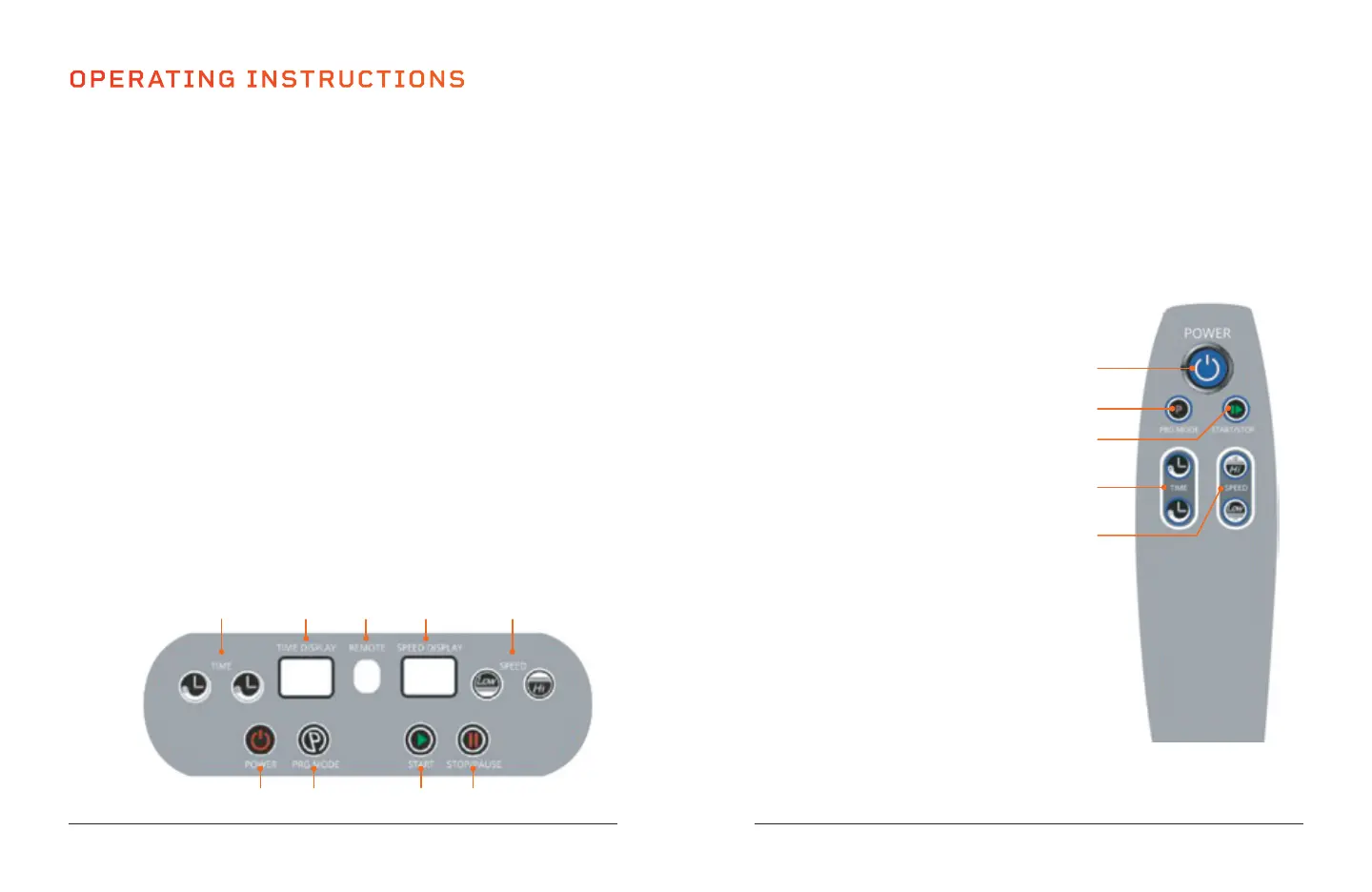
USING THE REMOTE TO OPERATE THE WAVER
1. Power Button: Press the button to power the Waver on and off.
2. Program Mode Button: Press the button to select a preset
workout program: P0-P9.
3. Start/Stop Button: Ensure power is turned ON. Press
the button to activate the selected program
or begin a custom workout in manual
mode. Press again to stop the selected
program or manual mode workout.
4. Time Increase/Decrease Buttons:
Press the buttons to set the time
duration in manual mode. NOTE:
You cannot adjust the time when
in program mode.
5. Speed Increase/Decrease
Buttons: Press the buttons to
adjust vibration speed in manual
mode. Press Start to begin
manual mode before adjusting the
speed. NOTE: You cannot adjust
the speed when in program mode.
1
2
4
3
5
OPERATING INSTRUCTIONS
USING THE DISPLAY PANEL TO OPERATE THE WAVER
1. Power Button: Press the button to power the Waver on and off.
2. Program Mode Button: Press the button to select a preset workout
program: P0-P9.
3. Start Button: Ensure power is turned ON. Press the button to activate
the selected program or begin a custom workout in manual mode.
4. Stop/Pause Button: Press the button to stop the selected program or
manual mode workout.
5. Speed Increase/Decrease Buttons: Press the buttons to adjust
vibration speed in manual mode. Press Start to begin manual mode
before adjusting the speed. NOTE: You cannot adjust the speed when
in program mode.
6. Speed Display: The display shows vibration speed for the current
program or custom workout.
7. Remote: Infrared receiver window for the remote.
8. Time Display: The display shows the duration of the current program
or custom workout.
9. Time Increase/Decrease Buttons: Press the buttons to set the time
duration in manual mode. NOTE: You cannot adjust the time when in
program mode.
9
1 2 3 4
8 7 6 5








 To Next Page