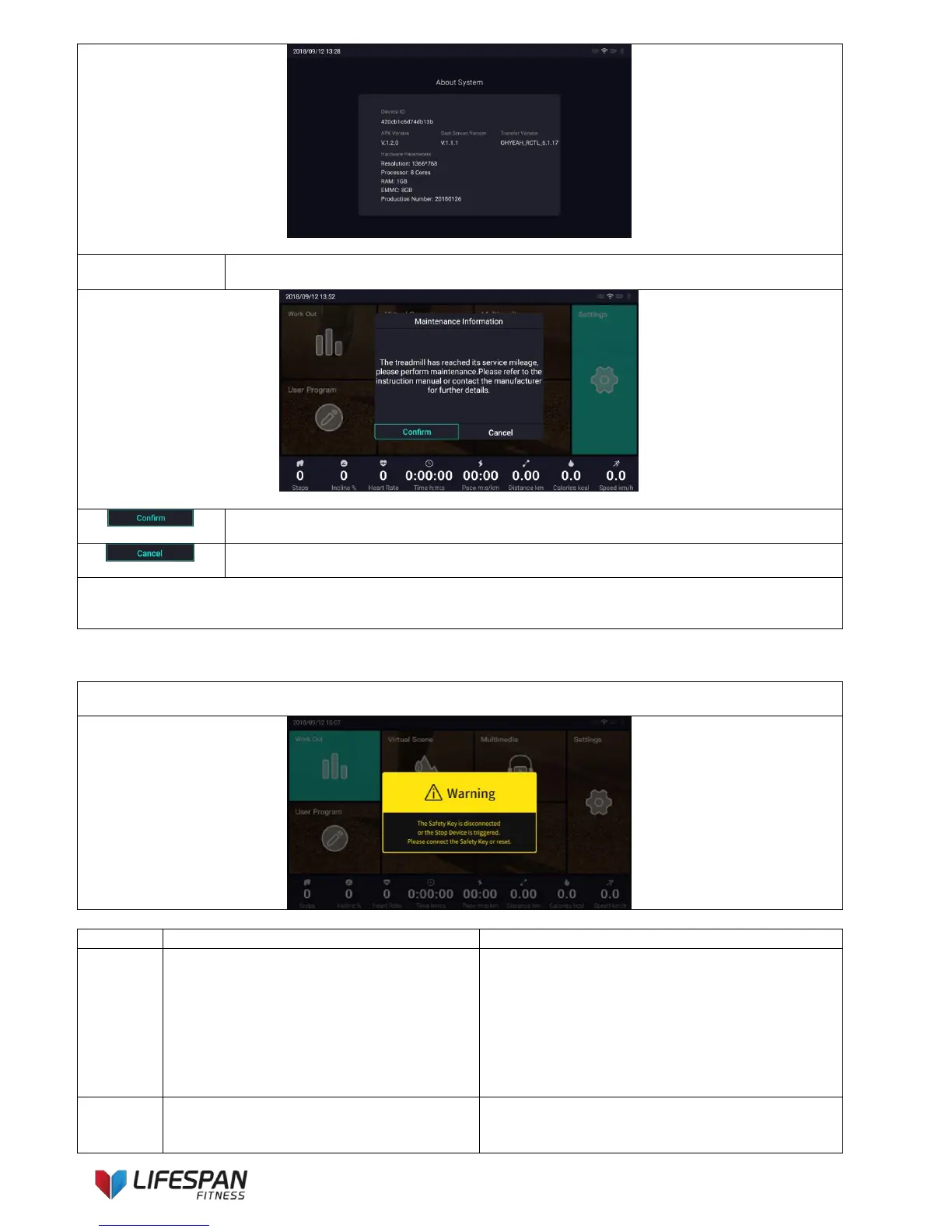
This interface provides related parameters of system software and hardware.
When the exercise mileage reaches the set service mileage, a prompt will pop up after
starting the treadmill next time. The display interface is as follows:
Note: This function can be selected to be enabled or disabled in the engineering mode(factory settings is required).
Click this icon to indicate that the treadmill has been maintained. After clicking, the command
to start the treadmill will continue to be executed. Please note.
Click this icon to indicate that no maintenance has been performed on the treadmill. After
clicking, the command to start the treadmill will continue to be executed. Please note.
Note: Select “Cancel”, the maintenance information will only pop up again next time and the first time the machine
is turned on.
Select “Confirm”, the maintenance information will not pop up again next time the treadmill is started.
Remove the safety key, the display interface is as follows: The safety key is disconnected, or the Stop Device is
triggered. Please connect the Safety Key or reset.
Low Voltage During Operation
1. Power off the machine, wait 1
minute, then restart.
2. Check the connection at the power
plug, socket and switch.
3. Check that the voltage from the
power supply is enough.
4. If the problem has not resolved,
please contact support.
NTC Temperature Sensor Fault
1. Power off the machine, wait 1
minute, then restart.
2. Check if the NTC Plug on the



 To Next Page