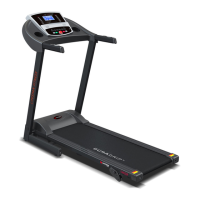
This manual describes the LifeSpan Workplace DT3 Console and TR800B, TR1200B, and TR5000B Treadmill Bases, designed to integrate movement with sedentary tasks.
Function Description:
The LifeSpan Workplace system allows users to remain productive while walking, helping to counteract the negative health effects of prolonged sitting. The DT3 Console provides control and feedback for the treadmill base, displaying workout data and allowing for personalized settings. The treadmill bases (TR800B, TR1200B, TR5000B) are under-desk treadmills designed for walking during work.
Important Technical Specifications:
DT3 Console:
- Readouts: Time, Steps, Calories, Distance, Speed
- Display: LED
- Buttons: On/Start, Stop/Reset, Speed Pre-Set, Speed Up/Down, Enter Mode
- Dimensions: 12.5" W x 3"D x 2"H (32cm W x 7.6cm D x 5.1cm H)
Treadmill Bases (TR800B, TR1200B, TR5000B):
- Speed Range: 0.4 - 4.0 mph (0.6 - 6.4 kph) for all models. (Note: Max speed can be changed to 2.0 mph/3.2 kph in personal settings).
- TR800B:
- Walking Belt Size: 18" x 52" (45.7 cm x 132 cm)
- Roller Size: 2.0 (5 cm) Tapered
- Deck: 3/4" (1.9 cm) Phenolic Deck
- Deck Suspension: 6 Independent Compression Shocks
- Drive Motor: 2.0 HP Continuous Duty DC
- Max User Weight: 300 lbs. (136 kg)
- TR1200B:
- Walking Belt Size: 20" x 50" (51 cm x 127 cm)
- Roller Size: Tapered Front 2.4" (6 cm), Rear 2.0" (5 cm)
- Deck: 3/4" (1.9 cm) Phenolic Deck
- Deck Suspension: 6 Independent Compression Shocks
- Drive Motor: 2.25 HP Continuous Duty DC
- Max User Weight: 350 lbs. (159 kg)
- TR5000B:
- Walking Belt Size: 20" x 50" (51 cm x 127 cm)
- Roller Size: Tapered Front 2.4" (6 cm), Rear 2.0" (5 cm)
- Deck: 1" (2.5 cm) Phenolic Deck
- Deck Suspension: 6 Independent Compression Shocks
- Drive Motor: 3.0 HP Continuous Duty DC
- Max User Weight: 400 lbs. (182 kg)
Usage Features:
-
Getting Started:
- Power On: Press and hold the "On/Start" button for three seconds to turn on the console from deep sleep mode.
- Starting Treadmill: Press "Start" to begin the treadmill belt movement.
- Speed Adjustment: Use the "AV" buttons to increase or decrease speed.
- Preset Speed: Use the "Preset" key to jump to a preferred speed (default 1.5 mph / 2.4 kph, adjustable in Personal Settings).
- Data Readouts: "Enter/Mode" changes the display between Time, Step, Calories, Distance, and Speed. Press and hold for one second to automatically cycle through readouts.
- Pausing/Resetting: "Stop/Reset" pauses the treadmill. Holding for one second resets all data readouts to zero. The console enters "sleep mode" after 10 minutes of inactivity post-reset.
- Safety Key: A safety key (F) must be engaged in the console for the treadmill to operate. The display will show "---" if not engaged.
- Weight Input: The console flashes for user weight input to ensure accurate calorie calculations.
- Step Counting: Steps are counted from 1 to 9,999. For numbers above 9,999, the display shows a truncated number (e.g., "1001" means 10,010 steps).
-
Innovative Features:
- Intelli-Guard™: A safety feature that automatically pauses the treadmill belt 20 seconds after you stop walking, provided the speed is 1.0 mph (1.6 kph) or faster. An audible beep notifies the user before pausing. This feature can be turned On/Off in Personal Settings.
- Intelli-Step™: Automatically calculates and displays steps with precision, offering immediate feedback and historical trends via the LifeSpan Club account. Accuracy is best for users over 100 pounds (45.5 KG).
- Club Membership: Includes a full membership to LifeSpan's health and fitness software for tracking activity and information.
-
Personal Settings:
- Access: Press and hold "STOP" and "A" for three seconds to enter Settings Mode.
- Navigation: Use "A" or "V" arrows to move through settings and choices.
- Selection: Press "ENTER" to choose a setting or select a choice.
- Exit: Remove the Safety Key to exit Personal Settings.
- Options:
- Intelli-Guard: ON/OFF (F012).
- Unit of Measure: English (EN) or Metric (SI) (F014).
- Beep: Turns ON/OFF the audible beep for button presses (F015).
- Speed Limit: Sets maximum speed to 2.0 mph / 3.2 kph (default) or 4.0 mph / 6.4 kph (F018).
- Speed Reset: Controls whether the treadmill resumes at 0.4 mph (default) or the last set speed after a pause (F019).
- Preset: Turns ON/OFF the Preset feature (F020).
- Preset Speed: Changes the default preset speed from 1.5 mph / 2.4 kph by +/- 0.1 (F021).
- Charging Port: A USB port is available for charging wireless mobile devices (not for data transfer).
Maintenance Features:
- Daily Cleaning: Wipe the treadmill down after each use to keep it clean and dry. A mild detergent can be used for dirt and salt removal.
- Monthly Cleaning:
- Remove the motor cover and clean around the motor and electronics, especially if carpet fibers are present.
- Tighten all assembly hardware.
- Check the power cord for damage.
- Safety and Integrity: Regularly examine the treadmill for damage. Replace worn or damaged components immediately, or remove the treadmill from service until repaired.
- Belt Lubrication:
- Use only 100% silicone lubricant (LifeSpan offers this). Avoid aerosol sprays with additives or petroleum distillates.
- TR800B & TR1200B: Lubricate every 50 hours of use with one ounce of silicone per application.
- TR5000B: Features a maintenance-free belt and does not require lubrication.
- Procedure: Unplug the treadmill. Lift the belt and apply about a dozen sprays toward the center from each side. Rotate the belt 1/3 and repeat twice more. Plug in and walk for a few minutes to disperse. Clean any excess silicone from the belt and side rails.
- Belt Tensioning:
- If the belt slips, tension bolts are at the back of the treadmill.
- Start the treadmill at 3 mph (5 kph).
- Use a 6 mm Allen wrench (included) to turn both right and left tension bolts 1/2 turn clockwise.
- Test for slipping; repeat if necessary.
- Caution: Do not tighten more than 2 full turns on each side to avoid excessive friction and wear. Check belt alignment after tensioning.
- Belt Alignment:
- Start the treadmill at 3 mph (5 kph).
- Observe belt drift from behind.
- If belt drifts left: Turn left adjustment bolt 1/4 turn clockwise, and right adjustment bolt 1/4 turn counter-clockwise.
- If belt drifts right: Turn left adjustment bolt 1/4 turn counter-clockwise, and right adjustment bolt 1/4 turn clockwise.
- Observe for two minutes and repeat as needed.
- Moving the Treadmill Base:
- Turn OFF the ON/OFF switch and unplug the power cord.
- Ensure the area around the treadmill is clear.
- Place both hands under the support bar at the back of the walking belt.
- Lift the back and roll to the desired location.
- Caution: Use proper lifting techniques (bend knees and elbows, keep back straight, lift evenly).
Troubleshooting:
- Console erratic/not lighting up: Check power plug, ON/OFF switch, safety key, and console wire connector. Disconnect/reconnect console connections.
- Motor strained/E1 error: Lubricate the belt with 100% silicone spray.
- Treadmill pauses automatically: Turn off Intelli-Guard in Personal Settings if step count is not being picked up.
- Speed feels wrong: Check Unit of Measure (Metric/English) in Personal Settings.
- "UART" or "dc-6" display: Turn off power, unplug/re-plug console connector, ensure thumb screws are tight, and check treadmill power plug.
- Belt slipping: Refer to Belt Tensioning instructions.
- Belt drifting: Refer to Belt Alignment instructions.

 Need help?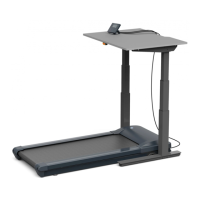

 To Next Page
 General