21
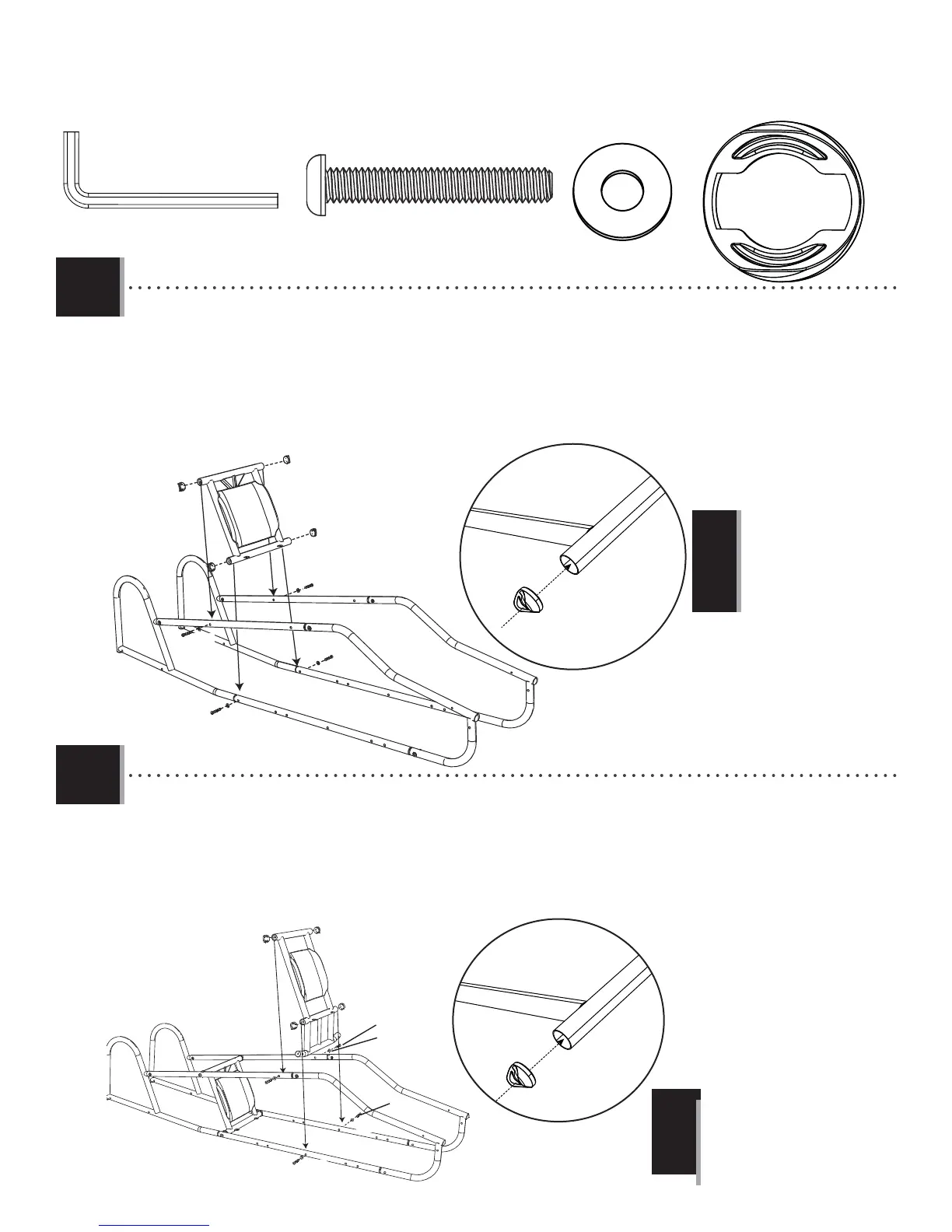
TOOLS AND HARDWARE REQUIRED
X SECTION 2 (CONTINUED)
2.5
2.6
AWS (x8)
ASB (x8)
CVZ (x8)
CPX
AWS
AWS
AWS
AWS
ASB
ASB
ASB
ASB
CVZ
CVZ
CVZ
CVZ
AWS
AWS
AWS
AWS
AWS
ASB
CVZ
ASB
ASB
ASB
CVZ
CVZ
CVZ
CPW
• Only fi nger-tighten this hardware.
!
• Only fi nger-tighten this
hardware.
!
• Place the assembled Back Seat Back Support (CPX) in between the two fuselage frames. Place the Coped Caps (AWS) in
the location pictured and line up the holes in the Back Seat Back Support with the holes in the fuselage frame.
AWS
• Attach the assembled Front Seat Back Support (CPW) in between the two fuselage frames. Place the Coped Caps (AWS) on
the tubes indicated. Line up the holes in the Front Seat Back Support with the holes in the fuselage frame.
3/16 in/po (≈5 mm)
(2)



 To Next Page